

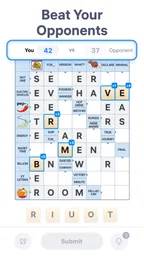
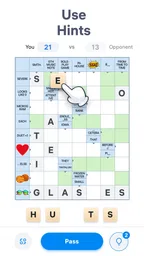
Crossword Master - Word Puzzle review
 Analysis by Appsdrops
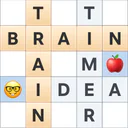
I like crossword games best when they let me focus on the clues instead of fighting the interface. Crossword Master - Word Puzzle is a straightforward word game from Easybrain, built around solving puzzles in short sessions. Its uncluttered premise makes it easy to understand, but whether it suits you depends on more than vocabulary: screen readability, how comfortably you can enter answers, and the setting where you plan to play all matter.
Clear puzzles, with a simple path into play
The game’s core appeal is immediately legible: read a clue, think of a word, and work through a crossword. That makes it approachable for someone who already knows the format, while its daily-puzzle focus gives regular players a natural reason to return. I would recommend it to people who want a quiet word challenge rather than a sprawling game with menus, storylines, or several systems to learn first.
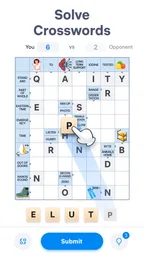
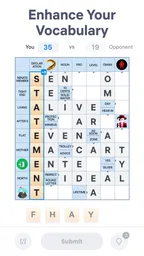
The interface is centered on the puzzle itself, which is a practical choice for a game that depends on scanning clues and connecting answers. A crossword naturally asks you to shift attention between a clue and its corresponding spaces, so a clear layout matters more here than decorative extras. Still, visual comfort is personal: a layout that feels readable on one device may feel cramped on another, particularly if you prefer larger text or have difficulty distinguishing small details.
There is also a useful difference between knowing how to solve crosswords and knowing a particular clue style. If you get stuck, crossing answers can help narrow down a word, but that process is less satisfying when a clue depends on unfamiliar vocabulary or a reference you do not recognize. I find it best to treat a difficult clue as a prompt to work through possibilities, rather than assuming every answer will come instantly.
With a 4.8 average from around 771,000 ratings, it has drawn a large audience. That popularity suggests the format works for many players, but it cannot tell you whether the clue difficulty, visual presentation, or pace will fit your own habits. If you are curious, the free price makes it easy to try before deciding whether it deserves a place in your daily routine.
Navigation that favors the puzzle over complexity
For a casual player, a simple crossword loop is a strength: there is little conceptual overhead between opening a word game and getting started. That can be especially helpful if you are introducing crosswords to someone who finds feature-heavy games intimidating. The trade-off is that players looking for extensive customization or a highly guided learning experience may want more than a direct puzzle interface provides.
A small workflow tip: when a clue stalls, move to a crossing answer instead of repeatedly rereading the same wording. Even a partly completed neighboring word can turn an open-ended guess into a manageable choice. This is a general crossword-solving technique, but it fits the game particularly well because the main activity is solving connected clues, not collecting items or managing a separate progression system.
Motor and sensory comfort depend on your setup
Crossword play is usually less frantic than action games, which makes it a comfortable option when you want time to think rather than react quickly. You can pause mentally between clues, reconsider a guess, and approach the grid at your own pace. That slower rhythm may suit players who find rapid tapping or constant visual motion tiring.
Even so, entering answers requires deliberate interaction with the screen. If precise taps are difficult for you, or if holding a device steadily is uncomfortable, a session may feel less relaxing than the puzzle itself suggests. I would test a short round before committing to longer play, paying attention to whether selecting spaces and entering words feels natural on your device.
Sound and visual sensitivity are also individual concerns. A word puzzle is a calmer genre than a game built around effects and rapid action, but that does not guarantee that every screen or interaction will feel comfortable to every player. If you are sensitive to small text, visual contrast, or repeated touch input, check the actual display on your device rather than relying on the game’s broad category to predict comfort.
One practical adjustment is to play when you can hold the phone at a comfortable distance and have enough light to read clues without straining. That sounds ordinary, but crosswords ask for frequent close reading; poor lighting can make the same puzzle feel much harder than it is. Short sessions are a sensible choice if you notice your eyes or hands tiring.
Daily play in different places
The daily-puzzle idea works well for a small routine: I could imagine opening the game during a quiet coffee break, solving a few clues, and returning later when a word comes to mind. It is also a reasonable companion for a commute when you are seated and can pay attention. In a crowded or bumpy setting, though, reading clues and tapping the right cells can become annoying, so it is not automatically ideal for every spare moment.
For a shared household, it can be a low-pressure way to compare guesses without needing a long session or specialized gaming knowledge. One person might spot a word another missed, and the crossword gives both a clear focus. It is less suited to someone seeking a competitive group activity, since the central pleasure is personal problem-solving rather than a team or versus format.
Daily puzzles can encourage consistency, but they can also make a game feel like an obligation if you dislike routines or prefer to play only when inspiration strikes. I would use the daily cadence as an invitation, not a streak to protect. A missed day should not turn a relaxing word game into another task on a checklist.
Compared with paper crosswords, a phone game is easier to carry and can make trying answers less cumbersome than writing and erasing. Paper, by contrast, offers a larger physical surface for people who prefer print or find screen interaction tiring. Compared with word-search games, this crossword format asks for more clue interpretation and vocabulary recall; if you want a more visual hunt for words, a word search may be a better match.
Where the experience may still fall short
The biggest limitation for an inclusive recommendation is that comfort cannot be assumed from the simple format alone. A crossword may be intellectually calm but still demanding to read, and a touch interface can be a barrier for someone who has difficulty making precise selections. Players who need a particular text size, contrast treatment, or alternative input method should check whether the game works for them in practice before settling into it.
There is a second kind of friction: clue familiarity. Crosswords often reward broad vocabulary and knowledge of common expressions, so a clue can feel unfair when its reference is outside your experience. That is not unique to this game, but it matters if you are learning English, have a narrower interest range, or simply prefer puzzles that explain their logic. If you want a game that teaches vocabulary step by step, a dedicated learning tool may be more suitable.
The title is free to download, with optional in-app purchases ranging from $0.99 to $69.99 per item. I would keep that in mind if you are choosing a game for a child or setting a strict spending boundary on a device. The content rating is Everyone, but that age label does not by itself determine whether the puzzle difficulty or screen interaction will suit a particular player.
It is a substantial release, with over 10 million installs, and the current version is 2.0.0. It is available for devices running Android 8.0 or later. Those details help establish whether it is a practical option for your phone, but they do not replace checking the game’s real-world readability and touch comfort on the screen you will use.
Who I would recommend it to
I would suggest Crossword Master - Word Puzzle to someone who enjoys clue-based wordplay, wants a compact activity, and is comfortable reading and tapping on a phone. It is a particularly sensible pick for a person who wants a daily mental exercise without learning a complicated game system. The developer, Easybrain, has made a word game whose appeal is its direct focus on crossword solving.
I would be more cautious about recommending it to anyone who needs unusually large text, relies on non-touch controls, or finds small-screen reading uncomfortable. I would also point a player toward paper crosswords if they want a larger format, or toward a word-search game if clue interpretation is not the kind of challenge they enjoy. Those are not failures of this game; they are signs that different formats serve different needs.
My overall view is positive but specific: this is an inviting, focused crossword option, and the free entry point makes trying it straightforward. Its strongest quality is that it gives vocabulary and clue-solving the center of attention. Its main caveat is that a simple puzzle concept does not guarantee an accessible experience for every person or every situation. If you can comfortably read the clues and enter answers, it can make a coffee break feel pleasantly purposeful; if not, a print puzzle or another input-friendly word game may be the kinder choice.
What we like
- Offers a relaxing way to practice vocabulary and spelling.
- Progressive difficulty keeps the puzzles accessible to newcomers.
- Hints help players move forward when they get stuck.
- Crossword format encourages logical thinking and recall.
- Short puzzles suit quick play sessions.
What could be better
- Some clues may feel too easy for experienced crossword fans.
- Hints can reduce the challenge if used often.
- A limited clue variety may make later puzzles feel repetitive.
- Players who prefer timed challenges may find the pace too relaxed.
- Small screens can make crossing letters harder to review.







