




Bluey: Let's Play! review
 Analysis by Appsdrops
I’d recommend Bluey: Let’s Play! to families looking for a gentle, familiar game that gives a child room to explore without demanding quick reactions or complicated instructions. It’s a casual game from Budge Studios built around Bluey’s world, so the appeal is less about winning levels and more about spending a little time with recognizable characters and making up things to do. My first impression is that it works best as a shared play prompt: a child can take the lead, while an adult joins in with questions and pretend-play ideas.
That distinction matters if you’re deciding what to download. This is not the sort of game I’d choose for a child who wants a difficult challenge, a long story campaign, or a clear sequence of goals. It is more suitable for short, relaxed visits, especially for young Bluey fans who enjoy imaginative play. The game is free to download, rated Everyone, and has in-app purchases listed at $9.99 per item, so I’d look at the purchase controls before handing a device over.
What to expect from a Bluey play session
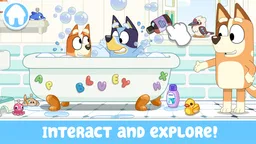
The basic idea is easy to understand: enter Bluey’s setting, look around, and use the game as a place to imagine. The store’s short description is simply “Bluey: Let’s Play!”, and that captures the broad mood better than a promise of elaborate progression would. I’d approach it as digital pretend play rather than as a conventional arcade game with scores, timers, or a finish line.
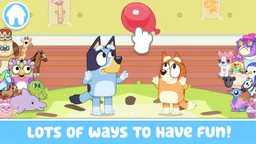
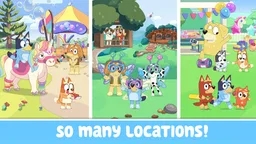
That makes it a different proposition from many casual games for children. A match-style game usually gives a child one repeatable task; a runner asks them to react quickly; a puzzle game often expects a correct answer. Here, the value is in letting the child decide what to explore and what the characters are doing. If your child likes narrating stories, moving between scenes, or turning small interactions into a bigger game, that open-ended feeling may be a strength.
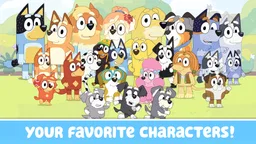
Bluey’s familiar setting is also a practical advantage for a first-time player. A child who already knows the characters can feel at home sooner than they might in an unfamiliar fantasy world. I wouldn’t assume that recognition alone will hold every child’s attention, though. A fan who wants a tightly directed episode-like story may find the looser format less satisfying, while a child who enjoys inventing their own scenes may be happy to revisit it in short bursts.
The game is published by Budge Studios, a developer associated here with a children’s entertainment title rather than a competitive or technical game. Its scale is reflected in the store figures: it has over 50 million installs, with an average rating of 4.3 from around 267,000 ratings. Those numbers suggest broad interest, but they don’t tell you whether the style suits your particular child; the open-ended, low-pressure approach is the more useful thing to judge.
Getting started without making setup a project
Before installing, check that the device meets the listed minimum requirement of Android 5.1 or later if you’re using Android. The game is also available in the broader Android and iOS app context, but device compatibility still depends on the store’s requirements for the specific phone or tablet. Once it is installed, I’d plan to sit with the child for the first few minutes rather than presenting it as a game they must figure out alone.
A calm first launch helps avoid a common mismatch: adults may expect a tutorial to explain the whole experience, while a child may be ready to tap around immediately. I’d start by letting the child explore at their own pace, then offer one simple invitation, such as choosing where to look or making up what Bluey is doing. This keeps the adult in a supporting role instead of turning play into a test of whether the child has understood the interface.
It’s also sensible to review in-app purchase settings before play. The listed price is free to start, while individual in-app purchases are shown at $9.99 per item. That is not a reason to avoid the game, but it does mean “free” should not be confused with “no possible spending.” If a child uses your device, set purchase approval or other household controls in advance, and explain that asking before buying is part of the routine.
For a first session, I would avoid trying to inspect every corner or deciding immediately whether the game will become a regular activity. Young children often need more than one brief visit to settle into an unfamiliar app, and a short, positive introduction is more useful than a long session that becomes tiring. If the child is eager to keep exploring, you can return later; if interest fades quickly, there’s no need to push through just because the game is installed.
The first small success: let the child lead
The most reliable first success is not a score or a completed task. It is the moment when the child chooses something to do and begins making it their own. I’d try a simple sequence: invite them to look around, ask what they think Bluey might do next, and then follow their idea rather than correcting it. That gives the child a clear starting point without imposing a goal that may not match the game’s style.
This works especially well in an everyday situation like a quiet stretch before dinner. A parent can offer the device for a short, supervised break, sit nearby, and use the game as a conversation starter: “What’s happening here?” or “What should happen next?” The screen then becomes one part of play, not a substitute for interaction. If the child prefers to play independently, you can still check in without turning the session into a constant stream of instructions.
One useful tip is to treat the first session as discovery rather than evaluation. If a child taps around without immediately creating a story, that does not necessarily mean they dislike it; they may be learning what the space invites them to do. Conversely, if they quickly move on, that is useful information too. The game’s strongest audience is likely to be children who enjoy imaginative freedom, not children who need a visible checklist to stay engaged.
Another practical approach is to give the game a clear ending before starting. For example, you can agree to play until you have made up one little Bluey story, then put the device away. That makes an open-ended app easier to fit into family routines, where “just one more thing” can otherwise stretch a short break. It also gives the child a sense of completion without relying on a formal level or reward system.
Where first-time players can get confused
The main source of confusion is expectation. Adults may look for a definite objective, while children may simply explore. If you’re used to mobile games that constantly show a mission, a score, or the next level, this may initially feel less structured. I’d resist calling that a flaw until you’ve seen how your child responds: for one child, freedom is the point; for another, the lack of a clear task may make the experience feel vague.
There can also be a mismatch between wanting Bluey-themed entertainment and wanting the same kind of storytelling as the television series. A game offers a different kind of engagement: the child is interacting with a digital play space rather than simply watching a complete episode. If your child mainly wants a story that unfolds on its own, watching a show together may be a better fit. If they want to make choices and invent what happens, the game is more likely to appeal.
Keep an eye on purchases as a separate issue from play itself. A child may interpret visible purchase options as part of the activity, or may ask for something before understanding that it costs money. I’d explain the boundary plainly before play and handle any purchase decisions yourself. Since individual purchases are listed at $9.99, it is worth making that conversation part of setup rather than waiting for a request to appear.
Finally, don’t assume that a familiar character makes the app equally engaging for every age or temperament. The Everyone rating makes it broadly suitable in content terms, but it doesn’t mean every child will find the pace or style right for them. A child who wants harder puzzles, precise controls, or a competitive goal may be better served by a different casual game. Likewise, an adult looking for an educational curriculum should not treat Bluey’s playful setting as a substitute for a purpose-built learning app.
What to try after the first visit
If the child enjoys the initial exploration, the next step is to build a small routine around it rather than trying to extract maximum screen time. Return for a short play session and let the child choose where to begin. You might ask them to continue a story from last time or invent a new one. This gives repeat visits a little continuity while keeping the game’s open-ended quality intact.
For shared play, take turns contributing to the pretend scenario. The child can choose what happens, and you can add one small idea without taking over. That approach is more useful than peppering them with questions, which can make play feel like a quiz. If the child prefers solo exploration, give them room and stay available for help. The point is to let the game support their imagination, not to dictate how they should use it.
It may also help to decide when another option would be better. For travel or a waiting room, a short visit can be a pleasant distraction if the child already enjoys the game. For a situation where you need a very predictable, self-contained task, a simple puzzle with an obvious endpoint may be easier to manage. For a child who wants to create stories away from a screen, toys or drawing may do the same job with fewer device-related distractions.
The game’s current version is 2026.14.0, and it was released on August 13, 2023. I wouldn’t choose it based on version numbers alone; what matters more is whether the child enjoys returning to Bluey’s world and whether the available style of play fits your household. The combination of a free starting point and optional purchases makes it accessible to try, while the purchase controls deserve a little attention from the adult setting it up.
My recommendation for families
Overall, I think Bluey: Let’s Play! makes sense for a young fan who likes to explore and invent rather than chase a high score. Its strongest use is a relaxed, brief play session where a child can lead and an adult can join in without needing to understand a complicated system. The familiar world lowers the barrier to starting, and the Everyone rating makes it an approachable choice for family devices.
I would skip it if your child is happiest with clear goals, escalating difficulty, or a complete story that plays out without their input. I’d also avoid handing it over without first considering purchase controls, even though downloading the game is free. Those are meaningful limitations, not reasons to dismiss it outright; they simply shape who is most likely to enjoy it.
If your child already loves Bluey and likes making up what happens next, I’d give it a try together. Start with a few minutes of free exploration, let the child create one small scene, and stop while the experience still feels fun. That is the most reassuring path from installation to a successful first session—and a fair way to find out whether this particular kind of digital play belongs in your family’s rotation.
What we like
- Familiar characters make the game appealing to Bluey fans.
- Simple touch controls are easy for young children to learn.
- Open-ended activities encourage imaginative play.
- Bright visuals match the warmth of the TV series.
- Parents can join in and play alongside their children.
What could be better
- Some activities may feel repetitive after extended play.
- The experience offers limited challenge for older children.
- Children may need help navigating menus at first.
- In-app purchases may be available depending on the version.
- The game requires a compatible device and enough storage.







