

Zocdoc - Find and book doctors review
 Analysis by Appsdrops
Zocdoc is most useful when the hard part of getting care is finding a suitable appointment, not deciding what kind of care you need. I see it as a practical search-and-booking tool for people who want to compare clinicians by insurance, availability, and patient feedback in one place. It can make the first steps less tedious, but it is not a substitute for medical advice, and a promising profile still deserves a careful check before you book.
Where the app makes booking easier
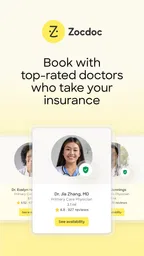
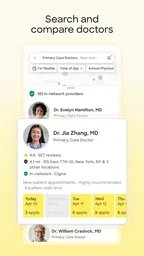
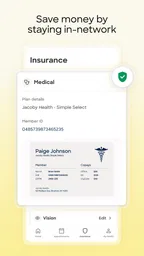
The app belongs to the medical category and is developed by Zocdoc, Inc. Its core appeal is straightforward: search for a clinician, narrow the results around your insurance, look at available appointment times, and read patient reviews before choosing. That combination is more useful than a bare directory when you are trying to move from “I need an appointment” to a specific booking.
In my view, the strongest part of this approach is how it changes the order of the search. Rather than picking a doctor based only on a name or a recommendation and then calling to learn whether the practice accepts your plan or has an opening, you can use those practical constraints earlier. That matters when you are comparing several options or trying to fit care around work, school, or family commitments.
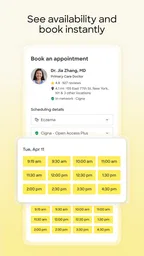
Real-time openings can also make the search feel more actionable. A profile with a visible appointment slot gives you something concrete to weigh against location, specialty, and patient feedback. The trade-off is that an opening is only useful if the clinician and practice are actually a good fit, so I would treat availability as a filter rather than the deciding factor.
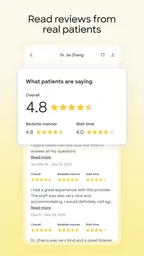
Reviews add another perspective, but I would read them for patterns instead of treating one very positive or negative comment as a verdict. Feedback can help you spot recurring themes in the patient experience, yet it cannot tell you whether a clinician is right for your particular health needs. I would use reviews to prepare better questions, not to replace professional judgment or a referral when one is important.
One practical workflow is to start with the coverage and appointment constraints that could rule out an option, then compare the remaining profiles. This avoids spending time on a clinician who looks appealing but cannot meet a basic requirement. Before confirming anything, I would still verify the insurance details and appointment information with the practice, especially if your plan has several variations or has recently changed.
A better way to compare options
It helps to decide what “good fit” means before browsing. For a routine appointment, convenience and a suitable time may matter most. For a new or complicated concern, relevant experience, a referral, or continuity with an existing clinician may matter more than the earliest opening. Separating must-haves from preferences keeps the search from turning into a contest between star ratings and appointment slots.
A less obvious benefit is that the app can help you compare trade-offs explicitly. If one clinician has a more convenient opening while another has feedback that better matches what you value, you can make that choice deliberately rather than accepting the first result. I would also note the details that prompted my choice, so I can confirm them when arranging the visit rather than relying on memory after browsing several profiles.
The app is free, and its content rating is Everyone. It has an average rating of 4.8, with around 57,000 ratings and about 7,500 written reviews; it has also passed the one-million-install mark. Those figures suggest that many people use it, but popularity does not guarantee that every clinician, specialty, or location will be equally well represented. The quality of the search is ultimately tied to the options available for the care you need.
Where I would slow down
The most important limitation is that finding a bookable appointment is not the same as finding the right care. A convenient time can draw attention away from questions about specialty, the practice’s location, or whether the clinician can address your concern. I would not choose solely by the first available slot, especially for care that calls for a referral or a clinician who already knows my medical history.
Insurance search is a helpful starting point, not a reason to skip confirmation. Coverage can depend on details that are easy to overlook when you are browsing, and an app search should not be treated as a guarantee of what a visit will cost. If affordability is a deciding factor, I would check the practice and insurer before the appointment rather than assume a search result settles the matter.
Patient reviews have their own limits. People may focus on different parts of an experience, and a review cannot reliably establish clinical quality or predict how a visit will go for you. I find them most useful when several comments point to the same practical issue, such as communication or scheduling, but I would give more weight to fit and verified care details than to an isolated score.
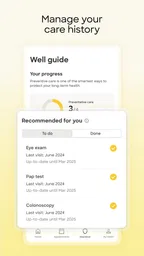
There is also a difference between using a booking search and managing care over time. If your priority is to keep all your health information in one place, coordinate treatment across clinicians, or get urgent guidance, a scheduling-focused app is not necessarily the tool you want. For a medical emergency, use emergency services rather than spending time comparing routine appointment listings.
Who will get the most from it
I would recommend Zocdoc to someone who already knows the kind of clinician they are looking for and wants to compare practical options without starting with a string of phone calls. It is especially appealing when insurance compatibility and appointment timing are both important, or when you are new to an area and do not yet have a local recommendation. The ability to review profiles and patient feedback can make that first search feel more informed.
Consider a common situation: you need a non-emergency appointment, have limited time away from work, and want to avoid calling several offices just to ask about openings. You can first narrow the search using your coverage, compare the profiles and feedback, and then focus on times that could realistically work. Before booking, confirm any details that would affect your decision. That small final check helps keep convenience from becoming a costly assumption.
It may be less useful if you already have a trusted clinician and normally book directly with that practice, or if your care depends on a referral and a specific treatment network. In those cases, your insurer’s directory, the referring clinician, or the practice itself may be a better first stop. I would also look elsewhere if I needed urgent care or a broader system for managing an ongoing condition rather than help finding an appointment.
For comparison, a traditional search engine can surface clinics and contact details, but you may need to check availability, insurance, and reviews across separate pages or calls. An insurer directory can be a sensible way to confirm network participation, while calling a practice directly can clarify details that a search result cannot settle. Zocdoc’s advantage is bringing several decision points together; its best use is alongside those other sources when the decision has financial or medical consequences.
What to expect from the app
The current version is 3.264.0, and the minimum operating system requirement is version 8.0. That makes the app accessible to many devices that are not running the newest software, though a phone that cannot install it may still be able to use an insurer directory or contact a practice directly. Since the app is free, trying it for a specific search does not require an upfront purchase.
For a smoother search, I would begin with the care need and coverage details I can confidently provide, then compare a manageable set of clinicians rather than opening every result. I would read profile information alongside reviews, check whether the location and time are genuinely workable, and verify key booking details before relying on them. If no result feels right, widening the search or switching to a referral or insurer directory is more sensible than settling for a poor match.
The app’s role is clearest when you treat it as a discovery and booking aid. It can reduce the friction of finding an option, but it cannot make the medical decision for you or remove the need to confirm details that affect coverage and care. That boundary is important: the best result is not simply the earliest appointment, but an appointment with a clinician who fits the actual need.
My recommendation
Zocdoc earns its place as a convenient way to search for clinicians and compare openings, insurance information, and patient feedback in one workflow. I would reach for it when I need a routine appointment and want a clearer shortlist before committing. Its real value is practical rather than medical: less back-and-forth at the discovery stage, with useful points of comparison along the way.
I would not use it as the sole authority on coverage, quality, or urgency. Confirm important booking details, read reviews with perspective, and choose based on the kind of care you need rather than convenience alone. If you approach it with those limits in mind, it is a helpful option for people who want to get from searching to scheduling without making the process more complicated than it needs to be.
What we like
- Search by specialty or condition to find relevant care.
- Filter results by insurance to narrow down in-network options.
- Book available appointments directly in the app.
- Read patient reviews before choosing a provider.
- Manage appointments and view booking details in one place.
What could be better
- Provider availability can vary widely by location.
- Some listings may have limited appointment times.
- Insurance details should be confirmed with the provider.
- Not every doctor accepts online bookings through Zocdoc.
- Appointment changes may depend on the provider’s policies.





