
YouVersion Bible App + Audio review
 Analysis by Appsdrops
I like a Bible app best when it makes a regular reading habit easier without turning that habit into a pile of menus and reminders. YouVersion Bible App + Audio is built around that practical idea: it brings Bible reading, audio, study material, and daily prompts together in one place. After spending time with it, I’d recommend it to someone who wants a flexible companion for personal reading, while keeping in mind that its range of translations and extras can feel busy if all you want is a simple digital Bible.
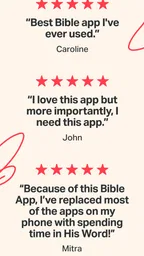
Developed by Life.Church, this free app sits in the books and reference category. It has a 4.9 average from around 9 million ratings, and more than 100 million installs. Those figures suggest broad appeal, but the useful question is whether its everyday workflow fits yours. For me, its strongest point is the way it supports several kinds of engagement—reading, listening, and following a guided plan—without requiring a separate app for each.
A steady reading routine, without a rigid schedule
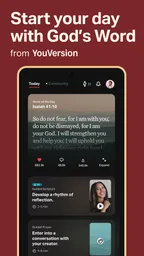
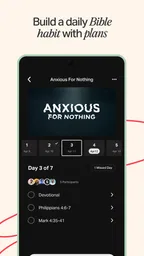
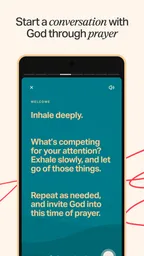
The easiest way to begin is to choose a passage and read at your own pace. The app’s daily verse can serve as a small entry point on days when a full reading session is unrealistic; it gives you something focused to consider rather than making the choice of where to start another obstacle. If you want more structure, study plans and devotionals provide a path through a topic or a sequence of readings.
I find that distinction important. A daily verse is useful as a brief pause, but it is not a substitute for reading a longer passage in context. When I have a few minutes, I’d use it as a prompt, then open the surrounding chapter before drawing conclusions from a single line. When I have more time, a plan can reduce the friction of deciding what to read next.
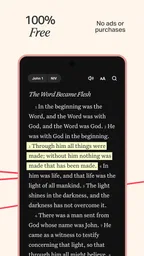
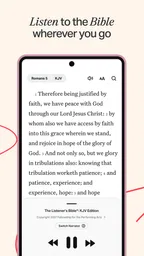
A realistic routine might be to listen to a passage while getting ready, then return to the text later and read it more slowly. Audio makes the app useful when looking at a screen is inconvenient, while the written text suits quiet reading or closer study. Switching between those modes lets the habit adapt to a commute, a lunch break, or a calm moment at home instead of demanding one ideal setting.
There is a trade-off: plans and daily prompts can make it easier to keep returning, but they can also make reading feel like a task to complete. I’d treat them as scaffolding rather than a scorecard. If a plan stops being helpful, choosing a passage independently is a sensible reset, not a failure of the app.
Make the text and audio work for your situation
Audio is more than a convenience for people who dislike reading on a phone. It can help when your eyes are tired, when you want to follow along while doing a simple household task, or when hearing the text makes a passage easier to absorb. It is less suitable for anything that needs your full attention, such as driving in demanding conditions; the practical advantage is flexibility, not a reason to divide attention unsafely.
For a first listening session, I’d choose a short passage and follow along on screen if that is comfortable. This gives you a chance to learn how the audio and text fit together before relying on audio alone. For reflective reading, I’d pause after a section rather than let a long stretch play automatically in the background. That small change helps preserve the difference between hearing words and actually considering them.
Settings and choices worth checking early
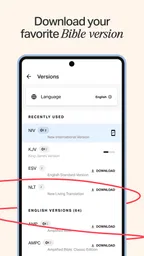
The app offers access to Bible translations, so it is worth choosing one that feels readable to you before building a routine around it. A familiar, straightforward translation can suit uninterrupted reading; comparing another translation can be valuable when a phrase seems unclear. I would avoid switching versions constantly during a first pass through a passage, though, because that can interrupt the flow. Read once for the overall meaning, then compare wording when you have a specific question.
Offline access is particularly useful for planned reading away from a reliable connection. The practical tip is to prepare the material you expect to use before you leave, rather than assume every page or audio item will be available wherever you are. If you rely on audio, check that your intended listening material is ready under the app’s offline options before heading out. This is a more dependable workflow than discovering a connection problem midway through a session.
Notifications and daily prompts are best treated as personal settings, not automatically as motivation. A reminder at a time when you can actually stop and read is more useful than one that arrives during a packed part of the day. If prompts start to feel like noise, reducing or turning them off can make the app calmer while leaving you free to open it on your own schedule.
It is also worth deciding how much of the app’s study material you want in your routine. A devotional can provide a concise theme and a starting point for reflection, while a Bible passage gives you the primary text to engage with directly. I’d use the devotional as a companion, not let its commentary replace reading the passage it is meant to accompany.
Repeatable patterns for experienced users
Once the basics feel comfortable, a simple sequence can make sessions more consistent: start with the planned passage, read it without interruption, then use a study resource only for the question that remains. This keeps the app’s range from pulling you into unrelated browsing. It also makes it easier to remember what you were trying to understand when you opened it.
A second useful pattern is to match the format to the moment. Use audio when your hands or eyes are occupied, text when you want to slow down, and a devotional when you need a guided prompt. That is more effective than trying to force every feature into every session. The app’s value lies partly in having these options close at hand, but the user still has to choose the one that serves the moment.
If you return to a passage, make the second visit purposeful: reread the section, compare a translation if the wording raises a question, or use a relevant study resource. Repetition alone can be comforting, but a focused question helps keep it from becoming passive scrolling. I also recommend keeping sessions modest at first. A short routine that fits an ordinary day is easier to sustain than an ambitious plan chosen in a burst of enthusiasm.
Compared with a basic e-reader-style Bible app, YouVersion offers a broader mix of plans, devotionals, and audio. That breadth is an advantage if you want one place for several approaches. A dedicated study tool may be a better fit for someone who wants a narrowly focused research workspace, while a plain text app can feel more direct for someone who wants only to open a passage and read. YouVersion’s strength is convenience across modes, not a guarantee that every user needs every mode.
Where the all-in-one approach has limits
The main friction I notice is the possibility of distraction. When a reading app includes daily content, plans, audio, and study material, it can be tempting to browse from one item to another instead of staying with the passage you opened. A clear intention helps: decide whether this session is for listening, following a plan, or reading independently, and return to that purpose when the surrounding options compete for attention.
Another limitation is that a guided plan may not match your preferred pace or approach. A plan is useful when its topic and structure suit your needs, but it is not inherently better than choosing your own reading. If you find yourself rushing to keep up, pause or change course rather than treating completion as the goal. People who want an app with no prompts, curated material, or extra navigation may prefer a simpler digital text.
Offline preparation also takes a little foresight. The feature can help when you know you will be without a connection, but it works best as part of a routine: prepare before leaving, and do not assume that every kind of content is ready just because you opened the app earlier. This is a small planning cost in exchange for being able to use selected material away from a connection.
The app is rated Teen, so it is not presented as a children-only product. That matters for families choosing what to install: an adult should consider whether the app’s material and wider reading experience suit the young person using it. For a reader seeking a strictly controlled child-focused environment, a purpose-built option may be more appropriate.
The current version is 11.34.1+7098322 and requires Android 7.0 or later. If you are using an older Android device, checking compatibility before planning to install is sensible. On a supported device, the more relevant decision is whether you want a broad, guided reading companion or a minimal Bible reader.
Who I’d recommend it to
I’d recommend YouVersion Bible App + Audio to readers who want to alternate between text and listening, appreciate a daily prompt, or like having plans and devotionals available alongside Bible reading. It is also a practical option for someone trying to establish a routine: a short daily passage, a prepared offline session, or a brief devotional can each lower the effort needed to begin.
I would be less likely to recommend it to someone who wants a completely bare reading screen, dislikes reminders and curated material, or needs a specialized research environment. The same breadth that makes it adaptable can make it feel crowded. In those cases, a simpler Bible reader or a more focused study tool may be a better match.
My overall impression is that YouVersion Bible App + Audio works best when you set a modest routine and let its features support that routine rather than compete for your attention. Pick a translation you can read comfortably, prepare offline material when needed, and choose between audio, text, or a guided resource based on the situation. Used that way, it is a flexible and approachable free companion; used without a clear purpose, its abundance of options can distract from the reading itself.
What we like
- Offers many Bible translations in one app.
- Audio playback makes listening to Scripture easy.
- Reading plans help build a daily routine.
- Verse images are useful for sharing passages.
- Offline access is available for selected content.
What could be better
- Some translations and audio versions require internet access.
- Audio playback may vary in quality between versions.
- The number of features can feel overwhelming at first.
- Reading plans may not offer the same content in every language.
- Some audio versions are unavailable for certain translations.




