
ReadEra – book reader pdf epub review
 Analysis by Appsdrops
Reading on a phone works best when the book, the app, and the moment all line up. ReadEra is built for people who want one place to open a range of ebook and document formats, including PDF, EPUB, Word, Kindle, and MOBI files. That makes it appealing whether you are settling in with a novel or checking a document between other tasks. My main impression is that ReadEra is a flexible reader for a mixed digital library, with connectivity most relevant when books need to be found or brought onto the device rather than during the act of reading itself.
A reader for a changing library
ReadEra sits in the Books & Reference space and keeps its promise straightforward: it is an ebook reader designed for several common file types. Instead of choosing a reading app around a single format, you can use this one for PDF, EPUB, Word, Kindle, and MOBI files. That breadth is useful in everyday life, where a personal library may include novels, reference material, and documents gathered from different places.
I like that the app’s purpose is easy to understand. It is not presented as a bookstore or a social network; the emphasis is on reading files. That distinction matters when considering connectivity. An app that reads documents is only one part of the process: you still need to locate, receive, or otherwise have access to the files you want to read. Once the right material is available, ReadEra’s central role is to provide a reader for it.
The app is free and is developed by READERA LLC. It has an average rating of 4.9 from around 1.6 million ratings, alongside roughly 21,000 written reviews and more than 50 million installs. Those figures suggest that many readers have made it part of their routine, though the best test is still whether its supported file types match the books and documents you actually use.
When connectivity enters the picture
Connectivity can shape the experience before reading begins. If a book is already available on your device, the task is simply to open it. If it is somewhere else, such as in a service or location that requires a connection, you will need that connection to get to the file first. This is a practical distinction rather than a special feature: the reader handles the document, while access to a remote source depends on the source and your network.
That makes ReadEra a sensible choice for people who collect files through several channels. You might receive a document from someone, obtain a book through a separate service, or keep reference material for later. The range of formats is the helpful part here. The app is positioned to read a variety of files, so the format itself is less likely to dictate that you switch readers every time your library changes.
I would think of the connection as most important at the handoff: getting the book to the point where the app can open it. A weak signal can interrupt that process if the file is being retrieved from a connected source. But it would be misleading to treat every reading session as network-dependent. Whether connectivity matters during a particular session depends on where the file is and how you access it.
Reading across everyday mobile moments
A phone is rarely used in just one setting. You may read at home, during a commute, while waiting for an appointment, or in a place where network access is inconvenient. In those situations, the useful question is not simply whether an app is an ebook reader; it is whether the book you want is ready when you are. With ReadEra, I would make that check around the file itself: know where it is, and make sure it can be opened before relying on it in a time-sensitive moment.
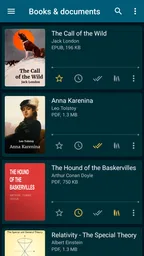
The supported formats give the app a broad everyday role. An EPUB novel, a PDF handout, a Word document, or a MOBI book can all fall within the kinds of material its store summary says it reads. That variety can reduce friction if your reading habits are split between leisure and reference. Rather than treating every document as a separate category of task, you can approach them through one reader.
For travel or other mobile use, preparation is the sensible habit. If your material is accessible only through a connected source, getting it ready while you have dependable access avoids a last-minute scramble. This is not a claim that the app provides a particular offline mode; it is simply a way to plan around the difference between a local file and one that still has to be reached over a network.
That distinction also helps set expectations. A reader cannot make a remote file available when the connection to its source is unavailable. On the other hand, connectivity problems at one point in the process do not tell you whether the reading experience itself will be interrupted once the document is accessible. I find this a useful way to evaluate ReadEra fairly: separate the app’s reading role from the network conditions surrounding file access.
When access fails, keep the problem in perspective
Not every connectivity issue is an app issue. If a file will not open because it has not yet been retrieved, the first thing to check is whether you can reach its source. If you already have the document, the next step is to confirm that you are opening the intended file and that it is one of the formats ReadEra is described as supporting. Keeping those questions separate can save time and prevent you from blaming the reader for a problem that began elsewhere.
In practice, I would use a simple recovery routine. First, check whether the network is available if the file still needs to be accessed remotely. Then confirm that the file is present where you expect it to be. Finally, try opening the document again. This is ordinary troubleshooting, not a promise of a special repair tool, but it gives you a clear path instead of repeating the same tap and hoping for a different result.
The same approach is helpful when you switch between formats. A PDF and an EPUB are different kinds of reading material, even though both are within the app’s stated range. If one document behaves differently from another, the format and the file’s source are both worth considering. ReadEra’s breadth is an advantage, but it does not erase differences between documents or the conditions under which they reach your phone.
For an important reading session, I would avoid leaving file access until the last minute. Check the document beforehand, especially if you expect to be away from a reliable connection. That habit is more dependable than assuming a book will be available at the exact moment you need it. It also keeps the app’s job clear: ReadEra is the reader, while your chosen source and connection determine whether a particular file is ready to open.
A considerate approach to data use
People who watch their mobile data use often want to know when an app is likely to need a network. With a document reader, the key question is whether the file is already available on the device or still needs to be reached from elsewhere. A file obtained through a connected source may involve data use during access, while opening a file already on hand is a different situation. The precise amount depends on the file and the source, so I would not assume that all documents have the same network impact.
If you are trying to be careful with a limited connection, plan the file transfer around a time and network that suit you. You can also keep track of which documents you have already made available, rather than repeatedly returning to a remote source when you want to read. These are general data-conscious habits, not claims about a particular setting in ReadEra. They make sense for any reading workflow that involves files coming from outside the device.
It is equally useful to avoid unnecessary assumptions about what the app does in the background. The simplest assessment is to focus on the action you are taking: opening a file that is already available, or accessing one that still depends on another service. That practical distinction gives you a better basis for managing connectivity than treating every ebook reader as if it handles every source in the same way.
Who is likely to appreciate ReadEra?
ReadEra is an appealing option if your reading material comes in several formats and you want a reader whose stated scope covers them. Its support for PDF, EPUB, Word, Kindle, and MOBI makes it relevant to both book-focused readers and people who regularly consult documents. The app is free, and its Everyone content rating makes its audience broad. It was released on March 31, 2017, and the current version is 26.11.06+2360, with Android 6.0 listed as the minimum operating system.
ReadEra’s strongest everyday appeal is its format range, especially for readers whose library is not limited to one type of ebook. The connectivity angle is more about sensible preparation than constant dependence: a network can matter when a file must be reached, but your reading plans should begin with knowing where that file is. If that distinction fits your habits, the app has a clear place in a mobile reading setup.
My connectivity verdict
Overall, I see ReadEra as a straightforward choice for reading a varied collection of digital books and documents. Its broad format coverage is the headline benefit, while network conditions affect the path to a file rather than defining the app’s whole purpose. For a smooth experience, I would make sure the material I want is accessible before I head into a setting where connectivity may be unreliable.
ReadEra is worth considering if you want one reader for several familiar file types and are comfortable managing access to your documents. Its popularity and strong average rating add context, but the real deciding factor is whether your own library includes the formats it reads. Keep file access and network access in mind, plan ahead for mobile reading, and the app’s role becomes easy to understand: it is a practical reader for books and documents, with connectivity shaping how you reach the material rather than serving as the whole experience.
What we like
- Reads books and documents without an internet connection.
- Supports EPUB and PDF alongside several other file formats.
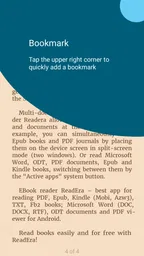
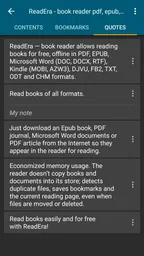
- Keeps reading progress and bookmarks for each book.
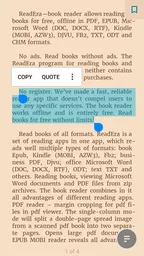
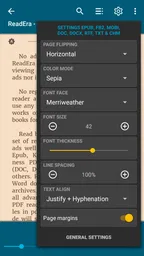
- Offers adjustable fonts and page layouts for comfortable reading.
- Includes a clean library view with useful sorting options.
What could be better
- The free edition includes ads.
- Its many settings may take time to explore.
- PDF reflow is not available for every document.
- Built-in note-taking tools are limited.
- Library organization may feel basic for large collections.





