
WellSky Personal Care review
 Analysis by Appsdrops
Care work depends on reliable coordination, but the right tool varies with the job: a family member helping occasionally has different needs from a professional caregiver following an agency’s process. WellSky Personal Care is aimed at caregivers and administrators rather than at people looking for a general health tracker. I’d consider it when care is organized through a provider that already uses WellSky, because an agency-linked mobile app can fit an existing routine better than a collection of personal notes and messages.
What the free app is—and what that means for value
The app is free to download, and it is published by WellSky Mobile Apps. That makes trying it on a compatible device a low-cost decision in the narrow sense: there is no listed purchase price for the app itself. It is rated for Everyone, runs on Android 7.0 or later, and its current version is 26.10. It first appeared on September 28, 2017, so this is an established product rather than a newly launched experiment.
Free access should not be confused with a guarantee that every caregiver can use the app independently or that every care service is included at no cost. Its purpose is tied to WellSky Personal Care and the work of caregivers and administrators. In practice, the first question I would ask is whether the agency or care organization involved uses this system and expects staff to work through its app. If not, installing it may not solve anything.
Its reach is substantial: the app has more than one million installs, with an average rating of 3.8 from around 35,000 ratings and roughly 14,000 written reviews. Those figures suggest that many people have encountered it, while the rating also leaves room for mixed experiences. I would treat popularity as evidence that it is in active use, not as proof that it will fit every workplace or care arrangement.
Where the value comes from
The useful value here is less about a long list of consumer-facing features and more about having a mobile tool designed for a particular care relationship. A professional caregiver may need to work within the organization’s chosen process; an administrator may need staff to use a consistent channel. When WellSky Personal Care is already part of that arrangement, a dedicated app can be more practical than trying to coordinate everything through private texts, paper reminders, or a general-purpose calendar.
That distinction matters because those alternatives are not interchangeable. A personal calendar is flexible, but it does not automatically become an agency’s system of record. Group messages can be quick, yet they can scatter information across conversations and personal phones. A care-focused app may be a better fit when the employer has built its workflow around it, though I would not assume that the app replaces every communication, recordkeeping, or scheduling tool the organization uses.
For a caregiver, the value is therefore conditional: it depends on whether the app supports the way their organization assigns and manages work. For an administrator, the value depends on whether staff can use it consistently as part of the established process. The download being free lowers one barrier, but convenience and usefulness come from the surrounding care setup, not from the price alone.
How it fits into an ordinary care day
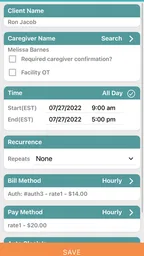
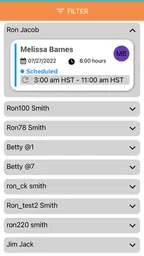
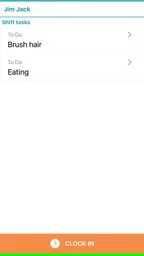
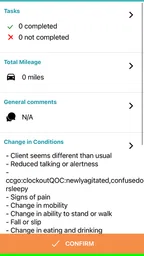
Picture a caregiver preparing for a shift with several responsibilities and a supervisor who coordinates the team. The practical benefit of an organization-linked mobile tool is that the caregiver can start from the same system the administrator expects them to use, rather than reconstructing the day from scattered personal reminders. That can make the app relevant before a visit begins, during the working day, and when the caregiver checks what the organization expects next.
A sensible way to assess it is to try one real work cycle rather than judge it from the app icon or a brief browse. Before relying on it, ask the administrator which tasks must be handled in the app and which still belong in another channel. Then check whether the information needed for an assigned shift is easy to locate on the phone you actually carry. This simple trial reveals a crucial trade-off: a system can improve consistency only if the organization’s instructions and the caregiver’s daily habits line up.
I would also avoid treating a work app as a substitute for urgent contact with a supervisor or emergency services. A mobile care tool belongs in the planned workflow; it should not be the only route for resolving an immediate safety concern. That boundary is especially important for family caregivers, who may not have the same organizational support or instructions as agency staff.
Trade-offs and points to check
The main limitation is that this is not presented as a universal personal-care organizer. Its intended audience is caregivers and administrators, so someone looking for an independent tool to coordinate a relative’s appointments, medications, or family updates may find the fit unclear. A general calendar, a shared family planner, or a communication tool may be more direct for that purpose—provided the family does not need to participate in an organization’s WellSky workflow.
There is also a difference between being able to install an app and being ready to use it for work. If an agency has not explained how staff should use WellSky Personal Care, the caregiver can end up unsure about where a task belongs or which channel to trust. I would ask the organization for onboarding guidance before relying on the app, particularly about what needs to be completed there and how staff should handle exceptions. That is not busywork: clear expectations are what turn a workplace app into a useful part of a shift.
Reviews can help set expectations, but they are not a substitute for checking the fit with your own organization. With an average of 3.8, experiences are not uniformly glowing, and a rating cannot tell me whether a particular complaint applies to a specific agency’s setup. If the app feels awkward, first distinguish a problem with the app from a problem with training, account access, or the organization’s process. The person responsible for administering the system is often the best starting point for that check.
Another practical trade-off is reliance on a phone during work. Anyone who prefers paper, has limited confidence using apps, or does not want job tasks on a personal device should discuss the organization’s expectations before switching routines. The download price being free does not settle questions about workplace policy, device arrangements, or whether a worker is expected to use a personal phone. I would get those details directly from the employer rather than assume that free access answers them.
Who is most likely to benefit
I can see the strongest case for caregivers whose organization already uses WellSky Personal Care and wants staff to work within its established process. For them, the app is worth evaluating as a work tool, especially if coordinating assignments through unrelated apps has created confusion. Administrators may also find it useful as a mobile option for a team already organized around WellSky, rather than introducing a second, unrelated system solely for convenience.
It is a weaker match for someone caring for a family member independently who simply wants a shared checklist or a household schedule. That person may be better served by a tool designed for family coordination, because the central value of this app is its connection to a caregiver-and-administrator context. Similarly, a professional caregiver whose employer uses a different platform should not install this expecting it to replace the employer’s required system.
If you are deciding whether to try it, I would ask three practical questions first: does the care organization use it, which parts of the workday does it expect you to manage there, and who can help if you cannot access the right information? Clear answers make the free download a reasonable experiment. Vague answers are a sign to get guidance before depending on it during a shift.
My verdict on downloading it
WellSky Personal Care is worth considering when it belongs to the care organization’s actual workflow. Its free download is a straightforward advantage, and its focused audience is a strength when caregivers and administrators need to work from the same system. The app is not automatically valuable just because it costs nothing, though: without the relevant organizational setup, it may be the wrong tool for the job.
I would recommend it to a caregiver or administrator who has been asked to use WellSky Personal Care and wants to understand how the mobile app fits into daily work. I would skip it as a first choice for a family seeking a standalone care planner, or for a worker whose employer uses another platform. In short, download it when there is a clear connection to your care team, confirm the expected workflow, and judge it on whether it makes that specific routine easier—not on the free price by itself.
What we like
- Caregivers can review assigned tasks and client details in one place.
- Visit notes help keep care information organized across shifts.
- The app can support clearer communication between caregivers and agencies.
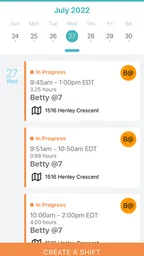
- Schedule access helps users check upcoming visits while away from the office.
- Mobile access can reduce reliance on paper records during visits.
What could be better
- Available features depend on the care agency's WellSky setup.
- Some actions may require a reliable internet connection.
- The app may feel less useful for people who manage care independently.
- Login problems can prevent access to visit information.
- Entering notes on a small screen may take longer than using a computer.





