
WeatherSight - Live Forecast review
 Analysis by Appsdrops
I tend to check the forecast at the moments when it can still change my plans: before taking the dog out, while deciding whether to hang laundry, or just before leaving for a walk. WeatherSight is a weather app built for that practical rhythm. Its promise is a quick view of current conditions and forecasts, rather than a reason to spend time exploring a complicated dashboard. I found its appeal easiest to understand in a household where several people share the same device or use the same forecast as a starting point for the day.
One forecast, several everyday decisions
Imagine a household getting ready in the morning. One person wants to know whether to carry a coat, another is planning a trip across town, and someone else is trying to choose a time to take a child to the park. A weather app cannot settle every disagreement about what to wear, but a clear forecast gives everyone a common reference. WeatherSight fits that role best when the question is simple and immediate: what might the weather be like where we are, and should we adjust our plans?
That shared-use angle is also where I would keep expectations sensible. I would not treat one screen as a family scheduling system or assume it can assign alerts to different people. Instead, I would use it as a quick household check-in: open the app, review the forecast together, then make the decision in conversation. That may sound modest, but it is often more useful than expecting a weather app to manage the rest of the family’s day.
As a weather app from Houpumobi Tech, WeatherSight sits in a familiar category with plenty of alternatives, including built-in phone weather apps and more detailed forecasting tools. Its store summary emphasizes current and forecast information, and its short description is simply WeatherSight. In my view, the important question is less whether an app can display weather at all and more whether its presentation helps you make a decision without turning a quick check into a project.
How I would use it through a normal day
For a morning commute, I would check the forecast before choosing shoes or deciding whether to carry an umbrella. Later, I might look again before walking to a shop or taking a longer route home. The useful habit is to check close to the moment a decision matters, rather than treating an earlier glance as a guarantee. Weather can shift, and an app’s forecast is guidance, not a promise about precisely what will happen at your door.
One practical tip is to make the forecast part of a decision routine rather than checking it repeatedly without a purpose. For example, check before leaving home, then check again only if the plan changes or conditions look unsettled. This helps avoid the common trap of refreshing a weather app every few minutes and still feeling unsure. WeatherSight is most valuable when it supports a choice—bring a layer, postpone an outdoor task, or take a different route—not when it becomes a substitute for judgement.
There is also a useful household trade-off here: one person may want a fast answer while another wants a more detailed forecast before committing to a long outing. A straightforward app can serve the first need well, but anyone organizing a full-day hike, a road trip, or an outdoor event should compare forecasts and consider local conditions. I would use WeatherSight for everyday orientation, then seek a more detailed source when the cost of being caught out is higher.
Keeping setup and expectations in the right lane
WeatherSight is free, so it is easy to try without first weighing a subscription against occasional use. That makes sense for a household member who mainly wants a convenient glance at the day. The app is listed for users of all ages, and the current version is 2.7.1.0. It supports Android 9 or later, which is worth checking before installing it on an older shared phone or tablet.
On a shared device, I would treat setup as a small boundary-setting task. Decide who is comfortable changing app settings and whether other household members should use the device for their own apps and accounts separately. I would not assume WeatherSight provides household profiles, individual preferences, or controls for assigning settings to different people. If those distinctions matter, keep them in the device’s own user and account arrangements rather than relying on the weather app to create them.
A second non-obvious habit is to confirm the place being forecast before making a decision for someone who is away from home. A forecast that is useful for the person holding the phone may not help a family member at school, work, or another town. If you are coordinating a pickup or an outdoor plan in a different area, make sure the app is showing the relevant location before sharing what you see. That small check prevents the easy mistake of discussing the right forecast for the wrong place.
Shared-device use can also blur who last changed a setting or what someone else expects to see. I would avoid treating the app’s display as a message sent to everyone in the household. If one person checks the forecast, they should pass along the conclusion directly—such as “take a light jacket”—rather than assume everyone has opened the same screen. This is a simple workflow, but it is more dependable than imagining automatic coordination that the app may not provide.
Who can rely on it, and when to double-check
WeatherSight has an average rating of 4.3 from around 20,000 ratings, alongside 311 written reviews, and it has been installed over a million times. Those figures suggest it has reached a sizable audience, but they do not tell me whether it will match every person’s expectations or every local forecasting need. I would judge it by how quickly it answers the questions I actually ask, and by whether I remember to treat a forecast as an estimate.
The app was released on December 8, 2025, so I would be cautious about reading its audience size as proof that it has a long record across every type of weather or location. That is not a reason to dismiss it; it is a reason to use normal care. For routine plans, a forecast is often enough to guide what to wear or whether to bring an umbrella. For safety-sensitive decisions—such as severe weather, travel through exposed areas, or a time-critical outdoor commitment—I would check official local alerts and another trusted source as well.
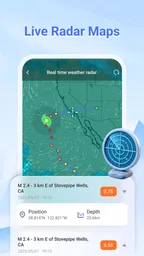
This is where WeatherSight differs from the usual alternatives in a meaningful way. A phone’s built-in weather app may be the quickest option because it is already on the device. A specialist forecasting service may be a better fit for users who want detailed maps, longer-range planning, or information for demanding outdoor activities. WeatherSight makes the most sense for someone looking for a dedicated, free option to check everyday conditions, rather than a full planning toolkit.
Its limitation is not necessarily that it fails at ordinary use; it is that a simple forecast can only answer so much. A single view cannot replace local awareness, advice from authorities, or checking conditions again when plans are consequential. I would also skip it if what I really needed were shared calendars, separate household profiles, or a guaranteed way to notify other people. Those are coordination needs, not basic weather needs, and I would choose tools designed for them instead.
Age, trust, and a sensible household routine
The Everyone content rating makes WeatherSight broadly suitable for general audiences. For a family, that is reassuring as far as the app’s age classification goes, but it does not remove the usual shared-device considerations. Adults should still decide how a child uses the device and whether the child needs help interpreting a forecast. “Rain later” or “a cooler afternoon” can inform a plan, but younger users may not know how to translate that into suitable clothing without guidance.
I would frame the app as a useful prompt, not an authority that settles every question. If a forecast appears at odds with what is happening outside, trust your observation and check again before making a bigger commitment. Likewise, if a household member is relying on the forecast for a journey or a vulnerable person’s plans, tell them what you checked and when. Weather information loses value when people silently assume everyone is looking at the same place or the same moment.
A practical household workflow is to keep the app’s role narrow: one person checks the relevant location, shares the takeaway, and the group agrees on the plan. For example, before a weekend outing, check the destination rather than only the home area, then revisit the forecast nearer departure if the outing depends on dry conditions. That approach does not require special family features; it simply makes the forecast more relevant and reduces confusion.
My household verdict
I would recommend WeatherSight to someone who wants a free, focused way to check weather as part of everyday decisions, especially if a shared phone or tablet is already part of the household routine. Its broad audience, straightforward purpose, and current Android compatibility make it easy to consider for casual use. The app is at its best when it helps answer a near-term question quickly, and when the person checking it remembers to share the useful conclusion with everyone affected.
I would not make it the sole source for severe-weather decisions, detailed outdoor planning, or household coordination that depends on separate accounts and tailored alerts. In those cases, an official alert service, a more specialized forecast tool, or a dedicated planning app may be the better choice. For ordinary choices—whether to carry a layer, when to do an outdoor chore, or whether a walk still sounds comfortable—I find the everyday role much more convincing than expecting a weather app to do everything.
Overall, WeatherSight is a sensible option for a household that wants weather information without turning it into a complicated routine. I would install it on a compatible device, check the location before passing advice along, and use another trusted source when the stakes are higher. That combination keeps its strengths in view while avoiding the mistake of asking a simple forecast app to act like a family organizer or a guarantee of what the sky will do.
What we like
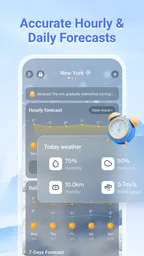
- Clear hourly forecasts make short-term planning easier.
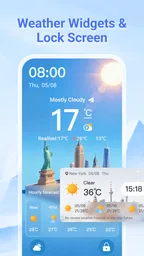
- The interface presents current conditions at a glance.
- Location-based forecasts help when traveling.
- Weather alerts can provide timely notice of changing conditions.
- Forecast details support everyday outdoor plans.
What could be better
- Forecast accuracy can vary by location and weather conditions.
- Some features may require an internet connection.
- Frequent alerts may become distracting.
- Background location access can affect battery life.
- Forecast information may differ from other weather services.





