
Weather & Widget - Weawow review
 Analysis by Appsdrops
I like a weather app best when it helps me make a decision without turning a quick check into a project. Weather & Widget - Weawow is aimed at people who want a calm, customizable view of the forecast rather than a bare temperature and a wall of alerts. My first impression is that it gives you room to shape how weather information looks, while keeping the everyday purpose clear: check what is ahead, then decide what to wear or when to head out.
What to expect from the forecast
Weawow is a weather app developed by Weawow. It is free to install, rated for Everyone, and has built a strong following, with a 4.9 average from around 761,000 ratings and over 10 million installs. The current version is 7.2.0, and the app has been available since May 1, 2017. Those figures suggest a well-established option, though popularity alone cannot tell you whether its presentation suits your habits.
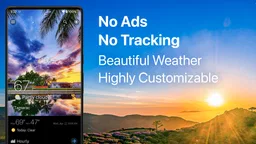
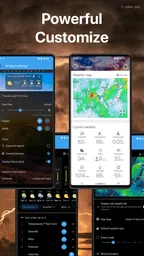
The app’s central appeal is flexibility. Rather than treating weather as one fixed screen that everyone must accept, it lets you customize the experience. That matters if you prefer a visual, uncluttered overview, or if you want the screen to feel more like your own useful dashboard. I find this a better fit for regular checking than for someone who only wants to glance at a single number and close the app.
On a first visit, give yourself a moment to look around before changing settings. The most meaningful first goal is simple: find your current location’s forecast and understand what the day is likely to feel like. Resist the urge to personalize every detail immediately. A weather app becomes useful when it answers a real question quickly, and the simplest first question is whether you need an extra layer or an umbrella before leaving.
Compared with the weather screen built into many phones, Weawow’s attraction is the opportunity to tailor its appearance and information. Compared with more elaborate forecast tools, its visual approach may feel easier to settle into. The trade-off is that customization can make the initial experience less obvious: there may be choices to explore before you know which layout you actually prefer. If you want a completely fixed, no-decisions interface, the default app on your phone may feel more immediate.
Getting through the first setup
When you open the app, start by making sure the forecast is for the place you care about. If the location shown is not the one you need, correct that before judging the forecast or its usefulness. This sounds obvious, but it is the most common source of confusion in any weather app: a sensible prediction for the wrong town is still the wrong answer. For a first test, use the place where you are standing rather than a holiday destination or a saved location you may have added for later.
Next, spend a little time on the display rather than trying to tune every available option. The useful question is not “What can I customize?” but “What do I need to see first?” If you tend to check before commuting, put the most relevant day-to-day information where it is easy to notice. If you check while planning a walk, favor a view that lets you take in the broader day rather than focusing only on the current conditions. Choose a layout around one routine, then live with it for a day before deciding whether it needs adjustment.
It is also worth separating appearance from forecast interpretation. A cleaner screen may make information easier to scan, but it does not make a forecast certain. I treat any weather app as a planning aid, especially when a decision depends on changing conditions. For a casual errand, a quick glance may be enough. For a long outdoor plan, I would check again closer to the time rather than relying on one early look.
Weawow is free, with optional in-app purchases ranging from $2 to $50 per item. You can start using it without treating a purchase as a necessary first step. I would first establish whether its everyday presentation works for you; only then does it make sense to consider whether any paid option is worthwhile. That keeps the initial setup low-pressure and helps you judge the app on the part you will actually use.
The first useful check
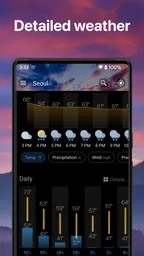
For a reassuring first success, use the app to answer one practical question: should you take a jacket when you leave? Check the forecast for your location, look beyond the moment you opened the app, and compare the expected conditions with how long you will be outside. That small workflow demonstrates more than a glance at the current temperature. It connects the display to a real choice, which is the point of installing a weather app in the first place.
Here is a realistic example. You are getting ready for work, and the morning looks comfortable through the window. Before heading out, you check the forecast for the hours you expect to be away. If conditions are likely to change later, you can pack a layer rather than making a decision based only on what the sky looks like right now. I like this habit because it avoids both overreacting to a single moment and assuming the morning will represent the whole day.
For a more useful comparison, check the same location at two different times rather than constantly refreshing it. The point is to notice whether your plan still makes sense as departure gets closer. That is especially helpful for a walk, an outdoor lunch, or a trip across town. A weather app cannot make the decision for you, but a consistent quick check can prevent the familiar mistake of dressing for the weather at home when you will be out much later.
One practical tip is to set up the app around a recurring decision instead of a vague interest in weather. Maybe you mainly want to know whether to walk, cycle, or take a coat. Choose a display that helps with that decision and leave it alone for a while. This gives you a fair test of the interface and prevents the customization process from becoming more work than checking the forecast itself.
Where first-time users can get tripped up
The main source of friction is the same feature that makes the app appealing: customization. When a screen offers ways to adjust the experience, it is tempting to keep browsing instead of learning the basic forecast view. I would avoid making several changes at once. If you alter the layout repeatedly, it becomes harder to tell which choice made the app more useful. Make one adjustment, use it for a day, and keep it only if it improves a routine check.
Another easy misunderstanding is to treat visual polish as a promise of precision. A clear presentation can help you notice a change, but no single forecast should be treated as a guarantee. When timing matters, check again before leaving. When the consequences are more serious than deciding what to wear, use the relevant local safety guidance as well. This is not a weakness unique to Weawow; it is a sensible boundary for relying on any general-purpose forecast.
Location can also make a forecast feel wrong when the issue is simply that the app is showing a different place from the one you had in mind. Before changing your preferred display or concluding that the information is unhelpful, check the location first. This is particularly important when you move between home, work, and another town. A quick location check is often more useful than repeatedly changing the forecast view.
Weawow is not the best choice for everyone. If you want a bare-bones screen with no interest in tailoring how it looks, your phone’s built-in weather app may be faster to use. If you need a specialist service for a particular professional or safety-critical activity, choose a tool designed for that job rather than assuming a general weather app covers every need. Weawow makes most sense for someone who wants an everyday forecast in a more personal, visual format.
Making it part of a routine
Once the basic view feels comfortable, the next step is to make checking purposeful. I would use it at predictable moments: before leaving home, before an outdoor plan, or when deciding whether to carry an extra layer. That is more effective than opening the app repeatedly without a question in mind. It also makes it easier to decide whether the customization you chose is genuinely helping.
Think about how much detail you want in a normal day. Some people need only a quick overview to plan clothes and errands; others enjoy spending longer comparing conditions across the day. Weawow’s adjustable presentation can suit the second group especially well, while still giving the first group a reason to keep the screen simple. The best setup is not the one with the most visible information; it is the one that lets you spot the detail you personally act on.
There is a useful trade-off here. A personalized screen can feel more welcoming and can put your preferred information within easy reach, but more choices also ask you to make decisions. I would not spend an evening trying to create a perfect arrangement before using the app. Start with the default experience, identify what slows you down, and adjust only that. This approach makes setup less intimidating and helps you avoid mistaking endless tweaking for better forecasting.
The app is free to try, but its optional purchases are a reason to be deliberate rather than assume every feature or choice is included at no cost. The sensible path is to use the basic experience for your normal routine first, then decide whether you have a specific reason to spend. If the app already answers your everyday questions, there is no need to turn a simple weather check into a shopping decision.
Who I would recommend it to
I would recommend Weather & Widget - Weawow to someone who checks the weather often and cares about how information is presented. It is particularly suitable if you like adjusting an app to fit your habits, or if the stock weather screen on your phone feels too limited or impersonal. Its high average rating and broad adoption make it an established choice, but the more important question is whether you enjoy a customizable approach.
I would steer a first-time user toward a small trial: confirm the location, choose a straightforward view, and use it for one real decision the same day. If that check is quick and clear, explore further only when you know what you want to improve. If you find yourself spending more time arranging the screen than using the forecast, simplify it or return to the simpler alternative already on your phone.
Overall, I see Weawow as a thoughtful everyday weather app rather than a tool that should replace judgment. Its visual flexibility is its strongest reason to choose it, and the need to spend a little time getting comfortable is the corresponding cost. For someone who wants a personalized forecast they can make part of a morning routine, that is a fair trade. For someone who wants one fixed answer with no setup, it may be more app than they need.
What we like
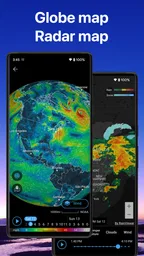
- Weather maps make it easy to explore conditions across different locations.
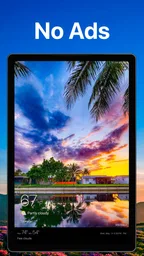
- The photo-based interface gives the forecast a distinctive look.
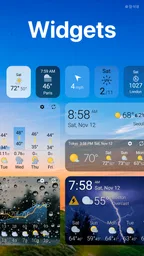
- Users can customize the home screen with a range of widget styles.
- Multiple weather providers help users compare forecast sources.
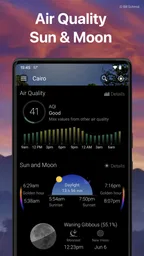
- The app includes useful details such as air quality and pollen.
What could be better
- Forecast accuracy can vary depending on the selected weather provider.
- Some weather details may require extra taps to find.
- Widgets can use more screen space than compact alternatives.
- The many customization options may take time to set up.
- Photo-heavy screens may feel busy to users who prefer plain forecasts.





