Weather & Rain Radar Forecast review
 Analysis by Appsdrops
I judge a weather app by whether it helps me make a decision at the right moment, not by how many colorful panels it can fit on a screen. Weather & Rain Radar Forecast is aimed at people who want a quick local outlook but also need a way to keep an eye on rain and more serious weather. Its mix of radar, a longer forecast, and alerts gives it a broader role than a simple temperature check, though it works best when I treat forecasts as guidance rather than guarantees.
Building a dependable daily routine
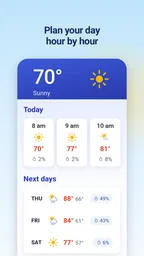
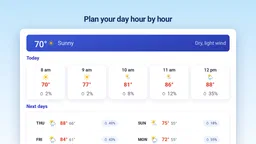
My useful starting point with this kind of app is deliberately simple: check the current conditions, look ahead to the hours that matter, then use the radar if the timing of rain could change a plan. That sequence is more practical than opening every available screen at once. For a commute, I care about whether rain overlaps with the trip; for an outdoor afternoon, the broader outlook matters more than a single current reading.
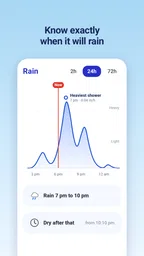
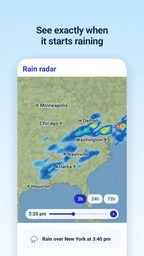
The radar is the feature I would consult when a general forecast feels too vague. A chance of rain across a day does not tell me whether to leave now, wait, or bring a coat. A radar view can help me judge the movement and coverage of precipitation around my area, but it should not be treated as a promise about exactly what will happen at my doorstep. Local conditions can shift, and a map is most useful as one part of the decision.
The longer outlook is better suited to planning than to precise scheduling. A forecast reaching two weeks ahead can help me notice a possible wet stretch before I choose a day for gardening or a family outing. I would not make a firm, costly plan based on a distant forecast alone. I would use it to identify a window worth checking again as the date approaches.
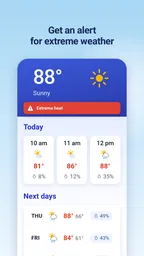
There is also a difference between checking an alert and checking ordinary weather. The app covers severe-weather notifications for events such as hurricanes, storms, and tornadoes, so it may be useful when conditions are potentially hazardous. In that situation, I would read the alert carefully and rely on appropriate local emergency guidance as well. A phone notification is helpful for awareness, not a replacement for official instructions.
A realistic day with the app
Imagine I have a morning walk planned, errands around lunchtime, and an outdoor dinner later. I would first check the local forecast to see whether the day looks broadly unsettled. If rain is a possibility, I would look at the radar before leaving, then check it again before the dinner plan rather than assuming the morning picture will hold all day. That repeatable habit is more valuable than repeatedly refreshing without a question in mind.
For a busy day, I would use the app to answer one decision at a time: should I carry an umbrella, should I move an outdoor task earlier, or should I keep a backup plan? This keeps the information manageable. It also helps avoid a common weather-app trap: treating every changing symbol as a reason to revise the whole day, even when the change has no practical effect on what I am doing.
Settings and habits that make checks more useful
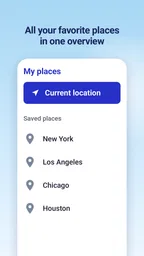
Before relying on any forecast, I would check that the location being shown is the one I actually care about. A weather view for home may be irrelevant when I am planning a trip across town or visiting someone elsewhere. It is worth taking a moment to confirm the displayed place rather than drawing conclusions from a map or forecast that happens to be open.
I would also decide how much I want to depend on alerts. Severe-weather notifications can be important, but alerts are most useful when they are noticeable without turning into background noise. I would review the app’s available notification controls and choose an approach that fits my routine. If I tend to ignore frequent notifications, a more selective setup is likely to serve me better than leaving every option on by default.
One practical habit is to separate routine checks from alert checks. I might look at the forecast when planning the day, then use notifications for conditions that warrant attention rather than repeatedly opening the app to see whether anything has changed. This is especially useful for people who travel between locations or spend much of the day away from a window: deliberate checks give context, while an alert can prompt an extra look when it matters.
Another good habit is to compare the forecast with what is happening outside. If the sky and radar disagree with the broad outlook, I would not assume that one view must be wrong; they may be showing different scales or times. For an immediate choice, nearby conditions matter. For a plan later in the day, the forecast and subsequent updates deserve more weight. This simple distinction makes weather information easier to use without expecting perfect precision.
For planning several days ahead, I would avoid locking in details too early. The longer outlook is useful for spotting a likely pattern, while the nearer-term forecast is a better basis for deciding whether to move an event or pack specific gear. Checking again closer to the day is not needless repetition: it is a sensible way to reduce uncertainty as the forecast horizon gets shorter.
Fast checks without turning the app into a habit loop
The fastest routine is to open the app with a specific question already in mind. “Will rain affect my walk?” calls for a local forecast and perhaps radar. “Can I plan an outdoor event next week?” calls for the extended outlook, with the understanding that it is provisional. “Is there a serious weather warning?” calls for the alert information. Matching the screen to the question is a small but useful discipline.
I would also avoid treating a single radar snapshot as a complete story. If rain is close to a planned activity, a second check nearer the departure time can be more useful than studying the map far in advance. The same applies to travel: checking the destination as well as the starting point is a better workflow than assuming conditions will be uniform along the way. These are habits rather than special features, but they make the app’s tools more informative.
For recurring outdoor plans, I would keep the decision rule consistent. For example, I might check the outlook the evening before, then use radar on the day if rain is nearby. The benefit is not that the weather becomes predictable; it is that I stop making every decision from scratch. A repeatable routine helps me notice changes that affect the plan while ignoring updates that do not.
The app is free to install, and it includes in-app purchases priced from $1.49 to $11.99 per item. I would begin with the free experience and decide whether any paid option is worthwhile only after using the features I actually need. The existence of purchases does not, by itself, tell me what a particular user will find valuable, so I would avoid paying simply because a feature appears on screen. The right test is whether it solves a recurring problem in my own routine.
Where it fits—and where I would choose differently
Deep Orbit is the developer behind this weather app. It has a 4.7 average from around 36,000 ratings and has been installed over a million times. Those figures suggest that it has found an audience, but they do not settle whether its layout or forecasting style will suit me. I would still judge it by how quickly I can locate my area, interpret the radar, and understand an alert.
The app is rated for Everyone, runs on Android 7.0 and later, and its current version is 141.0. It was released on March 18, 2026. Those details matter most when checking whether an older device can run it; they are less important than the day-to-day experience once it is installed. As an app in the weather category, its value comes from combining several kinds of information in one place rather than focusing only on a single forecast view.
Compared with a basic weather widget or a very minimal forecast app, this one is a stronger fit if I want to move between radar, a longer outlook, and severe-weather alerts. A lightweight alternative may be better if all I want is the temperature and a quick glance before leaving home. On the other hand, people who need specialist forecasting for work, outdoor safety, or detailed route planning should look for a service designed around those specific demands rather than assuming a general-purpose app covers every professional need.
The main limitation is that more information can create more chances to overread uncertain forecasts. A long-range outlook is not a fixed schedule, and a radar image does not guarantee what will happen at one exact spot. I would also consider the cost of optional purchases before treating every extra as essential. If I want nothing beyond a simple daily high and low, the extra radar and alert emphasis may be more than I need.
Another trade-off is that weather information is inherently local and time-sensitive. A forecast can be useful in one neighborhood and less representative a short distance away, particularly when conditions change quickly. I would keep the location relevant to the plan, revisit the information when timing matters, and use official emergency instructions for serious hazards. That approach is more reliable than expecting any single app to remove uncertainty.
Who will get the most from it
I would recommend Weather & Rain Radar Forecast to someone who regularly adjusts errands, walks, or outdoor plans around rain and wants severe-weather alerts alongside ordinary forecasts. It is especially appealing if radar helps you decide whether to wait or go, rather than merely confirming that rain is possible. Someone who checks weather only once in the morning may still find it useful, but may not need to explore every part of the app.
I would skip it if I prefer a very stripped-down screen, do not want to manage notifications, or need highly specialized meteorological tools. I would also avoid paying for extras until I know that they improve a real, repeated decision. For many people, the free starting point is enough to assess whether the combination of forecast, radar, and alerts suits their habits.
My overall view is that this is best used as a practical planning companion, not an oracle. Its strongest case is the workflow: use the forecast to frame the day, radar to judge nearby rain, and alerts to draw attention to serious conditions. Keep the longer outlook flexible, verify the location, and check again when a decision is close. With those habits, Weather & Rain Radar Forecast can make everyday weather choices clearer without pretending that forecasts are certain.
What we like
- Clear forecasts make upcoming weather easy to understand.
- Radar maps help track approaching rain in your area.
- Useful weather details support everyday planning.
- Location-based updates provide relevant local conditions.
- A simple layout makes key information easy to find.
What could be better
- Forecast accuracy can vary by location and time.
- Radar coverage may be limited in some regions.
- Frequent alerts can become distracting.
- Some features may require an internet connection.
- Advertising may interrupt the browsing experience.





