Weather Radar, Live Radar review
 Analysis by Appsdrops
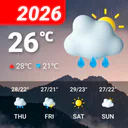
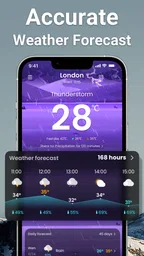
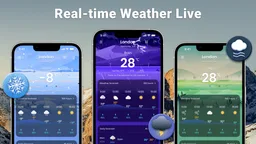
When I check the forecast, I usually want one useful answer quickly: should I leave now, bring a coat, or change my plans? Weather Radar, Live Radar is built around that practical kind of decision, combining local forecasts, radar, and a weather widget. My impression is that it can make everyday weather checks more convenient, especially for people who like seeing conditions at a glance, though a radar screen is not automatically easier for everyone to interpret.
Clear checks, with radar as a second layer
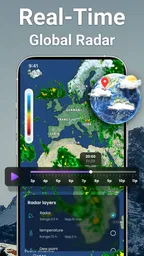
The basic appeal is the combination of forecast information and a map view in one weather app. I find that pairing more useful than treating radar as a novelty: a forecast helps with planning, while radar can help answer whether rain is approaching or already nearby. For a quick decision, I would start with the local forecast and open the map only when the timing or direction of weather matters.
The app is in the weather category, and its developer is Weather Forecast & Widget & Radar. It is free to install, with in-app purchases listed at $5.99 to $9.99 per item. That makes it easy to try before deciding whether it suits your routine; I would check the app’s purchase screens carefully before buying anything, rather than assuming every option is included at no cost.
Its name is Weather Radar, Live Radar, and the current version is 2.1.6. The app has a 4.6 average from around 400,000 ratings, with over 10 million installs. Those figures suggest that it has found a broad audience, but they cannot tell me whether its display will work well for a particular person or on a particular device. The practical test is whether you can find the information you need without effort.
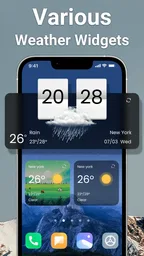
For someone who checks the weather several times a day, the widget can reduce the number of steps involved. A useful way to evaluate it is to place the widget where you normally look for quick information, then see whether it answers your usual question without opening the app. If it only prompts you to launch the full screen, it may offer less benefit than expected. Widget usefulness can also depend on how much space you are willing to give it on your home screen.
Reading the screen at your own pace
Radar maps can be informative, but they ask the viewer to interpret a visual pattern rather than simply read a sentence. I would treat the map as a supporting view, not as the only source of guidance. If the colored areas or movement are hard to make sense of, return to the forecast and use the map only to add context. That approach is also sensible when you are tired, in a hurry, or looking at a small screen.
One non-obvious tip is to compare the map with the forecast for the same location instead of drawing conclusions from a single glance at radar. A patch of precipitation on a map does not, by itself, tell you whether your exact route will be affected or how comfortable it will be to travel. Use the broader forecast to plan, then consult radar when you need a closer look at what may be developing nearby.
Navigation matters as much as the information itself. When trying a weather app, I look for a simple path from the opening view to the local forecast and then to radar, without having to explore every screen. I cannot assume every user will find that path equally obvious, so I recommend taking a minute when you first open the app to locate those core views before relying on it during a rushed commute.
Weather Forecast & Widget & Radar has a broad, descriptive developer name, while the product’s identity is centered on weather and radar. That makes the app’s purpose easy to understand, but it does not tell you whether its visual presentation will be comfortable for you. If small text, dense screens, or color-heavy maps are difficult for you, judge the actual display on your own device before making it your main source.
Different senses and ways of interacting
A map-first view naturally favors people who can comfortably scan visual information. If you have low vision or find changing colors difficult to distinguish, a radar image may be less useful than a concise written forecast. I would avoid relying on the map alone in that situation. The more inclusive workflow is to use whatever forecast text is readable to you and treat radar as optional context, not a required step.
For motor considerations, the widget may be helpful if reaching and opening an app repeatedly is uncomfortable: a quick glance can be easier than several taps, provided the widget displays what you need. Try it during an ordinary day rather than assuming it will save effort. If you need to open the app each time or navigate through several screens, the convenience may not outweigh the extra interaction.
There is also a useful trade-off between detail and simplicity. Radar can offer a closer visual sense of changing conditions, but that detail brings more to interpret. If you mainly need to know whether to carry an umbrella, a straightforward forecast may be quicker. If you are deciding whether to walk to a bus stop before a shower arrives, the map may add value. Choosing the simplest view that answers your question is often better than trying to absorb every available layer.
The app is rated for Everyone, and it supports devices running Android 7.0 or later. It was released on December 21, 2020, and its free entry point lowers the barrier to trying it. Those details are useful when checking basic compatibility, but age suitability is not the same as accessibility. I would still recommend that families or users with specific visual or motor needs test the screens and controls directly.
When the weather check needs to fit real life
Picture a weekday morning when you are deciding whether to walk to work or take another option. I would check the local forecast first, then use radar to see whether rain seems close enough to affect the walk. If the map is unclear, I would not let it overrule a plain-language forecast or common-sense caution. The app is most useful here as a way to bring two kinds of information together, not as a guarantee about conditions on every street.
For someone caring for a child, an older relative, or a pet, quick access can be valuable when plans need to change. A widget can make a routine check less disruptive, while the radar view may help decide whether to postpone a short outing. The practical insight is to check before the decision point: looking while still at home gives you more options than trying to interpret a map while already outside and distracted.
People who spend time outdoors may appreciate having forecast and radar in the same place, but I would not use this app as a substitute for a dedicated planning tool when conditions are consequential. A casual walk and a remote hike are different situations. For higher-stakes travel, use dependable local guidance and allow for conditions that can change; a phone’s weather display should inform a decision, not carry the whole burden of it.
Compared with a basic forecast app, this one makes radar a central part of its appeal and adds a widget for quick checks. Compared with a specialist weather service, it may suit someone who wants an everyday overview more than someone who needs extensive analysis or highly tailored presentation. The right alternative depends on what is difficult for you: choose a text-led service if map interpretation is a barrier, or a simpler forecast if you rarely need radar at all.
Where it may still create friction
The biggest practical limitation is that a radar map can look precise while still being easy to misread. It is tempting to assume that a colored patch maps neatly onto the next few minutes of your own plans. I would resist that instinct and use the forecast alongside the map. This is especially important when traveling, when your destination is farther away, or when you cannot readily change plans.
Another possible friction point is visual density. Weather information is most useful when it can be read at a glance, but a map and supporting controls can compete for attention. If you find yourself repeatedly zooming, searching, or switching views just to answer a basic question, the app may not be a good fit for your preferred way of checking weather. In that case, a simpler, text-focused alternative could be kinder to your time and attention.
Free installation does not mean every in-app option is free, so I would be deliberate about any purchase prompt. The listed purchase range is $5.99 to $9.99 per item. Before paying, ask whether the feature you want addresses a real problem in your routine, rather than buying simply because the app presents an option. If the basic forecast and widget already cover your needs, there may be no reason to spend more.
There are also situations when I would skip a radar-centered app altogether. If you want a low-distraction forecast with minimal visual interpretation, a plain forecast tool may suit you better. If you need weather information presented in a particular accessible format, test the app first instead of assuming a widget or map will meet that need. And if your plans depend on highly specialized local information, choose a service built for that specific task.
A practical inclusive choice, not a universal one
I would recommend Weather Radar, Live Radar to someone who checks local conditions often, wants radar available alongside a forecast, and appreciates a widget for routine glances. Its strongest everyday use is helping you decide when to look more closely at nearby weather, rather than making every weather decision for you. Starting with the free app is a sensible way to see whether its screens suit your habits.
For people with visual, motor, or sensory needs, the answer is more personal. The widget may reduce repeated navigation, but the map may add visual complexity; a quick forecast may be easier than a detailed radar view. Try the parts you expect to use in the situations that matter to you, and keep an alternative available if the display is tiring or hard to interpret. That is a more useful accessibility test than assuming one design works for everyone.
Overall, I see this as a convenient everyday weather option with a clear reason to choose it: forecast, radar, and a widget are gathered in one app. Its rating and popularity may reassure a curious user, but the deciding factor should be whether its visual approach makes your own weather checks easier. If you value a map and can read it comfortably, it is worth trying; if you need a simpler or more tailored presentation, another weather app may serve you better.
What we like
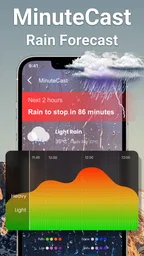
- Radar maps make approaching rain easier to track.
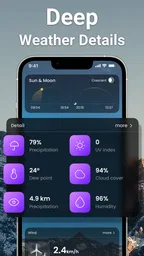
- Live conditions help with quick weather checks.
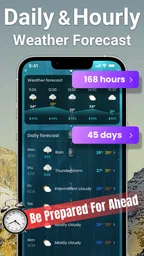
- Forecasts support planning for outdoor activities.
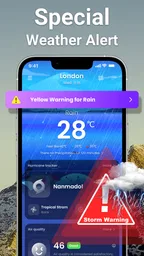
- Severe weather alerts can provide useful warnings.
- A clear layout helps users find key information.
What could be better
- Radar updates may lag behind local conditions.
- Some features may require an internet connection.
- Location access is needed for local forecasts.
- Alerts may be less useful in areas with sparse coverage.
- Forecast accuracy can vary by region and weather conditions.





