Weather Radar Home review
 Analysis by Appsdrops
Weather can change the shape of an ordinary day: a walk becomes a dash for cover, a commute needs an extra layer, and outdoor plans suddenly depend on the sky. Weather Radar Home is built around making that check easy to reach, bringing storm radar, alerts, and live weather forecasts onto the home screen. I like that practical focus. Instead of treating weather as something to look up only after a change becomes obvious, the app puts it closer to the point where a decision starts.
Weather checks that begin at home
The first step in a useful weather routine is knowing what you need from it. Sometimes I only want a quick sense of current conditions; other times, I want to check whether a storm could affect an upcoming trip or an outdoor plan. Weather Radar Home presents itself as a weather radar and forecast app, with its home-screen approach making the central idea clear: get relevant weather information within easy reach.
That emphasis matters because checking the weather is rarely the end goal. The real outcome is choosing what to wear, when to leave, or whether to adjust plans. By focusing on live forecasts and storm alerts, the app speaks to people who want weather information to support everyday choices, rather than merely provide a reason to open another screen.
Weather Radar Home is a free app from OmniHome Apps, and its content rating is Everyone. It has an average rating of 4.2 from around 2.9 thousand ratings, with roughly 706 written reviews. Those figures suggest that it has attracted a substantial audience, though I would still judge any weather tool by whether its presentation fits my own routine.
From a glance to a decision
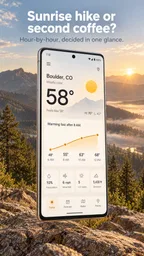
The ideal workflow starts before the day gets busy. I check the home screen, get a quick weather snapshot, and decide whether I need to look more closely. If the forecast looks unsettled, radar and alerts become more relevant; if conditions seem straightforward, a brief check may be enough to move on.
This is a sensible way to organize a weather app because it follows how people actually use one. I do not always want to explore a collection of menus just to answer a simple question. A home-screen-first design is appealing when it helps shorten that first step between wondering about the weather and having enough information to make a plan.
The app’s core promise is easy to understand: weather information should be available where I already begin using my phone. That can be especially helpful in a busy morning routine, when I am getting ready, checking messages, and deciding how to travel. The less effort it takes to start a weather check, the more likely I am to make it part of my day.
Following changing conditions
Weather is not always a single snapshot. A clear start can give way to rain, and a forecast that looked unimportant earlier can matter when plans are approaching. The combination of radar, alerts, and live forecasts gives Weather Radar Home a workflow that can move from an initial glance to a closer look as circumstances change.
For example, I might check the weather before leaving home, notice that conditions deserve attention, and then use the app’s weather-focused tools to inform the next decision. The practical value is not just seeing weather information; it is having a reason to revisit it when conditions could affect the day. A good weather check should lead to a useful next step, whether that means leaving earlier, taking a jacket, or reconsidering an outdoor activity.
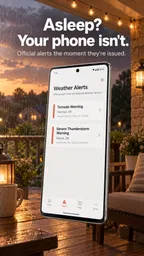
Storm alerts are particularly relevant in that chain. An alert can help draw attention to a developing weather concern, while radar and forecasts support a broader view of what may be happening. Together, those elements give the app a clear purpose for people who want more than a basic current-conditions glance.
The handoff from phone to real life
A weather app earns its place when information carries smoothly into real decisions. I might start with a quick check on the home screen, take in a forecast, and then pass that knowledge into the rest of my routine: choosing clothes, packing for the day, or coordinating plans with someone else. Weather Radar Home is positioned to support that handoff by making weather information a convenient starting point.
That handoff is also where clarity matters. Weather information can influence a decision only if I can understand what I am looking at and connect it to my plans. The app’s focus on forecasts, radar, and alerts gives users recognizable weather tools, rather than asking them to think about the product in abstract terms. I can approach it with a question—will weather affect what I am about to do?—and use the available information to guide my next move.
There is a useful distinction between checking weather out of curiosity and checking it with a specific outcome in mind. A quick glance may settle whether a coat seems sensible. A more deliberate check can help me think through a longer outing or a changeable day. Weather Radar Home’s home-screen concept makes the first kind of check feel like the natural entry point, while its radar and alert focus gives the routine room to continue when I need more context.
What the routine feels like
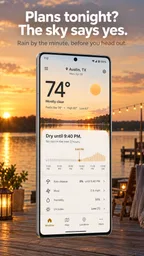
The strongest aspect of the concept is convenience. Weather is one of those things that can affect a lot of small choices, but it does not always deserve a long session in an app. Bringing the forecast closer to the home screen fits that reality. I can make weather part of the same quick scan I already do before starting an activity, rather than treating it as a separate task every time.
For people who prefer to check conditions repeatedly, the app’s combination of live forecasts and storm-related information is a coherent fit. It gives the routine a reason to continue beyond the first glance: check, notice a possible change, look more closely, and then adjust plans if needed. That sequence is more useful than checking weather without knowing what to do with the result.
Still, the value of a home-screen-centered weather app depends on personal habits. If I already have a weather routine that works well, another app needs to make the initial check feel convenient enough to earn space in it. If I often forget to check until the weather has already become relevant, putting forecasts within easier reach may be a more noticeable benefit.
Where the flow can feel less smooth
No weather workflow removes the need for judgment. A forecast is information to consider, not a guarantee that every moment will unfold exactly as expected. I would use radar and alerts to inform plans, while staying ready to adapt when the sky or circumstances change. That is true of weather apps generally, and it is worth remembering whenever a forecast influences travel or outdoor activities.
There can also be a difference between a quick glance and a deeper check. The home-screen approach is most compelling when I want an immediate overview; if I need to make a more involved decision, I may naturally spend longer reviewing weather information. That is not a flaw by itself, but it does mean the app’s convenience matters most when its first step is clear and useful for the question I have.
Weather checks can also lose their value if they become a habit without a purpose. Opening an app repeatedly is not helpful unless the information changes a decision or reassures me that my plan still makes sense. I find the most practical approach is to check when a choice is coming up, then revisit the forecast if conditions or plans shift. Weather Radar Home’s emphasis on alerts and live forecasts aligns with that kind of use.
A practical fit for everyday planning
Weather Radar Home has a straightforward identity: it is a weather app designed to bring radar, alerts, and forecasts closer to the home screen. That makes it easy to understand who may appreciate it—people who want weather information to be convenient, especially when storms or changing conditions could influence the day.
The app has over 500 thousand installs, and its current version is 4.0.46. It was released on August 17, 2024, and supports devices running version 8.1 or later. For anyone comparing weather apps, those details offer a quick sense of its availability and development context, while the more important question remains whether its home-screen approach suits the way they check the weather.
My overall impression is that Weather Radar Home makes the most sense as a practical companion for quick checks that can grow into a closer look when plans depend on the forecast. It puts convenience at the center and connects that first glance with radar and storm alerts. If I want a weather routine that starts quickly and helps me think through everyday decisions, it is an appealing option to consider.
In the end, the best result is a weather check that helps me act with a little more confidence. I can start with the forecast, pay closer attention when conditions look uncertain, and carry that information into the day. Weather Radar Home is most useful when its quick access turns weather awareness into a better-informed plan.
What we like
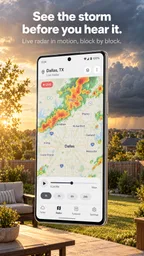
- Radar maps make approaching precipitation easy to follow.
- Home screen widgets provide quick access to local conditions.
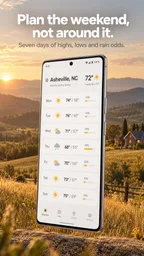
- Forecast details help with planning outdoor activities.
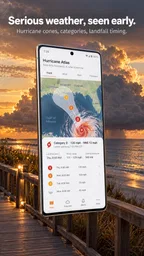
- Severe weather alerts can give users time to prepare.
- The interface is simple to navigate.
What could be better
- Some features may require a paid subscription.
- Radar updates can be delayed in some areas.
- Adverts may interrupt the browsing experience.
- Forecast accuracy varies by location and conditions.
- Location access is needed for relevant local updates.





