Weather Now Launcher - Radar review
 Analysis by Appsdrops
I judge a weather app by what it helps me decide before I leave home, not by how many maps it can put on a screen. Weather Now Launcher - Radar makes its most useful idea easy to understand: bring weather information into the home-screen experience, with radar and forecasts close at hand. That can save a few taps when I want a quick check, particularly if changing weather might affect a commute, walk, or errand.
It is a free weather app from Homescreen Apps, aimed at people who want more than a temperature glance but don’t want to open a full forecasting dashboard every time. Its central appeal is the combination of live radar, storm tracking, forecasts, and alerts, with the home screen as the convenient starting point. In everyday use, that emphasis matters more than a long list of weather terms: it encourages checking conditions as part of the normal phone routine.
Weather information where I already look
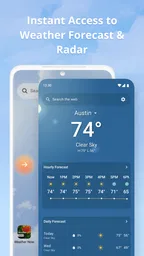
The home-screen focus is the feature that gives this app its identity. Many weather apps make you open the app, wait for a screen to load, and then find the detail you need. Weather Now puts the idea of an at-a-glance weather check closer to the place where I already begin other tasks. That is useful when I’m deciding whether to take a jacket or whether a short outdoor trip can wait.
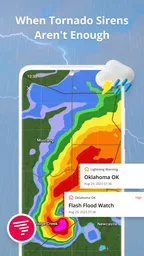
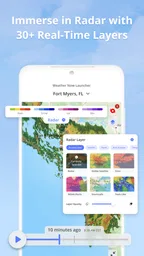
Radar is especially relevant when the forecast is changing rather than settled. A daily forecast can tell me what conditions are expected, but a radar view can help me judge whether rain appears to be approaching or whether a storm is already nearby. I’d treat that as a practical visual aid, not a guarantee about the exact weather on my street. Local conditions can shift quickly, and a map is most useful when I read it alongside the forecast and alerts.
The app has a 4.1 average from around 52,000 ratings, and it has been installed over five million times. Those figures suggest that it has found a sizeable audience, but they don’t tell me whether its particular home-screen approach will suit everyone. The right question is whether I want weather to be visible and quick to consult, rather than tucked away in an app I only remember when the sky changes.
Turning a glance into a decision
The practical value of a home-screen weather setup is not simply speed. It can change how often I check. If I’m already looking at my phone before getting dressed, I’m more likely to notice a developing weather concern than if I have to remember to open a separate forecast app. That makes the layout useful for routine decisions, especially on days when a brief shower or a storm would change my plans.
A good way to use the radar is to check it when the forecast and the sky seem to disagree. For example, if the morning looks clear but rain is expected later, I can look at the radar before setting out for a longer walk. If there is no immediate sign of a weather system nearby, that still doesn’t cancel the forecast; it simply helps me decide whether to leave now, bring a layer, or check again before returning.
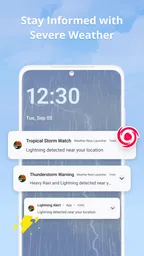
Alerts add another layer to that workflow. They are most helpful when I cannot keep checking the screen, such as while working or travelling. I would still use judgement about how much I rely on them: an alert is a prompt to pay attention, not a substitute for checking conditions before an important outdoor plan. This distinction matters particularly for activities where a sudden change could be more than an inconvenience.
A realistic day with changing plans
Imagine I have a morning appointment and plan to walk home afterward. I can check the forecast as I get ready, then use the radar later if the clouds build or the weather changes. If an alert arrives while I’m occupied, I can reconsider whether to walk or arrange another way home. The benefit is the sequence: a quick early check, a more focused look when conditions become uncertain, and an alert to draw my attention back to the weather.
That workflow is more useful than repeatedly opening a weather app just to confirm the temperature. It gives radar a specific job: helping me assess timing and changing conditions. I would not use it to make a high-stakes decision without checking a trusted local source, but for ordinary plans it can help turn a vague “maybe rain” into a more informed choice.
There is also a useful habit here for people who commute on foot or by bike. Instead of checking only before leaving, check once before the return trip if the day’s weather is unsettled. A forecast made in the morning is not necessarily enough for the evening, and a radar view can make a second check more purposeful. This is a practical benefit of keeping weather prominent, rather than a hidden technical trick.
Where this approach has limits
A home-screen view prioritizes quick access, so it may not be the best place for detailed investigation. If I want to compare several locations, study long-range patterns, or explore specialist meteorological information, I would prefer a dedicated forecasting service with tools designed for that deeper work. The app’s appeal is convenience around radar, storms, forecasts, and alerts, not a promise to replace every kind of weather resource.
There is a tradeoff in keeping weather close to the main screen: it can make weather more visible, but it also asks me to give that information space in my phone routine. People who prefer a minimal home screen or who rarely make plans based on weather may find the approach less compelling. A standard weather app that they open only when needed could be a better fit.
Radar also takes interpretation. A moving patch of rain on a map can look decisive, but it is still a snapshot of a changing situation. I would avoid treating the display as an exact countdown to when rain will reach a particular doorway. For everyday choices, it helps to combine what the radar suggests with the forecast and the conditions outside, especially when timing matters.
Another consideration is the difference between a useful alert and an interruption. Weather notifications can be valuable when they flag a change that affects plans, but any alert-based setup works best when I pay attention to the notifications I receive and adjust my phone’s notification choices to suit my routine. If I tend to dismiss alerts automatically, the feature loses much of its value. The app works best when I use alerts as a nudge to check, rather than expecting them to make the decision for me.
Who will get the most from it
I’d recommend giving it a try if weather influences ordinary choices throughout the day: deciding how to travel, when to run errands, or whether to continue an outdoor plan. It is particularly suited to someone who wants radar and storm information close by, but who doesn’t need a complex forecasting workspace. The app is free and rated for Everyone, which makes it easy to consider for general household use.
It may be less suitable for someone who wants only a simple temperature and a short forecast, since a home-screen weather emphasis and radar tools could be more than they need. It is also not my first choice for someone whose main interest is specialist weather analysis or comparing extensive forecast models. In those cases, a more technical weather service is likely to offer a better fit, while a basic built-in weather tool may be quicker for the simplest checks.
The app is currently at version 1.6.5 and supports devices running Android 9 or later. Homescreen Apps is the developer, and the product’s focus remains easy to explain: bring weather checking nearer to the home screen rather than making every check a separate task. That focus is a strength when I want to notice conditions early, though it does not remove the need to interpret a forecast carefully.
My take after weighing the tradeoffs
Weather Now Launcher - Radar is most convincing when I use it as a fast weather companion, not as an all-purpose meteorology tool. The combination of a prominent home-screen presence and radar gives me a sensible way to check changing conditions, while forecasts and alerts help connect that information to the day ahead. Its main advantage is making weather easier to revisit at the moments when plans might change.
I would choose it for everyday awareness and practical decisions, especially if I often forget to check the forecast until I’m already heading out. I would skip it if I want a bare-bones temperature display or a deep analytical toolkit. For me, the useful middle ground is the point: keep radar and changing weather within easy reach, but use them as guidance rather than certainty. That makes the app a worthwhile option for routine planning, with a clear limit on what I expect it to do.
What we like
- Radar imagery helps users follow approaching precipitation.
- Launcher access keeps weather details close to the home screen.
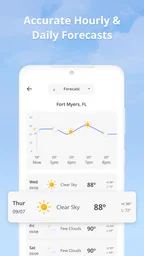
- Local forecasts can help with everyday planning.
- Weather alerts can provide timely notice of changing conditions.
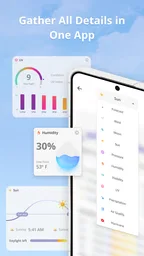
- A weather-focused layout makes key information easy to find.
What could be better
- Radar updates may depend on a stable internet connection.
- Forecast accuracy can vary by location and weather conditions.
- Weather data may use battery when refreshed frequently.
- Some features may require location access.
- A weather launcher may not suit users who prefer a standard home screen.





