


Weather Kitty - App & Widget review
 Analysis by Appsdrops
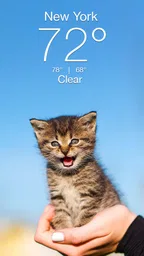
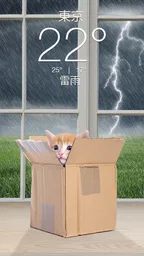
I like a weather app best when it answers a quick practical question without turning a routine check into a chore. Weather Kitty gives that everyday glance a playful twist: cats accompany the local forecast, making a familiar utility feel warmer and more personal. I would consider it for a household where people share a device or casually check the weather together, especially if a standard-looking forecast app feels a little dull. The charm is real, but it is still a weather app first; the cat-themed presentation is not a substitute for choosing a tool that suits everyone’s forecasting needs.
A cheerful forecast for everyday household checks
In a shared-use situation, the main appeal is simple: someone can open the app to decide whether to take a jacket, plan a walk, or rethink an outdoor errand, and the cat artwork makes that small task more inviting. It is a weather app from Weather Creative Inc., with a concept that puts cats alongside local conditions. That gives it a more distinctive personality than the plain layouts many people associate with weather utilities, without changing the basic reason to open one.
That kind of presentation can be useful when a phone or tablet gets passed around. A child may enjoy the cats, while an adult is checking whether the forecast suits the school run or a trip to the shops. I would treat that as a pleasant shared moment, not as a household-management feature: the app’s appeal is its friendly forecast experience, rather than any special system for coordinating family members.
A realistic routine might be checking the weather at breakfast, then taking another look before leaving later in the day. The themed visuals can make those repeated glances feel less sterile. Still, the decision should come from the forecast itself, not the decoration. If a household member needs detailed meteorological tools for work, travel, or safety planning, I would compare those needs with a more technical weather service rather than assuming that a charming interface covers every use case.
What the cat theme changes—and what it does not
The cats give the app a clear identity, which matters in a category where many alternatives can feel interchangeable. A conventional weather app may prioritize a restrained interface or a dense set of figures; Weather Kitty’s point of difference is that it makes checking local weather feel more playful. That can be enough to make someone more willing to open the forecast, particularly if they enjoy cats or want a less austere screen.
The trade-off is taste. A cat-centered design is a feature for people who like the idea and visual noise for people who do not. In a shared household, one person’s favorite touch can be another person’s reason to prefer a simpler app. I would try it on the device’s main user profile first and see whether the presentation remains pleasant after the novelty wears off, rather than treating the theme as an automatic win for everyone.
It is also worth separating visual appeal from forecast confidence. A cheerful interface can make information easier to approach, but it does not by itself tell me whether conditions will change quickly or whether a forecast is suitable for a high-stakes decision. For an ordinary choice such as whether to bring a layer, the app’s style may be all the encouragement a casual checker needs. For decisions where a missed change matters, I would use a source whose detail and alerts match that specific need.
Setting it up on a shared device
Weather apps can feel personal because local forecasts depend on the place being checked. On a shared phone or tablet, I would be deliberate about setup: decide whose device profile is being used, check that the displayed location makes sense for the people who will consult it, and avoid assuming that one person’s preferences will suit everyone. That is ordinary shared-device housekeeping, not a special family control built into the app.
Account boundaries matter for the same reason. If several people use one device, they should understand that the app is being used in that device’s context and should not assume it separates each person’s settings or activity for them. I would keep personal information and purchasing decisions under the account holder’s supervision, especially when a younger user likes the cat theme and may tap around out of curiosity. The app is free to download, but it also offers in-app purchases priced from $0.99 to $49.99 per item, so a shared device should have sensible purchase safeguards managed at the device or store-account level.
One useful habit is to agree on what the household means by “the local forecast.” Someone may be checking home, while another is planning a visit elsewhere; if the device is being passed between people, a quick location check prevents the wrong forecast from guiding the decision. I would not rely on a shared screen alone to communicate plans. A person leaving for an activity should check the relevant place and timing themselves rather than assuming another household member has already checked it.
The app’s current version is 6.2.12, and its minimum operating-system requirement is version 7.0. That makes compatibility a practical question before installing it on an older shared device: check the device’s software first, especially if it is a spare tablet used by children or guests. The app is free, but the optional purchase range means “free to start” is a more useful household expectation than assuming every available element necessarily comes at no cost.
Coordinating plans without over-relying on one screen
For everyday coordination, I find a weather app most useful as a prompt for a conversation: “It looks like we should take coats,” or “Let’s check again before we go.” Weather Kitty can fit that role when the household wants a quick, approachable way to look at local conditions. Its cat artwork may even help make the check memorable for someone who would otherwise ignore a forecast, but it should not be treated as a shared calendar, messaging tool, or family alert system.
A practical approach is to make the person responsible for an outing check the forecast for the destination, not just the home area. That small distinction matters for a school pickup, a park visit, or a trip across town. If the plan depends on changing conditions, check again closer to departure. This is not a claim about a particular forecasting feature; it is a sensible workflow for any weather app and avoids asking a single morning glance to cover the whole day.
Compared with a typical weather alternative, the choice comes down to what the household values. If people mainly want a pleasant, recognizable interface for casual checks, the cat theme gives this one a reason to stand out. If they prefer a minimal screen, technical depth, or a specialized way to monitor conditions, a more conventional or specialist option may be a better fit. I would choose based on the person who actually needs the forecast, not only on which design gets the biggest reaction from the rest of the family.
There is another small coordination benefit to a consistent routine: everyone can learn to check the same device before a shared outing, while still confirming that the location is right. But consistency should not become blind trust. A weather screen is a snapshot to help with planning, not a promise that the day will behave exactly as shown. Keeping that expectation clear is more useful than trying to make one app responsible for every household decision.
Age, purchases, and trust
The app has a Teen content rating. That gives parents useful context, but I would still judge suitability by the actual device setup and the child’s maturity rather than treating an age label as a complete household policy. A weather utility may be used casually by younger family members, yet the presence of in-app purchases makes supervision and store-account settings worth considering before handing over a shared device.
I also would not confuse a friendly theme with child-specific controls. The app’s appeal to cat fans does not mean it provides separate child accounts, purchase approval, or family coordination tools. Those boundaries are better handled through the device and account settings that the household already uses. For a child who only wants to see the local forecast, an adult can introduce the app and explain which information to check; for independent use, the adult should first decide what access and purchase limits are appropriate.
Its audience response is strong: it has a 4.9 average from around 76,000 ratings, with over 1 million installs. That is reassuring as a sign that many people have found the concept appealing, but popularity cannot answer whether the cats suit your household or whether the forecast experience has the detail you need. I would use the rating as context, then make the decision based on the intended user and the kinds of weather checks they actually make.
The app was released on October 10, 2014, and has around 14,000 written reviews. Those figures suggest a product with a long presence in the weather-app space, though they do not tell me how any particular household will respond to its design. I would focus on whether the app remains easy to use on the device in question, whether the local forecast serves the household’s routine, and whether everyone is comfortable with the purchase boundaries.
Who should choose it, and who should look elsewhere
I would recommend giving Weather Kitty a try if you like cats, want a more cheerful way to check local weather, or share a device with someone who responds well to visual personality. It is particularly suited to low-pressure decisions: deciding what to wear, whether to bring an umbrella, or whether an outdoor plan deserves another look. The app is free to begin using, and the cat-centered concept makes its purpose easy to understand without needing a long learning period.
I would skip it if you strongly prefer clean, neutral interfaces or if the household needs a specialized forecasting workflow. Someone planning activities where precise, detailed weather information is central may prefer a dedicated alternative. Likewise, a family looking for per-person profiles or built-in coordination should not choose this app on the assumption that its shared appeal means it has those functions. Its strength is personality around a familiar task, not a replacement for every household tool.
For a shared phone, I would install it under the account that should manage any purchases, verify the device’s software compatibility, and let the regular users try the interface before making it the household default. Then agree on a simple habit: check the correct location, revisit the forecast before plans that depend on conditions, and do not assume another person has done the check for you. These steps make the app more useful without pretending it can coordinate the family on its own.
My overall view is that Weather Kitty is a likeable choice for casual weather checks when its cat theme is part of the appeal, not a distraction. Weather Creative Inc. has made a familiar utility feel more personal, and that can be a genuine advantage for a household that enjoys sharing small routines. Its limits are just as important: the playful identity will not suit every user, optional purchases deserve normal shared-device care, and people with more demanding forecasting needs may be better served elsewhere. If those boundaries fit your situation, it is an easy app to consider; if the household wants a neutral or highly specialized forecast tool, I would keep looking.
What we like
- Playful cat illustrations make forecasts more enjoyable to check.
- Customizable themes let you give the app a personal look.
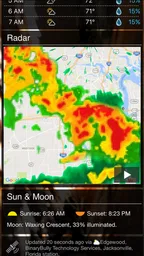
- The widget puts weather details on your home screen.
- Hourly forecasts help with planning near-term activities.
- Location support makes checking weather for other places convenient.
What could be better
- Some themes and features may require in-app purchases.
- The cat-focused design may not appeal to every user.
- Weather accuracy can vary by location and forecast provider.
- Widgets may use battery and data while updating.
- Ad-supported screens can make the experience feel less polished.





