
Weather Forecast: Live & Daily review
 Analysis by Appsdrops
Weather Forecast: Live & Daily is a weather app from Affirming Voices, and its appeal is easy to understand: it aims to put useful forecast information within reach without making the first visit feel like a project. I’d consider it for everyday planning—deciding what to wear, whether to take an umbrella, or when to leave—rather than treating it as a specialist tool for severe-weather tracking. The name is plain, but the practical question is whether the app helps you make a better call before heading out. My view is that it is worth trying if you want a straightforward weather companion and are happy to judge its usefulness in your own location.
What to expect from a daily weather app
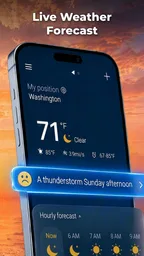
The experience is centered on forecasts for ordinary decisions, not an elaborate dashboard that demands attention all day. That distinction matters: a weather app can be useful even when you only open it briefly, but it needs to make the information you came for easy to interpret. With Weather Forecast: Live & Daily, I’d start by checking the current conditions and the forecast that is relevant to the next part of my day, then close it once I have a plan.
That quick-check approach is especially helpful when your routine changes. If I’m leaving home for work, I care about what conditions may be like during the walk to transit and whether the day calls for an extra layer. If I’m planning an outdoor errand later, I’d look again closer to the time rather than assume an early forecast will settle every detail. The app’s weather focus makes those small decisions its natural territory.
It is a free app, rated for Everyone, and it has a 4.6 average from around 840 ratings. More than 100,000 installs suggest that it has reached a substantial group of users, though popularity alone cannot tell me whether a forecast fits my neighborhood or habits. I would use those figures as context, not as a substitute for checking how clear and useful the app feels on my own phone.
The best reason to try it is practical convenience, not a promise that every forecast will be exact. Weather can shift, and forecasts are estimates. I treat any app as a planning aid: useful for spotting a likely wet commute or preparing for a change, but not a guarantee that conditions will unfold precisely as shown.
Getting from install to a useful first check
On first opening, keep the goal modest: get to a forecast for the place you care about and see whether the presentation answers your immediate question. If the app asks you to identify a location, choose the option that makes sense for your plans. For a commute, your current area may be the right starting point; for a trip or a family member’s town, a manually selected place may be more useful if that choice is available.
I would avoid adding several locations before I know how I use the app. Start with home or the place you visit most often, then check whether the daily view gives enough context to make a decision. This is a small but worthwhile setup habit: too many saved places can turn a quick glance into a search, while one familiar location makes it easier to notice whether the forecast is relevant.
Allowing location access, when requested, can make a weather app more convenient, but you should choose deliberately. If you prefer not to share your current location, look for a way to use a chosen place instead. A forecast tied to a manually selected town can still be useful for planning, though you will need to remember that it may not reflect the exact conditions where you are standing.
My first meaningful success would be simple: check the weather before leaving, decide whether to carry a rain layer, and then see whether that choice made sense later. That is a better test than tapping through every screen. It tells you whether the information is easy to find and whether the app fits your routine, without requiring a long setup or a complicated experiment.
Making the forecast work for real plans
A useful habit is to check at the moment when the answer can still change your plan. For a morning commute, look before getting dressed or packing a bag. For an afternoon walk, check again before leaving rather than relying on what you saw several hours earlier. This timing is a practical advantage of keeping a weather app on your phone: the forecast can inform a decision while there is still time to act on it.
Consider a realistic weekday: I have a short walk to a bus stop, errands after work, and a jacket that is comfortable in cool weather but awkward to carry indoors. A morning check helps me choose what to wear; a later glance can help me decide whether to do the errands straight after work or wait. I would not treat a forecast as a minute-by-minute guarantee, but even a broad sense of changing conditions can make the day less improvisational.
There is also a useful distinction between checking for yourself and planning for someone else. If you are arranging a visit, outdoor meal, or school pickup, focus on the location where the activity will happen rather than assuming your current conditions apply. A nearby area can have different weather, especially when your plans involve travel. That simple location check is easy to overlook and often matters more than refreshing the same forecast repeatedly.
Weather Forecast: Live & Daily is currently at version 1.0.12, and it supports Android 7.0 or later. The developer is Affirming Voices. Those details make it easier to decide whether it fits your device and whether you are comfortable trying an app from this publisher. Its release date is Jul 30, 2026, so I would not assume a long development history from the app’s name or its audience size alone.
What can feel confusing, and how I’d handle it
The most common confusion with any forecast is expecting a single answer to cover every part of a day. A daily outlook is useful for broad planning, but the conditions at your departure time may differ from those later on. I’d read the forecast as a guide to timing and preparation, then check again if the decision has real consequences—such as a long trip, outdoor work, or an event that would be difficult to move.
Another easy mistake is treating a forecast for a city as exact for every street in that city. If the app is showing a broad area, use it for general expectations and leave room for local variation. That is not a flaw unique to this app; it is a limitation of interpreting weather information at a finer scale than the location shown can support.
If the first screen seems less useful than expected, pause before concluding that the app is wrong for you. Confirm that the selected place matches your plans and that you are looking at the time period you care about. A forecast can be perfectly reasonable yet unhelpful when it is attached to the wrong location or when you need a different horizon. This quick check can prevent a lot of needless refreshing.
I would also resist comparing every small difference between two weather apps as if one must be correct. Forecast services may present information differently, and conditions can change. For a normal day, choose the view that you can understand quickly and use it consistently. When the stakes are higher, compare with another dependable source and follow local safety guidance rather than relying on one phone screen.
How it compares with familiar alternatives
Many people already have a weather panel built into their phone or use a well-known weather service. Those options can be perfectly adequate if they provide a clear forecast for the places you need. The case for trying this app is not that every alternative is inadequate; it is that another focused weather app may suit you better if its presentation fits the way you make everyday plans.
Compared with a more information-dense weather service, I would expect a daily-use app to be most valuable when it keeps the decision simple. If you mainly want to know whether to bring a coat, it is better to find a clear answer quickly than to sift through details you will not use. On the other hand, people who routinely need specialized radar views, detailed storm monitoring, or tools for professional forecasting should choose a service built around those needs rather than assume a general weather app will replace it.
The same trade-off applies to notifications. Some users want their phone to call attention to changes; others prefer to open an app only when they are ready to check. Choose your approach based on your routine and the controls the app actually presents. I would not install a weather app expecting it to remove the need for judgment, especially when plans depend on precise timing or hazardous conditions.
For a first-time user, the most reassuring way to evaluate it is to keep the test small and repeatable: check one location, use the forecast for one ordinary decision, and notice whether the information was easy to understand. If that works, make it part of a morning or before-you-leave routine. If you find yourself hunting for the detail you need, or if your plans require specialized tools, a different weather service may be a better fit.
Who I’d recommend it to
I’d suggest trying Weather Forecast: Live & Daily if you want a dedicated weather forecast app for common day-to-day choices and prefer a focused check over browsing a large service. It is a sensible fit for someone who checks conditions before commuting, walking, running errands, or arranging a casual outdoor plan. The app is free, so trying it does not require a purchase, and its Everyone rating makes it broadly suitable from an age-rating perspective.
I would skip it if you already have a weather app that answers your questions clearly, or if you need specialist forecasting capabilities that go beyond everyday planning. I would also avoid relying on any single forecast for high-stakes decisions without checking more authoritative local information. An app can help you prepare; it cannot remove uncertainty from the weather.
My recommendation is to install it, choose the location that matters most, and make one practical decision with the forecast before expanding your routine. That gives you a fair first impression without assuming the app will suit everyone. If it helps you leave with the right layer or adjust an outdoor plan in time, it has earned a place on your phone. If not, your built-in forecast or another service may be the simpler choice.
In short, Weather Forecast: Live & Daily is best approached as a convenient everyday planner rather than an all-purpose meteorology workstation. I like that the use case is easy to understand: check the place and time that matter, make a reasonable plan, and revisit the forecast when the day changes. Keep expectations realistic, verify important conditions when necessary, and let clarity—not a crowded feature set—decide whether it deserves to stay installed.
What we like
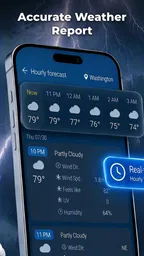
- Hourly forecasts make it easier to plan around changing conditions.
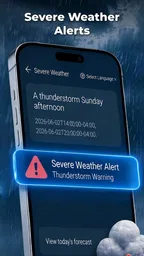
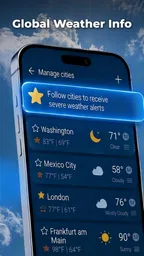
- Severe weather alerts can help users prepare for hazardous conditions.
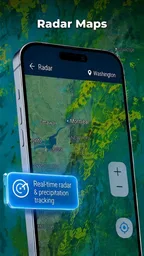
- A weather radar map offers a visual view of approaching precipitation.
- Multiple locations are useful when checking conditions for trips.
- Daily forecasts provide a quick overview of upcoming weather.
What could be better
- Forecast accuracy may vary by location and weather conditions.
- Some features may require an internet connection to show current data.
- Frequent alerts can become distracting if notification settings are not adjusted.
- Detailed weather screens may feel crowded on smaller displays.
- Location access may be needed for convenient local forecasts.





