Weather Forecast - Live Alerts review
 Analysis by Appsdrops
I like a weather app best when it helps me make a decision quickly, not when it turns checking the sky into a project. Weather Forecast - Live Alerts is a free weather app from RODRIGUEZCASTILLO FABIOLA, with a straightforward focus on forecasts. Its appeal is easy to understand: open it when plans depend on the weather, get oriented, and decide whether to take a coat or change the timing.
That simple role also sets expectations. I would treat it as a convenient daily reference rather than assume it can replace a specialist source for severe-weather planning or highly detailed forecasting. The name may suggest alerts, but what matters in everyday use is whether the information you see is current and useful for your location. A little care during setup and when conditions look unusual can make the experience more reliable.
Getting past the first-location snags
The first hurdle with any forecast app is making sure it is showing the place you actually care about. A forecast for a nearby town can be misleading when local conditions vary, especially around the coast, hills, or a large urban area. I recommend checking the displayed location before relying on the forecast for a commute or outdoor plan. If the app offers a way to select a place manually, that can be a sensible fallback when automatic location is unavailable or points to the wrong area.
When the app appears to have trouble finding your location, start with ordinary checks rather than assuming the forecast itself is broken. Confirm that location services are on, that the device has a usable connection, and that the app is allowed to access location if you have chosen to use that option. Menu names differ between Android and iOS, so I would look in the phone’s own settings rather than follow instructions written for another device.
If you would rather not share your location, check whether you can choose a city or other place yourself. That approach can be more comfortable for privacy and is often enough for a broad daily outlook. The trade-off is that a manually chosen place may not follow you when you travel. Before leaving home, make a quick check that the forecast still refers to the destination rather than your usual area.
Accurate location matters more than a polished-looking forecast: a clear screen cannot compensate for information tied to the wrong place. I would make the location check part of my first few visits, then repeat it after travel, a device-setting change, or any moment when the forecast seems out of step with the conditions outside.
Small setup checks that prevent confusion
Weather information can look stale when a phone has been offline, background activity is restricted, or the app has not refreshed since it was last opened. If the screen does not seem current, reconnect to the internet and reopen the app. Give it a moment to update before deciding that the forecast has failed. This is a general troubleshooting step, not a guarantee that every refresh issue will resolve immediately.
It is also worth checking the device’s date, time, and time zone when forecast periods appear confusing. A phone set to the wrong time zone can make an otherwise sensible forecast harder to interpret. If you have recently changed location or travelled, compare the place shown in the app with the place and local time you intend to use.
There is no need to grant every permission a phone requests simply to look at a forecast. Decide which access is useful for your own routine, and use manual location selection if that suits you better. If you want alerts, review the phone’s notification settings as well as any relevant controls in the app. Notifications can be silenced at the system level, so an absence of a prompt does not by itself show that the forecast information is unavailable.
Making the forecast useful in a real routine
My most practical use would be a two-check routine: look once before settling on the day’s plan, then check again before heading out if the weather could change that plan. For example, if I am deciding whether to walk to an appointment or take public transport, I would check the forecast for the correct destination and revisit it before leaving. That second look is especially sensible after a long gap or a period without connectivity.
For a day with several stops, think in terms of the places that matter rather than treating one forecast as a promise for an entire region. A city-centre forecast may be a useful guide for errands there, but it may not describe a more distant outdoor venue. If the app allows you to change locations, switch deliberately and verify the selected place. If it does not fit the multi-stop task comfortably, checking a second trusted source for the destination is a reasonable workaround.
People often wonder whether an app like this needs to stay open to be useful. For a quick check, opening it when needed is the least complicated approach. If you rely on notifications, make sure the phone is not blocking them and that the app’s own settings support the behaviour you expect. I would not depend on an alert alone for a time-sensitive decision; checking the forecast directly gives you a chance to see whether the relevant location and timing still match your plans.
Another useful habit is to separate a broad outlook from a decision that carries real consequences. A forecast can help decide what to wear or whether to move a casual picnic, while a long drive, a hike, or work outdoors may warrant checking an authoritative local weather service as well. That is not a criticism unique to this app. It is a sensible limit for any single general-purpose weather source.
When a forecast or alert seems wrong
If the forecast looks frozen, first check the connection, reopen the app, and confirm the selected location. Then compare the displayed conditions with what is happening nearby and give the app another chance to refresh. If the phone has battery-saving settings enabled, those can affect how apps behave in the background; opening the app directly is a useful test before changing system settings.
If an expected notification does not arrive, check whether notifications are permitted for the app and whether the phone is in a mode that suppresses them. Also check that the app is still set up for the location you care about. These steps help distinguish a notification-setting issue from a forecast issue, but they do not establish why a particular alert was absent.
Sometimes the app is not the cause at all. Local weather can differ over a short distance, and conditions can change after a forecast is prepared. A forecast for the wrong town, a device that has not refreshed, or a sudden change outside can all make a display seem inaccurate. For a high-stakes situation, use current local guidance rather than relying on one app’s screen or a notification that may not reach you.
When the problem persists, a cautious recovery path is to close and reopen the app, check for an update in the app store, and restart the phone if other apps are also behaving oddly. The current release is version 1.1.0, and the app’s minimum operating-system requirement is 7.0. Keeping the operating system and app reasonably current can help avoid compatibility friction, though an update is not a promise that a particular issue will disappear.
What it offers, and where alternatives fit better
The app has an average rating of 4.5 from around five thousand ratings, and it has passed one million installs. Those figures suggest that many people have tried it, but they do not tell me whether its presentation or forecast detail will suit a particular user. I would use them as context, not as a substitute for checking whether the app works well on my phone and provides the information I need.
Compared with the weather screen built into a phone, a dedicated app can be a better fit if you prefer opening a separate place for forecast checks. Compared with specialist weather tools, a simple forecast app may be easier to approach but is not necessarily the stronger choice for radar interpretation, storm tracking, or planning around rapidly changing hazards. I would choose based on the task: everyday clothing and errands call for convenience; a safety-sensitive activity calls for dependable local guidance and a backup source.
It is suitable for a broad audience: the content rating is Everyone, and the app is free. The developer is RODRIGUEZCASTILLO FABIOLA. Its 114 written reviews offer another place to look for other users’ experiences, but I would still judge it by my own location accuracy, how quickly it becomes useful, and whether its notifications behave as I expect.
Who should keep it in their routine
I can see this being useful for someone who checks the weather before a school run, a walk, or a quick trip across town and wants a dedicated app rather than relying on memory or a glance outdoors. It is also a reasonable option for someone who prefers a free, uncomplicated starting point and is happy to verify important details when plans are sensitive to changing conditions.
I would skip it, or pair it with another source, if I needed specialist tools, detailed planning for outdoor work, or a forecast I could safely treat as definitive. The same goes for anyone whose primary need is a particular presentation or advanced weather layer: a general forecast app may not match that workflow. In those cases, try the app for ordinary checks but keep a more suitable service for the decisions that matter most.
Overall, I would give Weather Forecast - Live Alerts a fair try as a practical daily weather companion, provided I confirm the location and do not mistake convenience for certainty. The best way to judge it is simple: use it for a few routine decisions, notice whether its information arrives when you need it, and keep a second source available for unusual or high-risk weather. That is a balanced role for a free weather app—and a sensible way to decide whether it belongs on your phone.
What we like
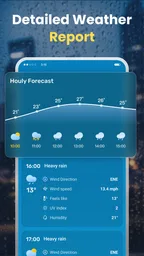
- Hourly forecasts make it easier to plan the day.
- Severe weather alerts can provide timely warnings.
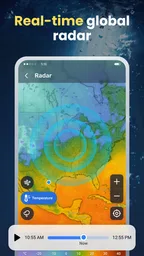
- A radar map helps track approaching storms.
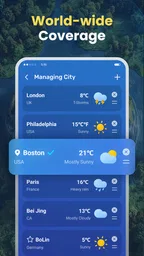
- Multiple locations are useful for travel planning.
- The forecast layout is easy to scan at a glance.
What could be better
- Forecast accuracy can vary by location.
- Frequent alerts may become distracting.
- Some features may require an internet connection.
- Detailed weather data can feel overwhelming to new users.
- Background location access may affect battery life.





