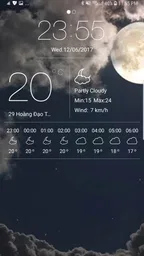
Weather app review
 Analysis by Appsdrops
I judge a weather app less by how many numbers it can show than by whether it helps me make a sensible decision before I leave home. This free weather app from Accurate Weather Forecast & Weather Radar Map is built around forecasts, radar and map views, so it aims to do more than display a single temperature. Its appeal is practical: check the conditions, see whether rain is nearby, and decide whether to bring a jacket or change plans. The experience is most useful when the phone has a dependable connection, because current conditions and changing forecasts are only helpful when the app can refresh them.
When the connection shapes the forecast
The first habit I would build with this app is to check it shortly before a decision, rather than treating an earlier glance as a guarantee. A forecast is a plan based on changing conditions, and a radar view is particularly time-sensitive. If I check before breakfast and then head out much later, I would reopen the app before setting off, especially when the weather looks unsettled. That small routine matters more than repeatedly refreshing the screen without a reason.
The radar and map focus gives the app a useful role alongside a standard forecast. A daily summary can tell me what kind of day to expect, while a map gives me a more visual way to assess what may be happening around my location. I find that distinction helpful when the question is not simply “Will it rain today?” but “Should I wait a little before walking to the shop?” A map can make a changing situation easier to interpret, though it still calls for judgement rather than blind trust.
Connectivity is part of that judgement. In a strong signal area, checking the app is straightforward; in a basement, a crowded station or a rural stretch with patchy reception, updates may be slower or unavailable. I would not use a momentary display as proof that conditions have not changed if the app has not had a chance to refresh. For decisions that depend on what is happening right now, the timing of the last successful update matters as much as the forecast itself.
That does not make the app unsuitable for travel. It simply changes how I would use it: check while connected, note the broad outlook before losing signal, and consult it again when service returns. For a commute, that can mean looking before leaving the house rather than waiting until I am already outside. For a longer journey, the app is a useful planning aid, but I would avoid assuming one check will cover every location along the route.
Useful checks on the move
On a phone, quick decisions are often the point. I can imagine opening the app at the door to decide whether a light layer is enough, then checking the radar before taking a longer walk. The combination of forecast and map makes those two checks complementary: one helps with the general plan, and the other gives a visual prompt to reconsider it. I would avoid getting drawn into monitoring every movement on the map when a simple decision is all I need.
A practical routine is to look at the forecast before committing to an outdoor plan, then use the map as a second opinion when conditions seem uncertain. If I am meeting a friend outdoors, I would check again shortly before leaving rather than sending a confident prediction based on an old glance. This is not a special trick; it is a sensible way to use any connected weather service, and the radar emphasis makes it especially natural here.
For a person who walks, cycles or runs, the value is less about having a screen open throughout the activity and more about preparing before it begins. I would check while I still have a stable connection, make a decision, and put the phone away. Anyone who needs uninterrupted updates during a trip through places with poor coverage should be cautious: this app should not be treated as a substitute for a weather plan that remains usable without a connection.
The same approach works for everyday errands. If I need to carry groceries home or collect a child, a glance at the forecast can help me choose when to leave. If the map suggests a change may be relevant, I can decide whether to wait or bring protection. The app cannot make the choice for me, but it can bring the information into one place without requiring me to rely only on a vague impression of the sky.
What to do when updates are slow
When a weather screen seems stale, my first response would be to distinguish an app problem from a connection problem. I would check whether other online services are loading, then return to the weather view once the signal is steadier. Repeatedly tapping refresh in a weak-signal area is unlikely to make a useful forecast appear faster, and it can turn a simple check into needless frustration.
If the app is open but the map does not seem to match what I see outside, I would give more weight to direct observation and try again later. A forecast or radar display is an aid, not a promise that a particular street will receive rain at a particular moment. Local weather can change quickly, and a map may not answer a very precise, street-by-street question. For a high-stakes decision, I would compare the outlook with another trusted source rather than treating one screen as definitive.
It is also worth separating a temporary failure from a lasting issue. A poor signal may explain why current information is slow, while a persistent problem after reconnecting may justify closing and reopening the app or checking for an available update through the app store. The current version is 7.9, and the app supports Android 5.0 and later. Those details are useful when deciding whether an older phone can run it, but they do not guarantee that every device or network will behave identically.
My main caution is that a weather app is most reassuring when its information is current, and the interface alone cannot make a weak connection reliable. If I were heading into an area with unreliable service, I would make the important decision before leaving coverage and carry a practical backup plan. People who need guaranteed access to detailed forecasts in disconnected settings should choose a tool specifically suited to that requirement rather than assume this one will keep updating.
Keeping checks useful and measured
Weather checks can become repetitive: opening a map every few minutes does not necessarily improve a plan. I would use the app at decision points—before leaving, before an outdoor commitment, or when the sky changes—rather than treating it as a live companion that must be watched constantly. This is a useful way to keep the experience focused and avoid spending attention and mobile data on updates that do not change what I will do.
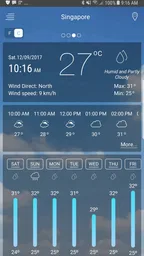
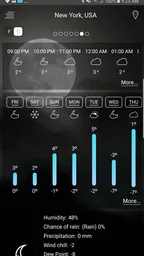
Because the app presents both forecast information and map-based weather, a user can choose how much detail a particular check needs. For a routine morning, I would start with the broad forecast and stop if it answers the question. I would open the map when the timing or movement of weather could alter my plans. That order is more efficient than beginning with the most detailed view every time, particularly when I am using a limited connection.
I would also be mindful of where I check. If I know I will soon be underground or travelling through an area with inconsistent coverage, I would consult the app beforehand. I would not rely on it as an offline reference, because the experience is centered on information that can change. This is a modest but important distinction: planning with a current forecast before losing signal is sensible, while expecting a disconnected phone to provide fresh conditions is not.
For people watching mobile data, the practical answer is to keep checks purposeful and avoid unnecessary repeated loading. I cannot promise how much data a particular session uses, since that can depend on the device, connection and what is being displayed. But a few deliberate checks are a more reasonable habit than leaving a map open simply to watch it. If data use is a strict concern, reviewing the phone’s own usage controls is a better guide than guessing from the app’s appearance.
Who will appreciate it, and who may prefer another option
This app is a good fit for someone who wants a free weather tool with both forecast and radar-map perspectives, and who usually has internet access when planning the day. It has a broad audience: the age rating is Everyone, and its reach is reflected in more than ten million installs. The average rating is 4.6 from around 237,000 ratings, with roughly 24,000 written reviews. Those figures suggest that many people have tried it, but I would still choose based on whether its map-led approach matches my own habits.
Compared with a basic weather screen that presents only a current temperature and a short outlook, the map component gives this app a more visual way to think about changing conditions. Compared with a specialist service chosen for highly detailed forecasting or a particular professional workflow, its general-purpose approach may feel less tailored. I would not select it on the assumption that a radar image can answer every local question; I would select it because forecast and map information together can help with ordinary decisions.
If I already rely on a built-in weather app and only want a quick temperature at a glance, installing another app may add little. Likewise, someone who needs reliable weather information while completely disconnected should look for an option that clearly supports that use. On the other hand, people who like to check a visual map before outdoor plans may find the extra perspective worth having, especially when they remember to refresh at sensible moments.
The developer name, Accurate Weather Forecast & Weather Radar Map, makes the app’s emphasis clear without requiring a complicated learning curve. The short store description calls it a weather app, but the useful distinction in daily use is the pairing of forecasts with radar and a map. It is free, which makes it easy to try, though “free” is a reason to test it rather than a reason to ignore whether it suits your connection, phone and preferred level of detail.
My connectivity verdict
After considering how I would use it, I see this as a practical, connection-dependent companion for ordinary planning: checking the day, deciding when to leave, and using a map when rain might affect an outdoor plan. My strongest recommendation is to make each check purposeful. Look at the forecast before the decision, use the map when it adds context, and check again if enough time has passed or the weather has visibly changed.
I would recommend it to a friend who wants more than a bare temperature readout but does not need a specialist forecasting tool. I would be less enthusiastic for someone who expects fresh information in places with no signal, needs highly precise local certainty, or prefers the simplest possible screen. In those situations, another kind of weather service—or a more deliberate backup plan—may be a better fit.
My bottom line: Weather app is most useful when a reliable connection lets its forecast and radar views inform a real choice, not when it is treated as an infallible live feed. I would keep it as a convenient check before a commute, walk or outdoor appointment, while remembering that forecasts are guidance and that patchy reception can limit how current any connected weather display feels.
What we like
- Clear forecasts make upcoming weather easy to check.
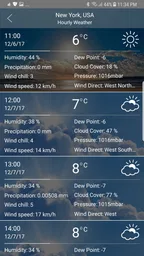
- Hourly updates help with planning throughout the day.
- A simple layout keeps key conditions easy to find.
- Local forecasts provide useful details for nearby areas.
- Weather alerts can help users prepare for severe conditions.
What could be better
- Forecast accuracy can vary by location and conditions.
- Some features may require an internet connection.
- Frequent alerts may feel distracting to some users.
- Detailed forecasts can be harder to read on small screens.
- Location access may be needed for automatic local forecasts.





