
Verily Me review
 Analysis by Appsdrops
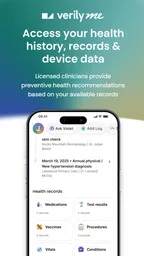
I’m cautious about health apps that promise to put everything in one place. A neat dashboard is only useful if it fits into a routine I can actually keep, and health information deserves more care than a casual step counter. Verily Me is a free medical app from Verily Health Inc., framed around helping people engage with their health. My practical take is to treat it as a possible home base for the health tools and information it makes available to you, rather than assume it replaces a clinician, a medical record system, or every specialist app you already use.
Building a useful baseline routine
The best way to judge an app with a broad health focus is to start with one clear task. Before relying on it, I’d open it when I have a few quiet minutes, look through the available sections, and decide what I actually want to return to: checking health information, completing a task, or using a tool offered within the app. That small orientation step matters. An all-purpose health app can feel scattered if you browse without a reason, while a specific goal makes its value easier to assess.
I would not try to move every health habit into Verily Me on the first day. Instead, I’d choose one recurring moment, such as reviewing something after a routine appointment or checking in at the end of a week. Repeating the same action in the same context makes it easier to tell whether the app is genuinely helping or simply adding another screen to your day. If the relevant information is easy to find and the workflow feels clear, keep that habit. If you find yourself repeatedly hunting for the same item, that is useful evidence too.
A realistic scenario is preparing for a conversation with a healthcare professional. I might open the app beforehand, review whatever relevant information or tools are available to me, and make a short note elsewhere of questions I want to ask. That is a more sensible role for a general health app than expecting it to diagnose a new symptom or make an urgent decision. Use it to support an organized conversation, not to replace medical advice.
Its appeal depends on what you need. If your current setup involves several disconnected health-related apps, a single place to begin may reduce the mental effort of remembering where to look. But “one app” does not automatically mean that every service, record, or personal routine will be unified in the way you expect. I’d explore the actual options available in my own account before changing an established system around it.
Check the practical details before settling in
Health tools are personal, so I would take a moment to review the app’s settings and the information presented during setup. Check what choices are offered, what you are comfortable sharing, and whether any available controls match your preferences. I would avoid granting access or entering details simply because a prompt appears; first ask whether that choice is needed for the feature you plan to use. This is especially worthwhile for an app dealing with health, where convenience should not outrun comfort.
I’d also check the basics that affect everyday use: whether the interface is readable on my device, whether I can find important sections without trial and error, and whether the app behaves as expected when I return to it later. On Android, it requires version 8.0 or later, and the current release is 3.11.9. Those details help establish compatibility, but they do not tell me whether the app will suit a particular phone’s layout or my personal workflow; trying the core task directly is the better test.
Because health information can be sensitive, I would make a deliberate choice about notifications rather than leaving every prompt enabled by default. If a reminder helps me remember a meaningful task, it may be worth keeping. If it creates noise or makes me feel pressured to check the app without a clear reason, I’d reduce or disable that prompt where the available settings allow. The goal is a routine that supports me, not one that turns health management into a stream of interruptions.
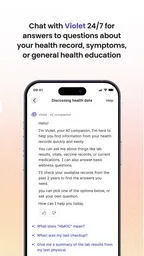
It is also sensible to distinguish between information that is useful to review and information that needs a professional interpretation. An app can help me organize attention, but a number or health-related entry may not explain its cause or significance on its own. I’d avoid making a major care decision based only on something I see in a mobile interface, and I would contact an appropriate professional when a concern needs clinical judgement.
Shortcuts that come from repeatable habits
I find that the best “shortcut” in a health app is often a reliable sequence, not a hidden button. For example, I can make a simple loop: open the app for a specific reason, go straight to the relevant area, review or complete what I came for, then close it. Repeating that sequence helps me notice whether navigation is genuinely efficient. If the same task takes too many detours, I would not blame myself for failing to master it; the workflow may simply not be a good fit.
Another useful pattern is to pair a check-in with an event that already happens, rather than relying on memory alone. I might review the app after a scheduled appointment or at a regular planning moment. That avoids opening it repeatedly just to see whether something has changed. It also makes the app easier to evaluate: after a few cycles, I can decide whether it is helping me keep track of a real need or whether my existing notes and routines are sufficient.
For anyone balancing several sources of health information, I would decide which one is the source of truth for each kind of detail. If one tool holds a particular record or serves a clinician’s workflow, I would not duplicate it in Verily Me unless there is a clear reason and I can keep the two in sync. Duplicate tracking can create uncertainty when entries differ or one place is out of date. A single dependable workflow is often better than copying everything into multiple apps.
The same principle applies to family or shared care. Before using an app as part of someone else’s routine, I would make sure the person understands what is being entered and is comfortable with the arrangement. Convenience for the person helping is not the only consideration. A health app should fit the individual whose information and care are involved, and a professional’s preferred process may matter more than any general-purpose digital option.
Where a broad health app may fall short
Verily Me is listed in the medical category, and that broad framing is both its potential strength and its main trade-off. People who want a starting point for health-related activity may appreciate having one app to explore. Someone who needs a narrowly defined tool, such as a particular clinical service or a specialized tracking workflow, may be better served by the dedicated app their provider recommends. A broad umbrella can make discovery easier, but it does not guarantee specialist depth.
I would also be wary of assuming that a health app can replace the systems already used by a clinic, insurer, or care team. If your priority is access to a specific medical record, appointment service, or clinician communication channel, check that the app actually supports the task before depending on it. When that exact function is essential, the organization’s own tool is usually the more direct choice. Verily Me is most reasonable as an additional resource when its available functions match a need you already have.
Ratings can offer a little context, but they are not a substitute for testing the workflow that matters to you. It has a 4.4 average from 903 ratings, with 115 written reviews, and more than 100K installs. I read figures like these as signs that other users have tried it, not proof that it will suit my health needs or device. Medical apps are particularly dependent on personal context: a smooth experience for one user may still be the wrong fit for another.
The app is marked Mature 17+, so it is not something I would casually recommend as a general-purpose option for younger users. For a parent or caregiver considering a health app for someone else, age suitability is only one part of the decision; the person’s needs, comfort, and any guidance from their healthcare professional still matter. If the app is being considered for a specific clinical purpose, I would confirm that purpose with the relevant care team rather than infer it from its broad medical focus.
There is also a practical limit to any digital routine: it only helps while the information and habits remain useful. If checking the app becomes a source of worry, or if I start treating every entry as a diagnosis, I would step back and seek appropriate human guidance. If I cannot identify a clear job for the app after exploring it, I would not keep it merely because consolidating health information sounds appealing. Removing friction is valuable; adding another obligation is not.
Who I’d recommend it to—and who should look elsewhere
I’d suggest trying Verily Me if you want to explore a general health-focused app and have a specific, modest task in mind. It may suit someone who likes having a consistent place to begin and is willing to spend a little time checking how its available tools fit their routine. Since it is free, trying the core workflow does not require paying for the app itself, though that does not mean every possible service or activity around it is necessarily free.
I would look elsewhere if I needed a clearly defined specialist function and could not verify that the app provides it. I would also be cautious if my health provider expects me to use a particular portal, or if my main goal is urgent symptom assessment. In those situations, a clinician, emergency service, or purpose-built provider tool is the more appropriate route. A general health app should not be asked to fill a clinical role it was not designed or confirmed to perform.
For a first try, I’d keep the test simple: choose one task, review the relevant settings, and use the same route a few times. Then ask whether it saved effort, made information easier to revisit, and felt comfortable from a privacy and attention standpoint. That short evaluation is more useful than exploring every screen at once. If the answer is yes, build on the habit gradually; if not, there is little reason to force it into your routine.
My verdict after weighing the trade-offs
Verily Me has a sensible role as a broad health companion, especially for someone who wants a place to start and is prepared to judge it by a real, repeatable task. I like the idea of shaping a small routine around an app rather than expecting it to manage every part of health care. Its value is not simply that it is available; it depends on whether the specific tools you find there make your own day-to-day health tasks easier.
My recommendation is measured: try it with one clear purpose, examine the settings before sharing information, and keep specialist or clinician-directed tools when they do a job this app does not. Verily Health Inc. has built an app with a broad medical identity, but a broad identity is not a promise that it will fit everyone’s needs. For someone who values a careful, low-pressure way to explore health tools, it is worth a look; for someone seeking a particular clinical service, I’d choose the direct, purpose-built option instead.
In short, the best way to get value from Verily Me is to give it one defined role and keep your expectations grounded. Its 4.4 average rating suggests many users have found something to like, but my practical test would still be whether it earns a place in your routine without creating duplication, confusion, or unnecessary worry. If it passes that test, keep the habit. If it does not, choosing a more focused alternative is a perfectly reasonable decision.
What we like
- Offers a convenient way to view personal health information.
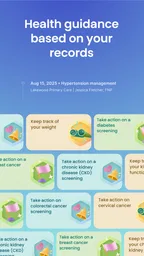
- May help users keep track of health-related activities.
- Provides access to Verily services in one place.
- A mobile interface makes information accessible on the go.
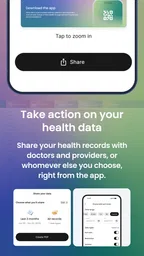
- Can support more informed conversations with care providers.
What could be better
- Available features may depend on location or eligibility.
- Some services may require a separate account or enrollment.
- Health data sharing may raise privacy concerns for some users.
- The app may offer limited value without compatible Verily services.
- Not a substitute for professional medical advice or care.





