
VA Video Connect review
 Analysis by Appsdrops
When a medical appointment happens over video, convenience matters—but so does knowing who you are connecting with and what you can control. VA Video Connect is a video-visit app made by the US Department of Veterans Affairs for patients meeting with their VA care team. I see its value less as a general-purpose video caller and more as a focused route into care for people whose appointment is already arranged through the VA.
That distinction sets expectations. This is not a substitute for a clinician, a way to book every kind of appointment, or a broad telehealth marketplace. Its purpose is to help VA patients attend eligible visits remotely. It is free, rated for Everyone, and sits in the medical category. Its average rating is 4.4 from around 12,000 ratings, which gives a useful snapshot of public reception but cannot tell me whether a particular clinic or appointment will work smoothly.
Trust starts with the care relationship
For me, the strongest trust signal is the app’s specific role: it is published by the US Department of Veterans Affairs and is meant for video visits with a VA care team. That makes it easier to understand why I would use it than a generic calling app that happens to offer video. Still, an official publisher does not remove the need to pay attention. I would confirm that the appointment and invitation are genuinely connected to my VA care, especially if a message arrives unexpectedly.
The practical boundary is important: the app supports a remote encounter, but it does not make every medical issue suitable for video. A clinician may need an in-person examination, and an urgent emergency should not be treated as an ordinary scheduled video visit. I would use it when a VA clinician has arranged a remote appointment and the matter can reasonably be discussed on screen, not as a replacement for emergency services or hands-on care.
Its scale suggests it is an established option in the VA’s digital-care mix: it has over 500,000 installs and is currently version 1.12.11. Those details help place the app, but they are not a guarantee of uninterrupted calls, consistent clinic workflows, or compatibility with every device. I would still prepare as I would for any appointment that depends on a working connection.
What the app can—and cannot—settle
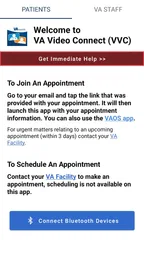
A common question is whether installing it is enough to see a VA clinician. I would not assume so. The app is for attending video visits with a VA care team; the appointment itself and the clinic’s arrangements still matter. If I have no scheduled visit or do not know how my care team expects me to join, the sensible next step is to contact the VA clinic rather than repeatedly opening the app and hoping an appointment appears.
That is also why I would not compare it directly with consumer video-call apps as if the only measure were picture quality. A personal call app is useful for family or friends, but it does not serve the same care-specific purpose. Conversely, if I need a general telehealth provider outside the VA, this app is not the right route just because it handles video. The relevant question is whether the appointment belongs to the VA care relationship.
Make the appointment less fragile
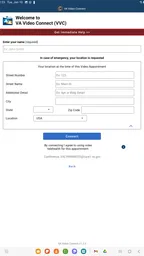
My most useful preparation tip is to treat the video visit as a small appointment workflow, not a spontaneous call. Beforehand, I would check that I can use the device I plan to bring, choose a quiet, private spot, and make sure the device has enough power and a dependable internet connection. Those steps do not guarantee a flawless session, but they prevent avoidable interruptions from becoming the main event.
I would also keep the appointment details and the clinic’s instructions close at hand. If joining does not work, knowing whom to contact is more useful than switching among unrelated calling apps. A video appointment can be time-sensitive, so I would avoid waiting until the scheduled moment to install or first open the app. This is especially helpful for someone who is less comfortable with mobile software: a calm practice run with the device beforehand can reveal basic setup problems while there is still time to ask for help.
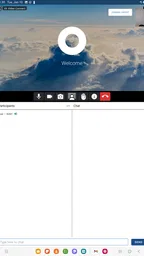
There is a trade-off here. A phone can make joining convenient, but a small screen may make it harder to see a clinician’s demonstrations or read anything shown during a visit. A tablet or computer-sized screen may be more comfortable when available, while a phone can be the practical choice for someone who is away from home or has no other device. I would choose based on the appointment and my own setup rather than assuming one device is best for everyone.
Privacy is part of the visit, not just the software
Video care creates data-sensitive moments even before anyone speaks: the device is used for a medical appointment, and the conversation itself may involve personal health information. I would therefore pay attention to the screen, the room, and who can hear me. Headphones can help keep a conversation private, while positioning the device so other people cannot casually see the display reduces an everyday exposure that app settings alone cannot solve.
I would avoid joining over a public or shared connection when I have a more private, reliable option. If I must take the visit away from home, I would look for a place where I can speak freely and where the screen is not visible to strangers. This is not a claim about the app’s network or data handling; it is a practical way to protect the conversation in the environment I control.
Another useful habit is to separate medical conversations from ordinary phone use. I would silence unrelated notifications, close distracting apps, and avoid recording or taking screenshots of sensitive material unless the care team has clearly explained an appropriate reason and process. These are simple choices, but they help keep attention on the clinician and reduce accidental disclosure on a shared device.
Know what you can verify and what you choose
People often want to know whether a medical app asks for permissions or collects particular information. I would not guess about those details. Instead, I would review the permission prompts shown on my own device, grant only what is needed for the video visit, and check the app’s privacy information through the app store or the VA’s official channels before using it if I have concerns. A camera and microphone are naturally relevant to a video call, but the prompt itself—not an assumption—is where I would verify what the app requests on my device.
That approach also gives me a concrete way to retain control. I can pay attention to the device’s permission settings, keep the operating system and app current, and decide whether I am comfortable using a particular device for a private appointment. The minimum operating system listed for the current app is version 12, so I would check that my device meets that requirement before relying on it for a scheduled visit. If it does not, contacting the clinic about another way to attend is better than discovering the mismatch at appointment time.
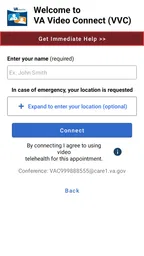
For a shared household device, I would be especially deliberate. I would make sure I am using my own appropriate account and that another person cannot casually access the screen or notifications during the appointment. If I am unsure how sign-in or device access should work for my circumstances, I would ask the VA care team rather than sharing credentials or improvising a workaround. That protects both privacy and the reliability of the visit.
Where it fits in an ordinary week
Imagine a veteran has a routine follow-up scheduled with a VA clinician and lives far enough away that travel takes a meaningful part of the day. If the clinic has arranged a video appointment, joining from a quiet room could avoid that trip and make it easier to fit the consultation around work or caregiving. I would still keep a written list of questions nearby and note any follow-up instructions, just as I would in person. The screen changes how the appointment happens; it does not make preparation less useful.
There are exceptions. If I need a physical examination, have a condition that is rapidly worsening, or cannot speak privately where I am, a remote visit may be a poor fit. A stable internet connection and a usable device also matter. In those cases, I would tell the clinic what is getting in the way and ask whether an in-person visit or another arrangement is more appropriate. The most responsible use of video care includes being willing to switch plans.
For someone new to remote appointments, I would make the first visit deliberately low-stress: set up in advance, keep the clinic’s contact route available, and ask for help early if the joining process is unclear. That advice is particularly valuable for people who are comfortable discussing health but less confident troubleshooting a device. The app’s purpose is narrow enough to be understandable, yet the appointment still depends on coordination between the patient, device, connection, and care team.
A cautious recommendation for VA patients
At no cost, with an Everyone age rating and a clear VA-care focus, VA Video Connect is worth considering if your VA team has arranged a video visit and you have a suitable device. The developer is the US Department of Veterans Affairs, and the app’s role is much more specific than a general video-calling tool. I would recommend it to a VA patient who wants to attend an eligible appointment remotely and is prepared to check the clinic’s instructions and protect the privacy of the setting.
I would not recommend relying on it as a stand-in for emergency care, assuming it can arrange an appointment on its own, or choosing it for a provider outside the VA. I would also hesitate if my device does not meet the minimum operating-system requirement, my connection is unreliable, or I cannot speak privately. In those situations, the better choice is to contact the clinic and discuss another arrangement.
My overall view is practical rather than unreserved: this is a focused tool for a particular care relationship, and that focus is its main strength. The rating of 4.4 reflects a generally favorable reception, but the best measure for an individual is whether the VA clinic has set up the visit and the person can join comfortably. With that confirmed, a little preparation and sensible privacy habits can make a remote appointment feel much more manageable.
What we like
- Connects patients with their VA care teams through video appointments.
- Supports secure visits from home or another private location.
- Works on compatible Android and iOS devices.
- Can reduce travel time for veterans who live far from a VA facility.
- Offers a convenient option for routine follow-up appointments.
What could be better
- A stable internet connection is needed for reliable video calls.
- Some appointments may still require an in-person visit.
- Users may need to complete setup before their first appointment.
- Video quality can suffer with a weak network signal.
- Availability depends on VA clinic scheduling and support.





