
USCCA Concealed Carry App review
 Analysis by Appsdrops
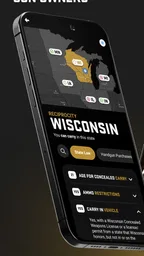
When I think about a concealed-carry app, I want more than a screen full of general advice. I want a useful starting point for checking where I can carry, finding ways to build my knowledge, and knowing where to turn for support. The USCCA’s app is built around that combination. Its promise is practical: bring reciprocity information, training, and instant support together for gun owners in one place.
USCCA Concealed Carry App is an education app from The USCCA, aimed at people who want to make informed decisions about concealed carry. I find its central appeal easy to understand: it connects research before a trip with learning and support that may matter afterward. That gives the app a real-world workflow rather than making it feel like a collection of unrelated reference pages.
A practical starting point for responsible carry
The app makes the most sense when I treat it as a companion to careful preparation, not as a substitute for reading laws or making responsible choices. Concealed-carry rules can vary across state lines, so reciprocity information is a natural first stop when planning travel. Training and support add context beyond that initial lookup, helping the experience cover more than a single question.
The app is free and has an Everyone 10+ content rating. It has been available since June 23, 2017, and its current version is 2.0.56. Those details place it as an established mobile tool rather than a new, untested idea. It runs on Android devices with version 7.0 or later, so owners of older compatible phones may be able to use it without upgrading their operating system.
From a question to a plan
My imagined starting condition is straightforward: I’m a gun owner preparing for a trip or trying to become more confident about the basics. Instead of searching separately for a reference, a learning resource, and a support option, I can begin with the app’s three stated pillars. Reciprocity addresses the location question, training addresses the knowledge question, and instant support points toward assistance when a situation calls for it.
That arrangement is useful because the questions tend to connect. A destination may prompt a rules check; that check may reveal a need to learn more; and a later concern may make support the priority. Keeping those needs under one app’s broad purpose gives the user a clear route through the topic, even if each step still calls for attention and judgment.
Checking reciprocity before travel
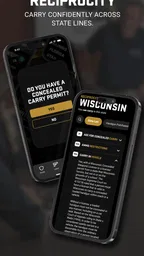
For a trip, reciprocity is the obvious first step. I would use this part of the app as a prompt to investigate how concealed-carry recognition applies to the places involved. That is a more focused starting point than relying on memory or assuming that familiar rules carry over across a border. It encourages planning before departure, when there is still time to look carefully at the situation.
Still, a convenient reference should be treated as one part of preparation, not as permission to stop checking. Laws and circumstances can be complex, and the responsibility for understanding them remains with the user. I like that reciprocity sits alongside education and support, since the app’s broader framing encourages a more considered approach than a quick yes-or-no search alone.
A sensible workflow is to identify the destination, consult the relevant information, and then pause to make sure the result answers the actual question. If the situation is unclear, the right response is to seek reliable clarification rather than guess. The app can be a useful entry point for that process, while careful research remains essential to responsible carry.
Moving from reference to learning
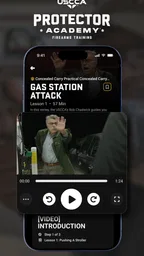
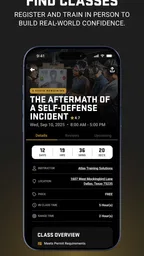
Once the immediate location question is on the table, training becomes the next natural handoff. A reference can help orient a user, but learning is what supports better understanding over time. The USCCA app places training alongside reciprocity, which makes the experience feel more complete: it is not only about where someone may carry, but also about building knowledge connected to carrying responsibly.
I appreciate that this pairing gives the user a reason to return even when no trip is being planned. A person can approach the app with a specific question, then use its educational purpose as a reminder that preparation is ongoing. That is a stronger role for a mobile tool than simply being opened once for a lookup and forgotten.
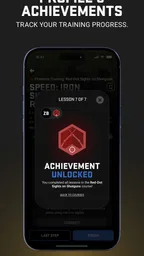
The training aspect also changes the tone of the experience. Rather than treating concealed carry as a purely logistical task, it points toward preparation as a continuing practice. That emphasis feels appropriate for an app intended for gun owners, especially when users may be at different stages of familiarity and may have different reasons for seeking information.
Handing off to support
The third pillar, instant support, completes the basic flow. A user may begin with a planned question, move through reference and learning, and then need support in a more immediate context. Having support named as part of the app’s purpose makes the overall concept more reassuring: the experience is intended to connect users not only with information but also with assistance.
That handoff matters because no app can make every situation simple. A well-organized tool can help someone get oriented, but real circumstances may require a person to make a careful decision or seek help beyond the screen. I see support as a valuable part of the app’s promise, while still remembering that a phone app should not be treated as a replacement for sound judgment or appropriate real-world assistance.
The three parts work best as a sequence rather than as isolated selling points. Reciprocity can frame the question, training can deepen understanding, and support can offer a next step when the user needs it. This workflow is easy to grasp, and it gives the app a purpose that extends from advance planning to the moments when information alone may not feel sufficient.
What the overall experience is designed to deliver
At its best, the app helps a gun owner feel more organized. Instead of beginning every question from scratch, the user has a single place associated with concealed-carry reference, education, and support. That does not remove the need for independent care, but it can make the first steps feel less scattered. For someone who wants a focused resource rather than a general-purpose news or lifestyle app, that focus is a real advantage.
The catalog figures suggest that it has found an established audience: it has more than 500,000 installs, an average rating of 4.1 from around 1,900 ratings, and 996 written reviews. Those figures provide a useful sense of its reach and reception, though they cannot tell me whether every user will find the same parts helpful. My impression is that the app’s value depends on whether its central subjects match what a person actually needs.
Because it is free, it is relatively easy to consider as a starting resource. The most relevant question is not whether it covers every possible need, but whether its combination of reference, training, and support fits into the user’s preparation habits. For people who want those themes gathered under one roof, the concept is appealing and easy to understand.
Where the workflow can lose momentum
The most important friction point is the subject itself. Concealed-carry decisions can have serious consequences, so a convenient app should never encourage casual assumptions. Users need to slow down, read carefully, and take responsibility for applying information to their own circumstances. That caution is not a weakness unique to this app; it is simply part of using any mobile reference in a high-stakes area.
Another potential snag is expecting one tool to answer every question. The app’s purpose brings together several useful areas, but users should still recognize the difference between an introduction, ongoing education, and situation-specific guidance. If someone opens it expecting a single tap to settle a complicated issue, the experience may feel less satisfying than if they use it as one step in a broader process.
There is also a natural handoff between digital information and real-world action. A reference can help prepare, and training can support understanding, but neither guarantees that a user has interpreted every detail correctly. I would use the app to organize questions and guide further learning, while keeping a careful eye on the context and seeking appropriate clarification whenever uncertainty remains.
Who may find it useful
I can see the app suiting gun owners who want a dedicated concealed-carry education app with a practical emphasis. It is especially relevant to someone whose routine includes checking reciprocity, building knowledge, or looking for a support-oriented resource. Its value is less about novelty and more about bringing connected needs into one recognizable place.
It may also appeal to users who prefer to prepare ahead rather than search in a rush. The workflow encourages a person to begin with a question, use relevant information as a starting point, and continue into learning or support when appropriate. That is a grounded way to use a mobile app in a subject where patience and responsibility matter more than flashy presentation.
By contrast, anyone looking for a broad firearms encyclopedia or a guarantee that every legal question can be resolved instantly should keep expectations measured. The app’s stated focus is more specific: reciprocity, training, and support. I think that focus is a strength when it matches the user’s needs, and a limitation only when someone expects a single app to cover every part of responsible ownership.
My overall take
USCCA Concealed Carry App has a clear purpose and a sensible real-world flow. It begins with practical preparation, connects that to education, and includes support as another step in the user’s journey. I like that the app is organized around needs that can arise together, rather than presenting concealed carry as just a map check or a one-off search.
The strongest reason to try it is that focused combination. Reciprocity can help frame travel research, training encourages continued learning, and support rounds out the concept. The key is to use those tools thoughtfully: treat information as a starting point, take time to understand the situation, and make responsible decisions rather than relying on a quick glance.
Overall, this is a useful option for gun owners who want a dedicated mobile resource for concealed-carry preparation. It cannot replace careful judgment, but it can give users a more organized route from an initial question to further learning and support. For someone looking for that kind of focused companion, the app is worth considering.
What we like
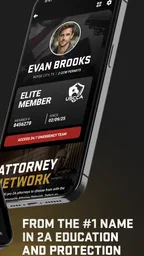
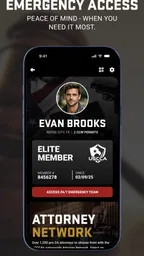
- Includes a digital membership card for quick access.
- Provides emergency contact information in one place.
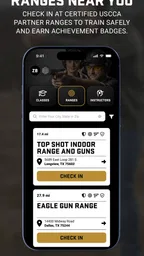
- Offers a way to locate nearby network attorneys.
- Supports account access through a mobile interface.
- Can help members find USCCA educational resources.
What could be better
- Many features require an active USCCA membership.
- Some resources may not be available in every location.
- Emergency features depend on a working phone and network.
- Location tools require access to device location.
- The app is not a substitute for legal advice or emergency services.





