

Kahoot! Play & Create Quizzes review
 Analysis by Appsdrops
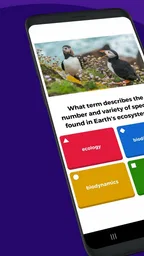
When I need to turn a lesson, family get-together, or workplace session into something more lively, I look for an activity that gets people participating rather than just listening. Kahoot! Play & Create Quizzes is built around that idea: it lets people create and play learning games at school, at home, or at work. Its appeal is easy to understand. A quiz gives everyone a clear task, while the game-like format can make reviewing a topic feel more social and less like a routine test.
From a topic to a shared activity
Kahoot! belongs to the education app space, but its use isn’t limited to a formal classroom. I see it as a flexible tool for anyone who wants to put questions at the center of a group activity. A teacher might use it to revisit a lesson, a family could bring it into a learning session at home, and a team could use a quiz to make a work gathering more interactive. The common thread is participation: people respond to questions instead of simply receiving information.
The starting point is a subject or goal. Before opening the app, it helps to know what you want the group to learn, recall, or discuss. That could be a set of facts, a theme from a recent lesson, or a topic the group already knows but could use a quick review of. Having that purpose in mind makes the activity feel more focused, and it also helps the person creating the game decide what belongs in the quiz.
That planning step matters because a lively format can’t do all the teaching on its own. If the questions are confusing or don’t fit the group, the activity can lose momentum. I’d treat the app as a way to deliver and energize a learning moment, rather than as a substitute for deciding what the learners need to take away.
Building the quiz around a clear goal
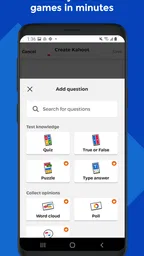
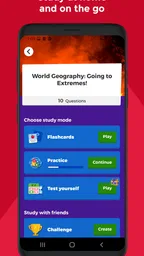
The creation side gives the organizer a way to turn a topic into a playable learning game. The most useful approach is to keep the goal in view while shaping the questions. A quiz intended to check basic recall should feel different from one meant to open a discussion or help a group revisit a difficult idea. The app’s central promise is straightforward: create and play learning games, then use that format to bring people together around a subject.
I like this workflow because it gives the organizer an active role. Instead of looking for a ready-made activity that may not match the group, the person preparing the session can build around the material they want to cover. That can make a classroom review more relevant or help a family activity feel connected to what someone is learning. At work, the same principle applies: a quiz can provide a shared starting point for a topic that might otherwise be presented in a one-way format.
The trade-off is that creating a good activity still takes thought. A quiz is only as clear as its questions, and a topic that needs careful explanation may not fit neatly into a quick round of responses. I’d keep questions direct and make sure the group understands why the activity is happening. That way, the game supports the learning goal instead of becoming a distraction from it.
Taking the activity from preparation to play
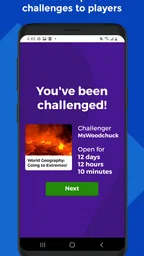
Once the quiz is ready, the next step is getting the group into the activity. This is where the app’s use in classrooms, homes, and workplaces becomes practical: the organizer prepares a learning game, then brings other people into a shared session. The handoff is simple in concept, but it still depends on the setting. Participants need to know what they’re being asked to do, and the organizer needs to make the purpose clear before the questions begin.
For a teacher, that means connecting the game to the lesson rather than presenting it as a disconnected break. At home, it helps to frame the quiz as a relaxed way to learn together, especially if participants have different levels of confidence. In a workplace, a short explanation can make the activity feel relevant rather than like an unexpected interruption. In each case, a little context smooths the move from preparation to participation.
The most effective handoff is not just “here’s a quiz.” It’s a quick explanation of what the group will practice and how the activity fits into the session. That gives participants a reason to engage and helps the organizer maintain a useful pace. I’d also leave room to pause and clarify a question if needed. A learning game works best when the people involved feel comfortable taking part, not when speed or competition becomes the only focus.
What the group gets out of it
The result is a more active way to revisit material. Rather than asking people to read or listen without responding, the format invites them to make choices and stay involved. That shift can help an organizer see whether a topic is landing and can give participants a more memorable way to engage with it. Even when the goal is simply to make a session less monotonous, a shared quiz gives the group something concrete to do together.
For education, that makes learning games the key phrase. The value isn’t only that a quiz feels playful; it’s that the activity can be shaped around what learners are working on. A teacher can use it as a review, while a learner or family member can bring the same general idea into a home setting. At work, the format offers a way to involve colleagues around a topic without relying entirely on a presentation.
I also appreciate that the app’s concept is easy to explain to newcomers. People don’t need a long introduction to understand that they’ll be taking part in a quiz connected to learning. That clarity helps the organizer spend more time on the subject and less time explaining the basic point of the activity. The strongest outcome comes when the questions lead naturally into a short explanation or conversation, so the session ends with more than a set of answers.
Where the flow can lose momentum
The first friction point is preparation. If the organizer hasn’t settled on a clear topic or hasn’t made the questions understandable, the group may spend its attention trying to interpret the activity instead of learning from it. That’s not a flaw unique to this app; it’s a reminder that a game format still relies on good facilitation. I’d prepare the purpose and the questions before bringing everyone in, especially when the group includes people with different levels of familiarity.
The second challenge is the handoff between playing and understanding. A quiz can make a session energetic, but energy alone doesn’t guarantee that the lesson sticks. If the group moves straight from one question to the next without any chance to think about the material, the activity may feel entertaining without being especially useful. The organizer can address that by connecting the questions to the larger topic and briefly revisiting points that deserve more attention.
There can also be a mismatch between the format and the subject. Some topics are well suited to concise questions, while others need longer explanations, open-ended reflection, or a slower pace. In those cases, I’d use a quiz as one part of the session rather than trying to make it carry the whole lesson. That keeps expectations realistic and helps the app support the activity instead of forcing the topic into a shape that doesn’t fit.
Another practical consideration is the audience. A group that enjoys a playful challenge may take to the format quickly, while a more reserved group might need a calm introduction and reassurance that participation is part of learning, not a public test of ability. The organizer sets much of that tone. When the experience is presented as a chance to review and learn together, people are more likely to focus on the material instead of worrying about getting everything right.
Who it suits, and what it costs
Kahoot! Play & Create Quizzes is a free education app developed by Kahoot!, with in-app purchases available. The listed purchase range runs from $2.99 to $469.99 per item, so anyone considering paid options should check the app store for the current details that apply to their needs. I’d start by thinking about the kind of learning activity I actually want to run, then decide whether the free app experience is enough for that use.
The app is rated for Everyone, and it has a 4.7 average from around 860,000 ratings. It has also passed 100 million installs, which gives it a large audience across the kinds of settings its learning-game format is designed for. It first arrived on November 1, 2012, and version 6.7.8 requires Android 8.0 or later. Those details make it easier to judge whether it fits a device and whether its broad, familiar format suits a classroom, home, or workplace routine.
For searchers looking for a quiz app for learning, the main question is whether they want to create activities as well as play them. The create-and-play combination is the defining idea here. It suits organizers who are happy to shape a quiz around a goal and guide a group through it. Someone looking only for a quiet, individual study routine may prefer a different kind of learning tool, while a person who wants a shared activity has a clearer reason to try this format.
My overall take
I find the app’s workflow most appealing when it connects preparation, participation, and follow-up. Start with a learning goal, turn it into clear questions, introduce the activity to the group, and use the responses as a reason to revisit the subject. That sequence makes the quiz feel purposeful. It also gives the organizer a practical way to add interaction to a lesson or gathering without losing sight of why the group came together.
The main thing to keep in mind is that the app doesn’t remove the need for thoughtful teaching or facilitation. The organizer still has to choose a suitable topic, make the activity understandable, and connect the game back to what people should learn. When those pieces are in place, the playful format can make a session feel more inviting and encourage people to take an active role.
Overall, I’d recommend Kahoot! to teachers, families, and teams looking for a straightforward way to create and play learning games together. Its strongest use is not simply making a quiz feel fun, but giving a group a shared path from a topic to active participation and a useful review. If that’s the kind of experience you want, it’s a compelling option to explore through the app store.
What we like
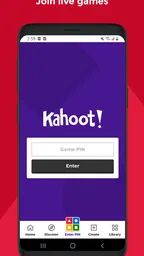
- Join live quizzes with a simple game PIN.
- Create custom quizzes for lessons or gatherings.
- Question timers keep rounds moving at a lively pace.
- Reports help hosts review quiz results.
- Works well for group play on shared screens.
What could be better
- Some creation tools require a paid subscription.
- A stable internet connection is needed for most sessions.
- Live games depend on a host setting them up.
- The free experience may include limits on quiz features.
- Fast timers can disadvantage slower readers.





