
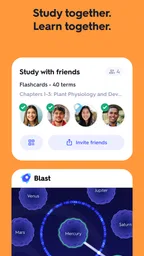


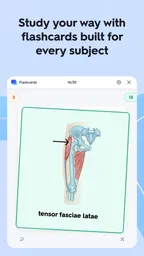
Quizlet: More than Flashcards review
 Analysis by Appsdrops
I find Quizlet most useful when I treat it as a flexible study routine rather than a magic shortcut: I can turn a topic into a set of terms, then check whether I can recall them without looking. That makes this education app handy for vocabulary, definitions, formulas, and other material that breaks into question-and-answer pieces. It is free to download, though in-app purchases are available, and its broad reach is reflected in more than 50 million installs. The experience depends partly on what you study and how reliably you can get online, so I would choose it for active practice—not as a replacement for every kind of learning.
Study sets work best when you shape them
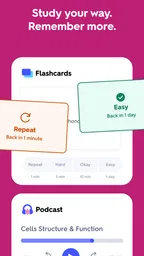
Quizlet is made by Quizlet Inc., and its central idea is straightforward: organize information into study sets and use those sets to practise. The app has been around since August 20, 2013, and version 10.60 continues that focused approach. Rather than simply rereading a chapter, I can put a prompt on one side of a card and an answer on the other, then use repeated recall to find out what I actually remember.
That distinction matters. A stack of cards copied from a textbook can feel productive while still encouraging shallow recognition. I get more from a set when each prompt asks for one clear thing and the answer is short enough to check quickly. For a language, that might mean a word and its meaning; for biology, a process and its key stages. If an answer needs a whole paragraph of context, I split it into smaller prompts or use a different study method for that material.
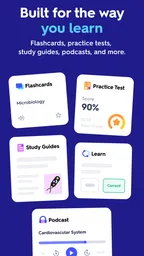
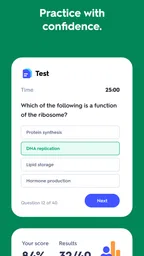
Interactive practice tests give the routine another useful shape. I like using a test-style session after reviewing cards because it nudges me to retrieve information in a different way. The useful question is not whether I can tap through quickly, but whether I can explain why an answer is right. When I get something wrong, I revisit the wording of the card: sometimes I have found a genuine gap in memory, and sometimes I have made a vague or confusing prompt.
The quality of a study set is the biggest lever I can control. Before building a large deck, I make a small one from the material I need soon, try it, and rewrite the cards that produce ambiguous answers. That small test prevents the common trap of spending more time formatting a giant set than learning from it. Quizlet is most effective when the content is concise and the learner is willing to maintain it.
Where it fits among study tools
Compared with paper flashcards, Quizlet is easier to revise: a correction does not mean rewriting a whole stack, and a phone makes a short practice session convenient. Paper still has an advantage when I want no screen distractions or need to sketch a diagram by hand. Compared with a plain notes app, Quizlet gives the material a more active, question-led structure. Notes are better for connected explanations; cards are better for checking recall of individual facts.
It also sits between a simple flashcard tool and a full course platform. I would not expect cards alone to teach a difficult subject from the beginning. They can help retain terms and steps, but they do not automatically provide the reasoning, feedback, or detailed instruction that a teacher, textbook, or well-designed course can offer. I use Quizlet alongside those resources rather than asking it to replace them.
The app has an average rating of 4.7 from around 926,000 ratings, with about 59,000 written reviews. Those figures suggest that many learners find the format worthwhile, but they do not tell me whether a particular public study set is accurate or well written. I still check material against my class notes, especially when a definition is technical or an exam depends on exact wording.
Online access changes the rhythm
Connectivity is most noticeable when I move between planning and practising. If I am searching for a suitable set, opening material, or changing what I want to study, I prefer a stable connection so I can work without interruptions. A short session at home or on campus is usually easy to plan around; an unexpected signal drop while I am trying to start a session is more frustrating because it breaks the study habit before it gets going.
I avoid assuming that every set or activity will behave the same way when a connection is weak. Before relying on Quizlet during a commute, in a basement classroom, or somewhere with unreliable service, I check the material I need while connected and make sure I can reach the relevant study screen. If the app does not provide the access I need in that situation, I switch to a paper card or another prepared resource instead of discovering the problem when I have only a few minutes.
That is a practical difference from physical cards: paper is ready wherever I carry it, while a digital study routine is tied to the device and the app’s current access. I find this trade-off manageable when I plan ahead. It is less appealing for someone who regularly studies in places with no dependable connection and does not want to prepare a backup.
Short mobile sessions, used deliberately
The phone format suits the small gaps that are easy to waste: waiting for a bus, arriving early for class, or taking a brief break between tasks. I would use those moments for a handful of focused prompts, not for trying to master an entire chapter while distracted. A realistic routine is to make a set after class, practise it for a few minutes later that day, and return to the difficult cards before a quiz. Each session has a purpose, which makes it easier to notice whether the app is helping.
There is a limit to how much a small screen helps. Long explanations, complicated diagrams, and material that depends on seeing several ideas together are awkward to reduce to isolated cards. I would study those topics in a book, on a larger screen, or with a teacher, then use Quizlet to reinforce the terms and facts that need memorising. That division keeps the app useful without forcing every subject into the same format.
For a student preparing for a vocabulary test, a compact set can turn spare minutes into retrieval practice. For a professional reviewing terminology, it can provide a repeatable way to check recall between meetings. For a learner who prefers to speak an answer aloud before checking it, the card format can still work as a prompt—but the learner has to supply the explanation. The app structures practice; it cannot do the thinking on the user’s behalf.
When a session is interrupted
Weak connectivity can make a study session feel less dependable, particularly if I have not opened the material before leaving a reliable network. My workaround is simple: prepare the set in advance, confirm that the screen and content I need are accessible, and avoid making a last-minute study plan that depends on a fresh search. If access falters, I stop rather than repeatedly tapping through the same screen, then retry when the connection is steadier.
I also keep a low-tech fallback for important deadlines. A short list of the hardest terms in my notebook is enough to preserve the session if my phone battery is low, the app is unavailable, or the network is poor. This is not a criticism unique to Quizlet; it is a sensible precaution whenever a digital tool becomes part of an exam routine. The more consequential the study session, the less I want a single device or connection to be my only option.
Content can need recovery, too. If a card keeps producing a wrong answer, I do not immediately assume the app has failed. I check whether the prompt is unclear, whether the answer has more than one acceptable form, or whether I have confused two similar terms. Revising the card often fixes the learning problem. If the source set itself seems unreliable, I use my course material to correct it rather than memorising an error just because it appears in a neat deck.
Keeping data use and spending in view
Because I cannot count on every study action working identically across network conditions, I use a data-conscious routine: I open or prepare the material on a trusted connection, avoid repeatedly loading content when reception is poor, and keep sessions focused. That is more useful than assuming a study app will be equally convenient everywhere. Anyone with a limited data plan should test their normal workflow before making Quizlet their main tool for daily revision.
The app is free, which makes it easy to try without an upfront purchase. In-app purchases range from $1.99 to $44.99 per item, so I would first see whether the free experience meets my needs and consider a purchase only after identifying a specific reason. I would not pay simply because I am worried that a paid option must be necessary; the right choice depends on the features and study routine I personally want.
Quizlet is rated for Everyone, and its minimum operating-system requirement is version 8.0. Those details make it approachable for a wide range of learners, though device compatibility still matters: before building a routine around any app, I check that the phone or tablet I plan to use can run it comfortably. A study tool is only convenient if it works on the device I actually carry.
Who should choose it—and who should not
I recommend Quizlet to learners who need repeated practice with facts, vocabulary, terminology, or concise steps and who are willing to create or check their own material. It is particularly useful when a study set can be revisited in small bursts and when the learner benefits from being tested instead of rereading. The strong average rating and large install base make it a familiar option, but my recommendation rests on whether the card-based method matches the subject.
I would steer someone toward a different tool if their main need is long-form note-taking, collaborative writing, guided teaching, or sustained work without dependable connectivity. A notebook, textbook, classroom resource, or course app may be a better fit for those jobs. I would also hesitate to recommend it to a learner who wants every answer explained in depth without making or checking study material; Quizlet is a practice aid, not a guarantee that the underlying content is complete or correct.
My verdict is that Quizlet is a practical recall tool when I prepare good sets and plan around connectivity. It turns a phone into a convenient place to test what I know, and its mix of flashcards and practice tests gives me more than passive review. Its limits are just as clear: card-based learning is not ideal for every subject, the quality of a set deserves scrutiny, and an unreliable connection can disrupt a mobile routine. If those trade-offs suit you, I would start with one small set tied to an upcoming class or task, improve the cards that confuse you, and see whether the practice helps you remember more confidently.
What we like
- Audio playback helps with pronunciation practice.
- Study sets can be organized into folders.
- The app supports collaborative set creation.
- Progress tracking helps identify topics that need review.
- Offline access is available for selected study materials.
What could be better
- Many advanced study features require a paid subscription.
- Some user-created sets contain errors or outdated information.
- The free version includes advertising.
- Account creation is needed to sync study progress.
- Offline availability may depend on your plan and saved sets.





