




Yousician: Learn & Play Guitar review
 Analysis by Appsdrops
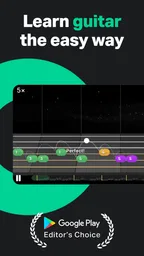
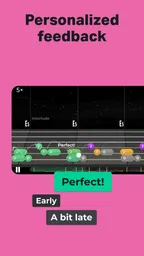
Learning an instrument takes more than enthusiasm: it takes regular practice, useful guidance, and a way to notice when you’re going off track. Yousician brings those pieces together in an interactive music-learning app for guitar, bass, and singing. Its lessons use real songs and give instant feedback as you play, making it a practical option for learners who want to build skills at home and keep their sessions focused.
A practice routine built around playing
The basic rhythm is easy to understand: choose a lesson or song, play along, and use the feedback to guide your next attempt. Rather than asking you to spend every session reading about music, the app puts your instrument or voice at the center. That hands-on approach is a good fit for people who learn best by trying something, hearing how it goes, and taking another pass.
In my view, the most useful way to approach Yousician is as a practice companion, not a shortcut to instant mastery. Start with a manageable session and stick with one goal at a time. If a passage feels awkward, repeat it slowly and pay attention to the feedback instead of rushing ahead just to finish. Small, consistent efforts are more likely to build dependable habits than an occasional marathon session.
The app’s focus on guitar, bass, and singing lessons gives it a clear audience. A beginner can use guided lessons to make practice feel less directionless, while someone with some experience may appreciate having songs to work through. The combination helps bridge the gap between learning an exercise and applying a skill in music, which is often where practice starts to feel rewarding.
Make each session count
Before you begin, decide what you want to work on. That could mean getting comfortable with a lesson, revisiting a tricky part, or simply completing a short practice session. Keeping the goal narrow makes it easier to listen to the app’s feedback and judge whether you are improving. It also helps prevent the common habit of jumping between activities without giving any one of them enough attention.
When the feedback points out a rough spot, treat that moment as a prompt rather than a verdict. Try the phrase again, focus on what changed, and keep your tempo comfortable. I find this kind of repeatable loop more useful than chasing a perfect run immediately. The point is to turn feedback into a concrete next step: listen, adjust, and play again.
Real songs add motivation, but they work best when paired with patience. A familiar tune can make practice feel less like homework, yet a song may still expose timing or coordination that needs attention. Give yourself permission to work on one difficult section at a time. That way, the music stays enjoyable without becoming a reason to ignore the fundamentals.
Check the setup that supports your practice
A little preparation can make an interactive lesson feel smoother. Settle somewhere you can hear your playing clearly, keep your instrument ready, and make sure you can comfortably follow the lesson while playing. If the app’s feedback seems inconsistent, pause and check the basics: your position, your sound, and whether you are following the exercise as intended. A calm reset is often more helpful than repeatedly pushing through a frustrating attempt.
It is also worth reviewing the app’s available settings and your account choices before settling into a routine. Pick options that suit how you practice, and take a moment to understand any choices presented in the app. Since Yousician includes in-app purchases, it is sensible to review purchase details before committing to anything. The app is free to download, while optional purchases are listed from $1.99 to $209.99 per item.
For a learning tool that responds while you play, a steady environment matters. Keep background noise low enough that you can concentrate on the lesson, and avoid changing several things at once when you are trying to work out why an attempt did not go well. A consistent setup makes it easier to compare one practice run with the next and focus on your playing rather than troubleshooting.
Build faster patterns through repetition
Experienced learners often save time not by rushing, but by making the next practice step obvious. A simple pattern works well: choose a target, play it, notice the feedback, and repeat the part that needs work. When it feels more comfortable, return to the larger lesson or song. This keeps practice purposeful without requiring an elaborate plan or a complicated system.
Use familiar material strategically. A song you enjoy can help you stay engaged, while a lesson can give you a more structured place to focus. Moving between those two kinds of practice can make a session feel balanced: one part builds a specific skill, and another lets you use what you have been working on in a musical context. The right mix depends on what you find motivating and what needs attention that day.
It can also help to finish by noting what you want to revisit next time. You do not need a detailed practice journal; even a quick mental note—such as remembering which passage needs another try—makes it easier to get started again. A repeatable routine reduces the time spent deciding what to do and leaves more of the session for playing.
Most importantly, do not treat every score or piece of feedback as a complete measure of musicianship. Feedback is useful because it gives you something immediate to respond to, but musical growth also involves listening, patience, and developing comfort with your instrument or voice. Use the app to structure practice, then give yourself time to absorb what you are learning.
Where an app can help—and where practice remains yours
Interactive feedback is the app’s central appeal, especially for people who want guidance while playing rather than a set of lessons to read through on their own. It can make independent practice feel more directed and help learners stay engaged with real music. For a first-time learner, that combination may make it easier to keep showing up and to connect exercises with songs.
Still, no app can do the practicing on your behalf. A lesson can point you toward a task, but improvement comes from returning to it, listening carefully, and giving yourself room to learn. Some users may also prefer a teacher or a group setting for personal guidance and musical interaction. Yousician is best understood as a useful learning aid, not a replacement for every kind of instruction or feedback.
Its broad reach suggests that the approach has found an audience: the app has more than 50 million installs, with an average rating of 4.4 from around 528,000 ratings. Those figures offer context, but they do not tell you whether its teaching style matches your preferences. If you enjoy learning by playing and responding to immediate guidance, the format is likely to feel more natural than a purely text-based course.
A practical choice for steady progress
Yousician is a polished fit for learners who want interactive music practice with songs and immediate feedback. I like that its core idea is straightforward: play, listen to the guidance, and try again. That makes it easy to build a routine around short, focused sessions rather than waiting for the perfect time or a long block of free hours.
The strongest results will come from using the app deliberately. Choose a clear goal, repeat challenging material, and keep your setup consistent enough to concentrate. Be patient when progress feels gradual, and use songs as motivation without skipping the work that makes them easier to play. Those habits matter more than trying to race through lessons.
Overall, this is a worthwhile guitar learning app for people who want an accessible way to practice guitar, bass, or singing. It offers a clear path into regular playing, while leaving the pace and commitment in your hands. If you are willing to return to the instrument, respond to feedback, and keep your goals realistic, Yousician can make practice feel more organized—and a lot more engaging.
What we like
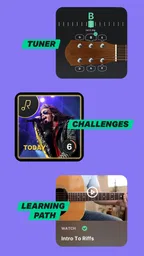
- Offers a tuner to help keep your instrument in tune.
- Supports guitar, bass, ukulele and piano learning.
- Works with acoustic and electric guitars.
- Provides lessons for different skill levels.
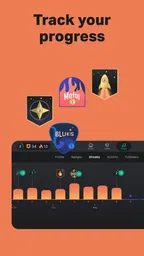
- Tracks progress as you complete lessons and challenges.
What could be better
- Many lessons and features require a paid subscription.
- Microphone recognition may struggle in noisy rooms.
- You may need to adjust your device placement for reliable note detection.
- The free plan limits how much you can practice each day.
- Some users may find the subscription cost high over time.





