

Gauth: AI Study Companion review
 Analysis by Appsdrops
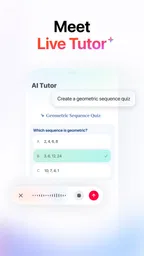
I see Gauth: AI Study Companion as a quick way to get unstuck on schoolwork, not as a replacement for learning the material. Its appeal is simple: bring a question to the app and use the response as a starting point for understanding it. That can be genuinely useful when a textbook explanation feels opaque or you need help getting moving. The important question is whether you will work through the answer—or just collect it.
What the free option means in practice
Gauth is a free education app from GauthTech Pte. Ltd., and it is available to users rated Everyone. In-app purchases range from $0.49 to $369.99 per item, so “free” describes the app’s price, not a promise that every possible purchase or level of access costs nothing. I would start with the free experience and decide whether it meets your needs before spending anything.
The purchase range is wide enough that I would not assume a particular item is necessary, or that the most expensive option is worthwhile for every student. The listed price range alone does not explain what each purchase includes. Before buying, check the exact item and its terms in the app store, then compare that cost with how often you actually use the help. If you only need an occasional explanation, paying may not make sense.
There is no reason to treat a purchase as a shortcut to better studying. The app’s useful value comes from helping you understand and continue a problem; any paid choice should be judged against that practical benefit. If the free option already supports your normal study routine, you may have no reason to pay. If you are considering an in-app purchase, make the decision based on its stated details rather than assuming it unlocks a specific capability.
Where the answers can save time
The clearest value is reducing the time between “I don’t understand this” and “I have somewhere to begin.” In a conventional study session, you might search the web, scan several pages, and try to decide which explanation matches your exact question. A question-and-answer study tool can make that first step more direct. It is especially helpful when you already know what is confusing and can ask about that point rather than looking for a whole lesson.
For example, imagine you are reviewing homework after dinner and keep getting the same kind of algebra problem wrong. Instead of copying an answer and moving on, use the response to identify the step where your reasoning diverges. Then close the explanation and try a similar problem from your assignment on your own. That small change turns an answer into a check on your understanding, and it is more likely to help on a quiz than simply seeing a finished result.
A useful habit is to ask one focused question at a time. If you paste a broad prompt or several unrelated problems together, it can be harder to tell which part of the response addresses your actual confusion. Narrowing the question—what rule applies here, or why does this step follow?—gives you a clearer target for checking the explanation against your notes. This is a study workflow tip, not a guarantee that every response will be right.
I would also use the app as a second explanation rather than the final authority. Compare its reasoning with class materials, especially when a problem depends on a method your teacher expects you to use. A result can look convincing while skipping a condition or taking a route that does not match the lesson. The better outcome is not merely having an answer; it is being able to explain why that answer follows.
What to expect from an AI study helper
AI answers are useful for momentum, but they still need a student’s judgement. If a response seems inconsistent with the question, contains a jump you cannot follow, or gives you a result that does not fit what you learned, pause and verify it. Treating a fluent explanation as automatically correct is the main risk of relying on this kind of tool. I would rather spend an extra minute checking a step than memorize a confident mistake.
There is also a difference between getting help and outsourcing the assignment. If you use Gauth to produce work you submit without understanding, you may finish that task while remaining unprepared for the next one. A more responsible approach is to ask for clarification, work through the reasoning yourself, and write your own solution. That makes the app a support for learning rather than a substitute for it.
Compared with ordinary web searching, a direct question can feel more convenient when you know exactly where you are stuck. Search results often require you to sift through explanations that may cover a different version of the problem. Compared with a textbook or class notes, though, Gauth is less suitable as a carefully sequenced course: those materials provide the structure and shared method that a single answer may not. I would keep notes and teacher guidance as the foundation, then use the app to clarify a snag.
It is also not the right choice for every kind of study problem. If you need sustained feedback on an essay, a teacher or writing tutor can respond to your argument and goals in a more contextual way. If your difficulty is a gap in basic knowledge, a full lesson or a patient human explanation may serve you better than asking isolated questions. Gauth is strongest when you can point to a specific obstacle and want a prompt route toward understanding it.
Who is likely to get the most from it
I would recommend trying it if you are a student who regularly gets stuck on individual questions, wants another way to approach them, and is willing to check the result. It can also suit a learner studying independently who needs a quick nudge before returning to a textbook or practice set. The app’s broad reach is reflected in its 100M+ installs, while its average rating is 4.8 from 2.2 million ratings; those figures indicate substantial adoption, but they cannot tell you whether its answers fit your subject or study habits.
It is less compelling for someone who already has reliable help and rarely needs quick explanations, or for a student who tends to accept answers without checking them. I would also be cautious about using it during graded work if your school’s rules restrict AI assistance. Follow the relevant class policy, and do not mistake access to an answer for permission to submit AI-produced work as your own.
If you are deciding whether to keep it, try a few real questions from subjects you currently study. Look not only at whether the final result seems plausible, but whether the explanation helps you solve another question without assistance. That is a better test of value than a smooth first impression. If you repeatedly need to verify every step or still cannot apply the idea afterward, a teacher, classmate, or structured learning resource may be a better use of your time.
Fit, access, and practical expectations
The app is listed as version 2.10.0 and requires Android 8.0 or later. If your device runs an older Android release, check compatibility before planning to use it. The release date is March 31, 2021, so this is an established app rather than a newly launched experiment, though the age of an app alone cannot guarantee that it suits your needs.
Gauth has 37,000 reviews in addition to its 2.2 million ratings. I would treat public feedback as a broad signal that many people use the app, not as a substitute for trying it on your own coursework. A review can reflect a different subject, expectation, or version of the experience. For your decision, the key test remains whether its explanations help you learn without making you less careful about checking your work.
Because the content rating is Everyone, the app is presented for a general audience. Younger students may still benefit from an adult helping them build good habits around AI answers: ask why a step works, compare it with class materials, and do not copy blindly. That guidance matters more than treating any answer tool as inherently reliable.
My verdict: try it, but make it earn a place
Gauth: AI Study Companion is worth trying if you want a fast way to get moving when a study question has you stuck. Its free price makes an initial trial straightforward, while the in-app purchase range means I would inspect any paid option carefully rather than assuming it offers value for everyone. The app is most useful when it helps you understand a method, not merely obtain a result.
My recommendation is to begin with the free access, use focused questions, and test whether you can solve a related problem afterward. Keep your notes, teacher’s instructions, and independent reasoning in the loop. If Gauth helps you bridge a specific gap, it can earn a useful place in your study routine; if it encourages copying or leaves you with explanations you cannot verify, skip the purchase and choose a more structured or human source of help instead.
What we like
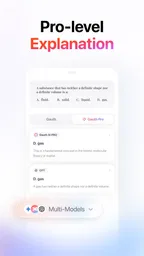
- Step-by-step explanations make difficult questions easier to follow.
- The AI tutor can help with multiple school subjects.
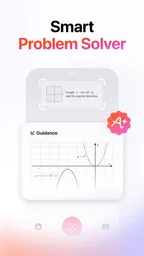
- Photo-based question input is convenient for textbook problems.
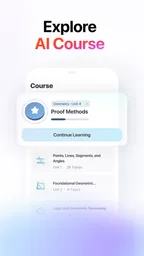
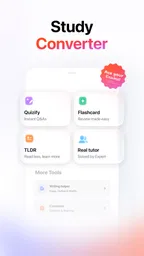
- Practice tools can support review beyond homework questions.
- A free option lets students try core features before subscribing.
What could be better
- AI answers can be incorrect and should be checked against trusted sources.
- Some features may require a paid plan.
- Photo recognition may struggle with messy handwriting or unclear images.
- Using the app for every answer can discourage independent problem-solving.
- Availability of tutors and responses may vary by subject and time.





