
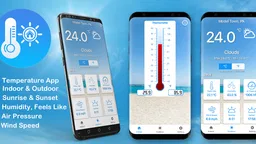
Thermometer For Room Temp review
 Analysis by Appsdrops
When I want a quick sense of how warm a room feels, I’m usually not looking for a full weather dashboard. Thermometer For Room Temp is aimed at that simpler need: it is a weather app from Micro Inc focused on indoor temperature, with a straightforward “thermometer” identity rather than a broad set of forecast tools. That narrow purpose makes it easy to understand, but it also means the first thing to do is treat its reading as a useful indication—not as a precision instrument.
What to expect from an indoor thermometer app
The central question for a first-time user is what a phone can actually tell you about a room. An app can display a temperature estimate, but the phone itself is not necessarily a dedicated room sensor. Its own heat, recent use, placement, and the way the app obtains a reading can all affect what appears. I recommend checking the result when the phone has been resting in the room rather than immediately after gaming, charging, or sitting in direct sunlight.
That distinction matters because “room temperature” sounds more exact than an everyday phone-based reading may be. I would use this app to get a general feel for whether a space is cool or warm, or to compare the same room at different times under similar conditions. I would not rely on a single reading to settle a disagreement over a thermostat setting or to make a safety-critical decision.
The app is free to install, and it has optional in-app purchases listed at $1.99 to $12.99 per item. It is rated for Everyone, which makes its basic subject approachable for a broad audience. Its current version is 1.26.52, and the minimum operating system is Android 6.0. Those details make it accessible to many Android users, though compatibility still depends on the device and its software.
At a glance, the app’s audience is clear: someone who wants a quick indoor temperature check without turning to a complicated home-monitoring setup. If you already use a standalone thermometer, a smart thermostat, or a sensor connected to a home system, those tools are likely better for dependable, continuous measurements. This app makes more sense as a convenient reference on the phone you already carry.
Keep expectations practical
I find it helpful to think of the app as a quick check rather than a calibrated measuring device. For example, a reading that seems unexpectedly high should prompt a second check after the phone has cooled and settled, not an immediate decision to open every window. The same caution applies if the phone has just been charging or has spent time in a pocket.
It is also worth separating indoor temperature from outdoor weather. A forecast app is designed to help with conditions outside and planning for the day; an indoor thermometer app has a different job. If your main question is whether to bring an umbrella, this is not the right tool. If you are trying to decide whether a bedroom feels stuffy before opening a window, its focused purpose is more relevant.
Getting started without overthinking it
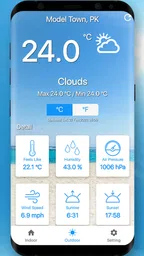
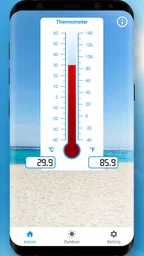
After installing Thermometer For Room Temp, I would begin by opening it in the room I want to check and taking a moment to orient myself around the reading. The store summary describes an indoor temperature measure and heat sensor, so the natural first task is simply to see what the app presents for that room. I would avoid drawing conclusions from the first number before understanding how it behaves on my particular phone.
For a more useful first check, place the phone on a stable surface away from a sunny window, heater, cooking appliance, or other obvious source of local heat. Let it sit undisturbed for a while, then look again. This is a practical way to reduce the influence of the phone’s recent activity and of a misleading spot in the room. It does not turn a phone into a laboratory instrument, but it can make a casual comparison more meaningful.
There is no need to start by changing several settings or hunting for advanced controls. A first-time user can begin with the basic task: choose a room, let the phone rest there, and note the result. If the app’s screen is clear enough to make that reading easy to find, that is already a successful first use. I would only explore additional options after confirming that the basic display is useful on my device.
One small but practical tip is to repeat the check in the same place rather than moving the phone around and comparing unrelated readings. A phone on a windowsill can be affected by sunlight or cold glass, while a phone near a radiator can pick up localized warmth. For judging the room itself, a central indoor spot is usually a better reference than a boundary or heat source.
Your first useful result
A realistic first success might happen before bed. Say the room feels warmer than usual and you are deciding whether to adjust the heating, change bedding, or leave the door open. I would set the phone down away from the radiator, give it time to settle, then use the reading as one clue alongside how the room feels. If it seems out of step with your experience, repeat the check before changing anything.
This kind of routine is more informative than treating one number as a verdict. You could check a room in the morning and again later, keeping the phone in roughly the same place and in similar conditions. That gives you a personal point of comparison. It can help you notice a pattern, such as a room warming after sunlight reaches it, without pretending the app has diagnosed the cause.
Another useful scenario is moving into a room that has been closed for hours. Instead of immediately turning up the heating, I would first compare the app’s reading with the room’s feel and then check again after a short period with the door open. That simple before-and-after habit can help you understand whether the space is changing, while keeping expectations grounded in a casual phone reading.
If you care about a baby’s room, a medication storage area, or any setting where a precise temperature matters, I would choose a dedicated thermometer designed for that purpose. The phone app can offer a convenient impression, but convenience is not the same as verified accuracy. For ordinary comfort decisions, a rough check may be enough; for sensitive thresholds, use equipment intended to monitor them.
Where confusion can creep in
The most common misunderstanding is assuming the phone measures the surrounding air in exactly the same way a purpose-built thermometer does. Phones generate heat, and their internal components are designed primarily for operating the device, not for acting as a room sensor. As a result, a reading can be influenced by what the phone has been doing and where it has been sitting. Letting it rest before checking is a sensible first response if a result feels implausible.
A second source of confusion is comparing readings taken in different conditions. A phone taken straight from a warm pocket and one left on a table are not necessarily starting from the same place. Nor is a sunlit ledge comparable to a shaded shelf. If you want to use the app to track a room informally, keep the location and routine consistent; otherwise, differences may reflect the setup rather than a meaningful change in the room.
There is also a difference between a temperature estimate and a full picture of comfort. Humidity, airflow, clothing, and how long you have been in the room all affect how warm or cool it feels. An indoor temperature reading cannot answer every comfort question by itself. I would use it alongside ordinary observation rather than expecting it to explain why a room feels uncomfortable.
People sometimes expect an app in the weather category to provide forecasts, alerts, or a detailed outdoor map. That is not the reason I would choose this one. Its short store description is simply “Thermometer,” and its focus is indoor temperature. If you need tomorrow’s rain outlook, local warnings, or a multi-day forecast, a conventional weather service is the better fit. The distinction saves time and sets the right expectation before installation.
Who will find it useful, and who may not
I can see this working for renters who want a quick check of a bedroom, people comparing the feel of two rooms, or anyone curious about whether a space seems warmer after the heating has been on. It is particularly convenient when a dedicated thermometer is not nearby and the question is informal. Because it is free to install and has an Everyone age rating, there is little friction in trying the basic idea for yourself.
It is less suitable for someone who needs a dependable record over time, precise control of heating, or a measurement for a health or safety decision. A smart thermostat or dedicated digital thermometer is a stronger choice when accuracy and consistency are important. Similarly, if your main need is outdoor forecasts, this app’s narrow indoor emphasis may feel like the wrong starting point.
The app has an average rating of 4.1 from around 4.1 thousand ratings, with 105 written reviews, and more than 500 thousand installs. Those figures suggest that many people have tried it, but they do not tell me whether it will behave equally well across different phone models. I would judge it by whether its result is consistent enough for my own casual use, not by popularity alone.
A sensible next step after the first check
If the initial reading seems useful, build a small routine around it rather than checking constantly. Choose one representative spot, let the device rest there, and compare readings only when you have a specific question—such as whether a room warms during the afternoon. This approach gives you a clearer personal reference and avoids mistaking every small fluctuation for a meaningful change.
If you are considering an optional purchase, first decide what you want beyond the basic temperature check and whether the app already meets your needs. The listed in-app items range from $1.99 to $12.99, so I would review the purchase details in the app store before paying. For someone who only wants an occasional indoor estimate, there may be no reason to spend anything; for someone seeking capabilities beyond that, it is worth checking exactly what an item adds before choosing.
Micro Inc’s app is best approached as a small, focused convenience, not a replacement for household measurement equipment or a full weather service. I like the simplicity of having an indoor check available on a phone, especially when I want a quick reference before making a minor comfort adjustment. My recommendation is conditional but straightforward: try it if a rough room-temperature impression is all you need, let the phone settle before trusting a reading, and choose a dedicated instrument whenever accuracy carries real consequences.
What we like
- Simple readings are easy to understand at a glance.
- A lightweight design should run smoothly on many phones.
- Useful for checking comfort levels in a room.
- No specialized thermometer hardware is needed for basic estimates.
- The straightforward interface suits occasional use.
What could be better
- Phone sensors may not measure ambient temperature accurately.
- Readings can be affected by device heat and recent use.
- Some phones lack sensors for reliable room temperature estimates.
- Results may differ from a dedicated digital thermometer.
- Accuracy can vary with the phone model and surroundings.





