
Sword Health: AI Care review
 Analysis by Appsdrops
I approach Sword Health: AI Care as a guided digital health app, not as a magic fix or a replacement for a clinician. Its appeal is the possibility of making care easier to fit into everyday life. Whether it suits you depends less on its polished promise than on what kind of support you need and whether its approach matches your situation.
What free access means in practice
The app is free to download, so trying it does not require an upfront purchase. That is a useful starting point for anyone curious about digital care but reluctant to pay before understanding whether it feels right. The free price is a confirmed fact; it should not be taken as a guarantee that every service or care option a person might encounter is free. I would check the terms shown in the app before relying on it for a particular course of care.
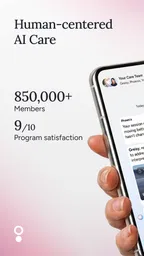
Sword Health is the developer, and the app sits in the medical category. It is rated for Everyone, though that age label is not medical guidance about which treatment is appropriate for a particular person. It has a 4.7 average from around 11,000 ratings, with roughly 1,200 written reviews and over 100,000 installs. Those figures suggest that many people have tried it, but they cannot tell me whether it will fit an individual’s health needs.
The app was released on August 9, 2019, and its current version is 8.7.0. Those details give a little context, but version numbers and time on the market are not evidence that a particular care plan will be effective for you. I would judge the experience by whether it helps you follow a suitable routine and whether the guidance feels clear and safe.
Where the value can come from
The most meaningful value in a digital care app is not simply that it is on a phone. It is whether the format helps someone take the next sensible step: understand what they are being asked to do, make room for care in a busy day, and keep from treating an exercise or health task as something to remember later. That is the lens I would use when deciding whether Sword Health deserves a place on your device.
For someone who has already been directed toward a digital care program, an app can make it easier to engage with that support at a time and place that works. A realistic example is a person with a packed workday who sets aside a quiet window at home rather than trying to squeeze a health task into a commute or a rushed lunch break. The practical win is not a guaranteed result; it is having a more deliberate moment to focus and follow the instructions presented to them.
There is also a useful distinction between access and adherence. Downloading a medical app is easy, but a routine only helps if it is appropriate and sustainable. I would treat Sword Health as a possible structure for care, not as motivation that will automatically overcome an inconvenient schedule. Before starting, it is worth deciding when you can realistically use it and where you can do so without distraction.
One non-obvious way to get more from an app-based care routine is to avoid multitasking through it. If an instruction needs attention, doing it while answering messages or watching something else can make the session feel like a box-ticking exercise. I would choose a consistent, low-distraction slot, then reassess whether the routine remains manageable after the novelty wears off. This small planning step can reveal whether the app fits real life rather than an idealized schedule.
Another useful habit is to note questions as they come up instead of expecting an app to resolve every concern in the moment. If something about your symptoms, comfort, or ability to follow a direction feels unclear, pause and seek appropriate professional advice rather than improvising. A phone-based program can make care more accessible, but it should not encourage you to push through something that feels wrong.
Tradeoffs to weigh before relying on it
The main tradeoff with digital care is that convenience and personal attention are not the same thing. An app may be easier to access than arranging an in-person visit, but it cannot automatically observe everything a clinician can assess in a room. If you need a physical examination, an urgent assessment, or help interpreting a new or worsening problem, a qualified healthcare professional is the better choice.
I would also distinguish between a general interest in feeling better and a specific need for treatment. The app’s broad positioning does not, by itself, establish that every person or condition is suitable for its care. If you have a diagnosis, are recovering from an injury, or have been given restrictions, check with your clinician before following a program that might conflict with those instructions. That is a sensible safeguard, not a criticism of the app.
Digital routines can bring their own friction. A session that seems easy to fit in may be less convenient when your home is noisy, your day changes often, or you prefer direct conversation. People who need someone to correct their movement in person or explain a plan face to face may find an app-based approach less reassuring. In those cases, an in-person provider or a hybrid arrangement is likely a better match.
There is a separate uncertainty around cost beyond downloading. The app itself is free, but I would not assume that any particular service, treatment, or access arrangement available through it has no charge. Before committing time or sharing personal information, read the in-app details about the option you are considering and make sure its terms suit you. The free download is a low-friction way to explore, not a substitute for checking the specific offer.
Compared with searching for health advice online, a dedicated medical app can provide a more focused place to engage with care. Compared with a clinician, it does not offer the same direct examination or conversation. And compared with a paper plan, it may be easier to revisit on a phone, but only if you like using a screen as part of your routine. The right alternative depends on whether your priority is convenience, personal oversight, or a simple reference you can use offline.
Who is most likely to benefit
I can see the strongest case for someone who is comfortable with phone-based health support, has a suitable care need, and wants a convenient way to engage with guidance. It may also appeal to a person who tends to forget a routine unless it has a clear place in the day. For that user, the app can be a useful companion to a broader plan, provided they understand its role and keep their clinician involved when needed.
It is less compelling for someone seeking a diagnosis from an app, immediate help, or close one-to-one supervision. It may also be a poor fit if you dislike health tasks on a phone or already know that you will not make time for a digital routine. In those situations, choosing an in-person appointment, speaking with a healthcare professional, or following a clinician’s preferred plan is more practical than installing another app and hoping it changes the habit.
If you are unsure whether it fits, I would start by asking three questions: Do I have a clear reason to use digital care? Can I set aside a calm, repeatable time for it? Do I know whom to contact if something feels confusing or uncomfortable? If the answers are yes, a free download makes an initial look relatively low-commitment. If not, getting advice first is a better use of your effort.
One practical tip is to judge the experience by whether it helps you act consistently, not by how impressive the technology sounds. After trying the routine, consider whether the instructions are understandable, the timing is realistic, and the app complements rather than replaces the support you need. Those are more useful measures of personal value than popularity alone.
My verdict: a sensible option, with clear limits
I would recommend Sword Health to people who want to explore digital medical care and already have a reasonable basis for doing so. Its free download lowers the barrier to trying it, and its broad reach gives some reassurance that it is not an obscure one-off product. Still, neither a high average rating nor many installs proves that its approach is right for every user, so I would keep expectations grounded.
The best reason to try it is convenience when convenience helps you follow appropriate care. The best reason to skip it is needing a level of assessment, personal explanation, or immediate help that a phone app cannot provide. I would not choose it as a stand-in for professional advice, and I would not assume that all care options inside it are free simply because the app costs nothing to download.
Overall, I see it as a potentially useful part of a care routine rather than a complete answer on its own. If digital guidance suits your needs, you have a realistic time to use it, and you are comfortable checking important decisions with a professional, it is worth exploring. If your situation calls for hands-on care or you need direct clinical attention, choose that first.
What we like
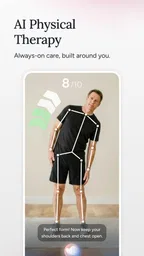
- Offers digital access to physical therapy guidance from home.
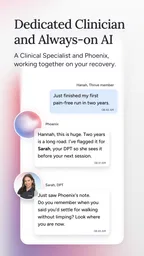
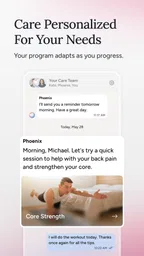
- AI tools can help tailor care to individual progress.
- May reduce the need to travel for routine therapy sessions.
- Progress tracking can help users stay engaged with their recovery.
- Useful for people seeking structured support between appointments.
What could be better
- Care plans may require an eligible employer or health plan.
- Some features may not be available in every region.
- AI guidance cannot replace an in-person clinical assessment.
- Users need a compatible device and reliable internet access.
- Results depend on consistent participation and accurate exercise reporting.





