


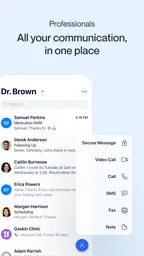

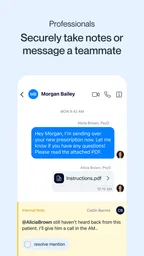


Spruce: Medical Communication review
 Analysis by Appsdrops
When I first open Spruce, I think less about it as another general-purpose messaging app and more as a place for healthcare communication. That distinction matters: if you are looking for a way to keep conversations with a care team organized, it may suit you better than juggling texts, calls, and separate apps. If you simply want a private messenger for friends, its medical focus is probably more than you need.
Spruce is a free medical app from Spruce Health, built around communication and care. It has an average rating of 4.9 from around 18,000 ratings, and has been installed over 500,000 times. Those figures suggest that many people have found a reason to keep using it, but they do not tell you whether it fits your particular clinic or care arrangement. The practical first question is whether the healthcare professional you want to reach uses Spruce.
What to expect from a healthcare-focused app
The central promise is a more appropriate channel for healthcare conversations than ordinary texting. Spruce describes its platform as designed for HIPAA-compliant communication and care. For a patient, that points toward a professional setting for communicating with a participating provider; it is not a guarantee that every message will receive an immediate reply or replace an appointment.
I would set expectations accordingly. A messaging tool can make it easier to ask a concise question or keep a conversation in one place, but it cannot examine you, interpret every symptom safely, or provide emergency care. If something feels urgent or severe, use the appropriate urgent or emergency service rather than waiting for an app response.
The app’s medical category is a useful clue about its intended audience, though the experience depends on the relationship around it. A provider must be part of your Spruce communication setup for the app to be useful in that way. Before spending time configuring it, confirm that your clinic or clinician works with Spruce and ask how they want patients to use it.
That is also the main difference from the usual alternatives. Text messages are familiar but can mix care questions with personal chats; email can be slow and scattered; phone calls are better for nuanced or time-sensitive discussions but may require coordinating schedules. Spruce is most appealing when your provider already uses it and wants routine communication handled through a dedicated channel.
Before you install: check the connection you need
For a first-time user, I would treat the provider relationship as step zero. Ask whether the person or practice you intend to contact uses Spruce, how they invite patients, and what kinds of questions they are comfortable handling through it. A quick confirmation can save you from installing an app that has no practical route to your care team.
It is also worth deciding what you want your first message to accomplish. A focused request—such as asking how to arrange a follow-up or clarifying a non-urgent instruction—is easier to handle than a long message combining several unrelated concerns. Keep sensitive details relevant to the question, and follow any guidance your provider gives about what belongs in the app.
Spruce is rated for Everyone, but that age label should not be read as medical guidance or as a substitute for a parent, guardian, or clinician helping a younger user navigate care. The important decision is whether the intended user has a suitable provider connection and understands when messaging is not the right channel.
Setting up without making it a project
Once you have confirmed that your provider uses Spruce, install the app and follow the setup prompts. I would keep the first session simple: complete the steps the app asks for, use the contact or invitation route provided by your clinic, and check that you are connected to the right care relationship before sending anything personal. The exact path can depend on how the provider has arranged access.
One useful habit is to prepare a short first message before opening the conversation. State the reason you are writing, include only the context needed to understand it, and ask one clear question. For example, if you are unsure how to follow a non-urgent care instruction, say which instruction is unclear and ask what you should do next. That gives the recipient a better chance of answering without a long back-and-forth.
Do not assume that installing the app alone creates a relationship with a clinician. The app is a communication tool, not a directory that automatically connects you to any medical professional you choose. If you cannot find the expected connection, go back to the clinic or provider for the correct invitation or setup instructions rather than sending health information to an unintended contact.
Spruce’s current version is 4.5.19, and it requires iOS 8.0 or later. That minimum operating-system requirement is helpful if you are checking an older device before installing. As with any app, a device that technically meets the minimum may still feel less comfortable to use if its software is outdated or it is slow; if setup behaves unexpectedly, checking for available system and app updates is a sensible first troubleshooting step.
Your first useful action: send one clear, non-urgent question
The first meaningful success is not completing every setting. It is confirming that you can reach the intended provider and communicate a routine question in the channel they expect. Keep the message brief, make the request explicit, and avoid treating silence as confirmation that someone has seen it. Follow the response expectations your provider has given you.
A realistic example is a patient who has received instructions after a routine visit and later realizes one detail is unclear. Rather than searching through old texts or leaving a voicemail that may not include the full context, they can use the established Spruce connection to ask a specific follow-up question. If the provider replies there, the patient has also learned which channel to use next time.
There is a trade-off in that convenience. Written messages are good for questions that can be answered clearly in a few lines, but they are not always the best format for explaining a complicated history or describing a fast-changing problem. If your message needs several paragraphs to make sense, or you are unsure whether the situation is urgent, calling the care team or using an appropriate urgent-care service may be the safer next step.
For a smoother exchange, avoid sending a stream of separate messages before the provider has time to respond. Put the key facts and question together, then wait according to the practice’s stated response routine. That small adjustment can reduce confusion and makes it easier for you to keep track of what you asked.
Common points of confusion
The biggest misunderstanding is expecting Spruce to work like a general chat app where any contact can be reached immediately. Its value depends on a healthcare connection, and communication is still shaped by the provider’s availability and workflow. If you are not sure whether a message is appropriate or how quickly it will be handled, ask the practice directly rather than relying on assumptions.
Another point to keep clear is the difference between a secure communication channel and medical advice on demand. A dedicated app can be a better place for an established care conversation than an ordinary text thread, but it does not make every kind of health concern suitable for messaging. For severe symptoms, emergencies, or issues requiring real-time assessment, choose a direct care route.
It is also easy to expect one app to replace every part of a patient’s routine. Spruce may help with communication, but you should not assume it replaces appointments, a provider’s existing records process, or other instructions from the clinic. Use it for the purpose your provider has set, and keep following their directions for scheduling and care.
Privacy deserves a practical approach rather than a blanket assumption. Spruce is presented as a HIPAA-compliant communication and care platform, but you should still use your own device thoughtfully: protect access to it, check the recipient before sharing information, and avoid putting unrelated personal details into a healthcare conversation. The professional channel helps; careful use remains part of the user’s responsibility.
Who will get the most from it—and who may not
I would recommend trying Spruce if your provider already uses it and you want a dedicated way to handle routine care-related communication. It is especially relevant for people who find phone tag frustrating or want to ask a focused follow-up without mixing it into everyday texting. The app’s medical purpose is a strength when both sides have agreed to use it.
I would skip it if your doctor or clinic does not use Spruce, if you need a broad messaging app for family and friends, or if your main goal is urgent medical help. In those cases, an existing patient portal, a phone call, or an appropriate urgent-care service may be more useful. The better choice depends on what your provider supports, not on which app sounds most convenient in isolation.
There is no need to move every healthcare interaction into Spruce just because you have installed it. Start with one low-stakes, non-urgent exchange and see whether the provider’s response process fits your needs. If the clinic continues to direct you elsewhere, follow that workflow rather than maintaining an extra app without a clear purpose.
What to do after the first successful exchange
After your first response, take a moment to learn the boundaries of the channel. Ask the practice what belongs in a message, what should be handled by phone, and what response window is realistic for routine questions. Knowing those expectations is more valuable than guessing how the app works from its interface alone.
If Spruce becomes part of your routine, keep conversations purposeful. Use one message for one main issue where possible, include enough context to identify the question, and retain any care instructions according to the provider’s guidance. This makes follow-ups easier to understand and helps prevent an important point from getting buried in a conversation that covers too much at once.
My overall view is that Spruce is worth considering as a provider-linked medical communication app, not as a standalone solution to every healthcare task. It is free, and its strong 4.9 average rating gives a first-time user some reassurance, but the decisive factor is still whether your care team uses it and explains how they handle messages. Try it when that connection exists, begin with one clear routine question, and keep calls or urgent services in reserve for situations that need faster or more detailed attention.
What we like
- Supports secure messaging between healthcare teams.
- Keeps clinical conversations organized around patient care.
- Helps reduce reliance on personal messaging apps.
- Designed for communication within healthcare organizations.
- Can make it easier to reach colleagues during care coordination.
What could be better
- Access may depend on an organization's Spruce account.
- Some features may require a paid subscription.
- Availability of tools can vary by organization settings.
- Requires an internet connection for messaging.
- Users may need onboarding to learn the workflow.





