

Spotify: Music and Podcasts review
 Analysis by Appsdrops
I’d choose a music app based on more than the size of its library. What matters day to day is whether I can get from a vague mood to something worth listening to, keep podcasts and music manageable, and control how much I spend. Spotify is a strong option when I want those activities in one place, though its best fit depends on how I listen and how much I mind working around a free tier and paid upgrades.
Spotify is a free music and audio app from Spotify AB, with a Teen content rating. It has an average rating of 4.3 from around 37 million ratings, and has passed one billion installs. Those figures suggest broad appeal, but they don’t tell me whether it suits an individual listener; the useful question is whether its mix of music, podcasts, playlists, and discovery fits your routine.
What matters when choosing a listening app
First, think about what you want to do most often. If you already know exactly which album or track you want, a straightforward player and a collection you control may be enough. If you regularly ask, “What should I put on while I work, cook, or walk?”, Spotify’s emphasis on playlists and discovery is more compelling. Its central strength is helping me move between a specific choice and a longer, more exploratory listening session.
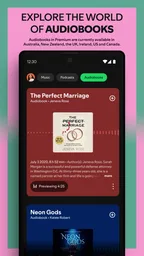
It is also worth deciding whether music and spoken audio belong in the same app for you. Keeping podcasts beside playlists can make a single listening routine easier to manage. On the other hand, listeners who prefer a dedicated podcast tool, or who organize music through files and a carefully maintained personal library, may value a different setup more.
Cost is another practical criterion. The app is free to download, while in-app purchases are listed from $4.99 to $203.88 per item. That wide span makes it sensible to check the purchase details shown in the app store and the options presented in the app before committing. I would start with the free experience, learn which restrictions actually affect me, and only then decide whether paying solves a real annoyance.
Turning discovery into a useful routine
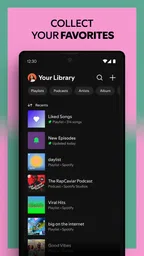
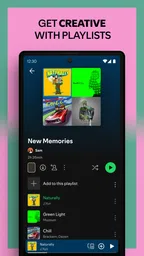
Spotify is particularly useful when I don’t want to build every listening session from scratch. Playlists let me group music by activity or mood, while discovery gives me a way to branch out from familiar listening. A practical habit is to keep a few playlists with distinct purposes rather than one enormous catch-all: one for focused work, one for a commute, and one for newer finds. That separation makes it easier to choose something quickly and notice which recommendations are worth keeping.
There is a trade-off in letting an app guide discovery. Recommendations can reduce the effort of searching, but they may also keep serving variations on what I already play. When that happens, I find it useful to deliberately search beyond my usual artists or switch from a familiar playlist to a specific album or podcast. Treating recommendations as a starting point, not a complete picture of my taste, keeps the experience from feeling repetitive.
Playlists are also more useful when they reflect how I actually listen. For example, I can make a short queue of reliable tracks for a routine that needs predictable background sound, while keeping a separate playlist for experiments. That way a recommendation I like doesn’t have to displace music I depend on. It is a small organizational choice, but it makes a large library feel more personal and less like a feed I have to keep correcting.
One app for the walk, the kitchen, and the desk
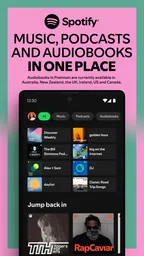
Imagine leaving home with a podcast, switching to music for the walk, then putting on a playlist while preparing dinner. Spotify’s appeal in that ordinary scenario is the ease of keeping different kinds of listening together. Rather than deciding in advance that every session must be an album or every spare moment must be a podcast, I can choose according to the task and my attention.
That flexibility is valuable if your day has several short listening windows. A podcast may suit a walk where you can follow a conversation; instrumental or familiar music may be better when you need to concentrate. I would still choose deliberately: spoken audio can distract during work that requires language-heavy thinking, and discovery-heavy music can interrupt a task if I’m constantly stopping to save tracks. A dependable playlist is often better for concentration than exploring new recommendations.
For a commute or other routine where connectivity may be unreliable, it is important to plan around the listening controls and options available in your account and app. I would check what is available for offline listening before relying on it, rather than assuming that every track or episode will be ready without a connection. This is especially worth doing before a trip: open the content you intend to use, confirm it is accessible in the way you expect, and avoid leaving that check until you are already offline.
Where it stands against other listening approaches
Compared with a service focused mainly on personal music files, Spotify is more appealing to someone who wants discovery, ready-made listening paths, and podcasts in the same environment. A personal-library approach can be better for someone who wants direct control over a carefully curated collection and does not need recommendations to fill listening time. These are different priorities rather than a universal winner: convenience and exploration pull one way, ownership and hands-on organization another.
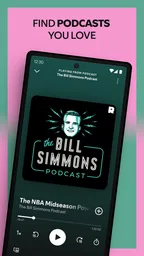
Against podcast-first apps, Spotify’s advantage is convenience for people who move between spoken shows and music. A dedicated podcast app may feel more natural if nearly all your listening is episodes and you want your listening habits centered on that format. Likewise, someone who cares most about a particular ecosystem or an existing collection should compare how well each service fits their devices and habits rather than assuming a popular app will automatically be the easiest one to use.
Spotify has been available since May 27, 2014, and its broad reach is a reason many people will encounter it, not a reason everyone should switch. The best comparison is your own week: note whether you spend more time searching, replaying saved music, browsing recommendations, or following podcasts. If the main frustration is finding something suitable, Spotify’s discovery-led approach is likely to help. If your frustration is lack of control over a personal archive, another kind of player may be a better match.
The friction to consider before switching
Changing listening apps is not just a matter of installing something new. Your existing playlists, saved choices, and habits may be arranged around another service, and rebuilding that organization takes time. Before moving, I would identify the playlists I actually return to and recreate those first, instead of trying to duplicate every old collection. That focused approach makes it easier to judge the new app on real use rather than on how long the setup takes.
There is also a difference between trying an app for free and deciding that its paid options are worthwhile. If you mainly listen casually and are comfortable with the free experience, an upgrade may not be necessary. If a limitation repeatedly interrupts a daily routine, then it may be worth comparing the available in-app purchase choices with your budget. Because the listed purchase range is broad, I would read the specific terms for the option I’m considering instead of treating the highest or lowest figure as a typical cost.
Some listeners may also prefer not to combine all their audio habits in one place. Keeping podcasts separate can make a listening queue feel clearer, and using a personal music library can provide a more deliberate sense of ownership. There is no need to move everything just because Spotify can handle several types of audio. A mixed setup is reasonable if it gives you better control, though it does mean maintaining more than one app.
Who I’d recommend it to
I’d recommend Spotify to someone who wants music discovery to be part of listening, makes playlists for different situations, and enjoys having podcasts nearby without treating them as a separate hobby. It is also a sensible first app for a listener who is still learning what they like: searching for familiar artists can lead into playlists and recommendations, and saved collections can gradually become more personal.
I would be less enthusiastic about it for someone who wants a strictly local music player, dislikes recommendation-led browsing, or listens almost exclusively to podcasts and prefers a dedicated way to manage episodes. It may also be the wrong choice if a free listening experience already meets your needs elsewhere and you have no desire to rebuild playlists. Popularity alone is not a reason to switch; the app should make a routine easier, not add another place to maintain.
My practical suggestion is to try it with one real use case rather than judging it from a quick scroll. Make a playlist for a regular activity, search for one podcast you already follow, and see whether discovery finds anything you would genuinely save. If those actions feel natural, Spotify is a capable all-in-one companion for everyday listening. If you keep reaching for another app to organize your collection or follow shows, that is a good sign that a more specialized alternative may suit you better.
Overall, I see Spotify as a good choice for listeners who value flexibility and help finding what to play, with the strongest case for people who move between music and podcasts throughout the week. Its free starting point makes it easy to test, while in-app purchases give listeners options to consider if the experience’s limits become relevant. I’d choose it for discovery and convenience, but I’d keep a different tool in mind for a library-first or podcast-first routine.
What we like
- Personalized playlists make it easy to find music for different moods.
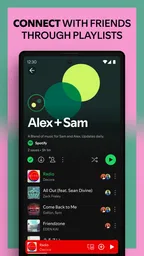
- Collaborative playlists let friends build a shared music queue.
- Crossfade creates smoother transitions between tracks.
- Offline downloads keep selected music available without a connection.
- Spotify Connect makes it easy to switch playback between devices.
What could be better
- Offline downloads require a paid subscription.
- Free listening includes frequent ads.
- Some tracks are unavailable in certain regions.
- Downloaded songs can only play inside the Spotify app.
- Podcast availability and features vary by country.




