
Lark Player:Music Player & MP3 review
 Analysis by Appsdrops
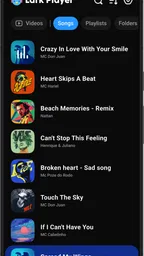
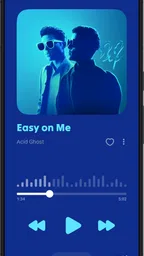
I tend to judge a music player by what happens when my routine gets interrupted: a weak signal on the commute, a track that takes too long to find, or a sudden need to switch from headphones to a speaker. Lark Player is an Android music and audio app built around listening to music stored on a device, with playback controls and sound-shaping options that make it more than a bare-bones player. Its appeal is practical rather than flashy: it gives local listening a dedicated home, while features such as an equalizer, lyrics, themes, and playback modes let you adjust the experience to suit the moment.
Listening when the connection changes
Network conditions matter differently in a local music player than in a streaming service. When I want a particular song from a collection already on my phone, I don’t want a poor connection to turn choosing music into a search for a usable signal. Lark Player is positioned for offline music playback, so it makes sense for people who want to listen to their own stored tracks rather than depend on a stream for every play. That distinction is useful on a train, during a walk through a coverage dead zone, or anywhere mobile data is unreliable.
There is an important practical distinction here: offline playback helps only when the music itself is available on the device. The app is not a substitute for obtaining or downloading tracks, and I would not choose it expecting a streaming catalogue. If your listening mostly involves discovering unfamiliar artists through online services, a streaming app is likely the better fit. If you already keep MP3s or other music files on your phone, Lark Player gives that collection a player designed around listening rather than browsing folders alone.
The app’s developer is Lark Player Studio - Music, MP3 & Video Player, and it sits in the music and audio category. It is free to install, with optional in-app purchases listed from $0.99 to $6.99 per item. The free starting point makes it easy to try as a secondary player before deciding whether it suits your habits. I would check any purchase screen carefully rather than assume every visual or playback option is included at no cost.
What happens before a song plays
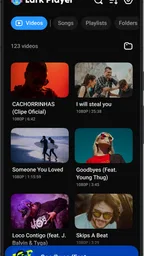
A local player’s usefulness depends on how quickly it gets from opening the app to the right track. In everyday use, I find the strongest reason to keep a dedicated player is avoiding the extra steps involved in opening a file manager, locating a music folder, and selecting songs one at a time. Once your collection is available to the app, music controls, play modes, and the equalizer are more relevant than network speed.
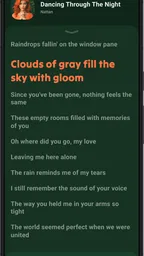
Lyrics are another feature that changes the feel of listening without changing the source of the music. They can make a familiar track easier to follow or help when you want to sing along, but their value depends on whether lyrics are available for the song you are playing. I treat them as a useful extra, not a guarantee that every file will show synchronized words. For uninterrupted listening, I would still make sure the tracks I care about are accessible locally before leaving a reliable connection behind.
On the move: commutes, workouts, and shared spaces
Lark Player is most compelling in mobile situations where I have a prepared music collection and want straightforward control. A realistic example is getting ready at home, choosing a few albums or playlists, then listening on the bus after the signal starts dropping. The key advantage is not that every part of the phone becomes independent of the network; it is that playback of music already on the device does not need to behave like a live stream.
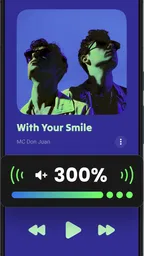
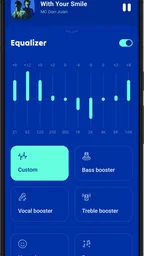
That makes it a sensible option for people who listen during commutes, travel, or outdoor exercise and prefer not to build their routine around a data connection. The equalizer can also be useful when the same headphones sound too bass-heavy with one album and too thin with another. I would make a small adjustment for the headphones I use most, then revisit it if I switch to a car stereo or speaker. A setting that sounds good through one output can be excessive through another.
For a workout, playback modes are worth setting intentionally before starting. Repeating a track or letting a collection continue can suit different routines, but the mode you used yesterday may not be what you want today. I recommend checking it when changing from a single-song mood to a longer session. It is a small habit that prevents the familiar annoyance of hearing the same track again when you expected the next one.
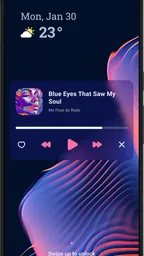
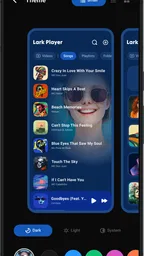
In shared spaces, themes are mostly a matter of comfort and readability rather than sound quality. They let the player feel more personal, though I would put reliable access to the music and clear controls ahead of appearance. If you usually start a playlist and leave the phone in a pocket, changing the theme may not matter much. If you browse tracks while walking or between tasks, a layout you can read quickly is more useful than a decorative choice you rarely notice.
When something goes wrong, plan for the source
Connectivity problems are not the only reason music can fail to play. A file may be missing, stored somewhere unexpected, or unavailable to the app, and an equalizer cannot solve that. When a track does not appear, I would first check that it is still on the device and in a location the player can access, then reopen the app and look again. If the file itself is damaged or absent, switching playback modes will not bring it back.
This is where a local player differs from a streaming service. With streaming, a connection or account issue may block access to a track held online. With a device-based collection, the file is the source of truth: a stable connection does not help if the music is not on the phone, while a weak connection need not interrupt playback of a file that is. That trade-off is easy to overlook when choosing an app, but it determines what kind of failure you are most likely to encounter.
For travel, I would test the exact songs I plan to hear before setting out, especially if I have recently moved or reorganized files. Start a track, move through a few others, and check that the player behaves as expected. This simple check is more dependable than assuming a playlist will work just because it was visible earlier. It also helps separate an app problem from a missing-file problem before you are away from home.
If playback is interrupted, returning to the player and selecting a known local track is a useful first recovery step. If that works, the issue may be limited to a particular file or selection. If it does not, checking the device’s music collection and the app’s access to it is more sensible than repeatedly changing sound settings. I value that kind of straightforward troubleshooting because it focuses on the likely source of the problem instead of promising that one button will fix everything.
Keeping mobile data in perspective
Choosing a local music player can help reduce reliance on continuous streaming, but it does not automatically mean the entire app experience uses no data. The practical data-conscious approach is to distinguish listening to music already stored on the phone from any activity that might require a connection. If your goal is to avoid streaming usage, prepare your music collection in advance and use the player for those files. Do not treat the word “offline” as a blanket promise about every feature or every part of the app.
That distinction also matters for people managing limited data plans. A playlist made up of local tracks is a more predictable choice for a long journey than relying on a streaming service throughout it. But if you are still searching for music online or using another connected service to obtain it, that activity has its own data demands. Lark Player’s value is clearest after the music is ready on the device, not as a way to make all music discovery data-free.
There is a storage trade-off, too. Keeping a music collection on a phone uses device space, while streaming shifts much of the library access to a network connection. If your phone is already crowded, a local collection may require pruning or careful selection. I would keep the albums and playlists I actually listen to, rather than copying everything and then struggling to find the tracks that matter. That makes browsing quicker and leaves the player’s main strength—direct access to personal music—easier to enjoy.
How it compares with other ways to listen
Against a basic file player, Lark Player offers a more music-focused set of controls, particularly the equalizer, lyrics, themes, and playback modes. Those additions matter if you regularly adjust sound or browse a personal collection. If you only tap one file occasionally, a simpler player may be enough. The choice is less about which app has the longest feature list and more about whether you will use the extra controls often enough to justify a dedicated music app.
Against a streaming service, the trade-off is more fundamental. Streaming is convenient when you want a broad catalogue and discovery without managing a collection of files. Lark Player is a better match when you already have music on your device and want playback that is not tied to a live stream. I would not replace a streaming subscription with it if exploring new releases is the main reason I listen. I would consider it alongside one if I also have a personal library, recordings, or tracks that I prefer to keep locally.
The app has an average rating of 4.6 from around 5.6 million ratings, alongside roughly 27,000 written reviews and over 500 million installs. Those figures suggest that it has reached a large audience, but they do not tell me whether its workflow matches yours. The most useful test is still whether your music is on the phone and whether the app’s controls feel comfortable during the way you listen.
Who should give it a try
I would recommend Lark Player to Android users who keep a music collection on their device and want more than the simplest possible play-and-pause controls. It is especially suitable if you switch between headphones and speakers, like to adjust equalizer settings, want lyrics when available, or need a dependable way to listen where a connection may be patchy. Its Everyone age rating makes it broadly suitable from a content-rating perspective, though that says nothing about whether its features are the right match for a particular listener.
I would skip it as a primary choice if almost all your music comes from online streaming, if you need music discovery built around a large service catalogue, or if you do not want to manage files and device storage. People who prefer the fewest possible settings may also find a minimal player more comfortable. Lark Player’s optional purchases are another reason to review what is included before paying for anything; the free version is the sensible place to begin if you are uncertain.
Released on June 24, 2016, the app has had time to become a familiar option for local listening, and its reach is reflected in its install count. That history is useful context, not a guarantee that every feature will suit every device or music library. I would judge it by a short, practical trial: find a few tracks you know, test the equalizer with your usual headphones, check the play mode, and try listening in a place where your connection is weak.
My connectivity verdict
Lark Player makes the most sense when I treat it as a home for music already on my phone, rather than as an all-purpose replacement for online music services. Its value becomes clearer when the network drops out: the right local track can still be the right track, without the listening experience being built around a live stream. The trade-off is that I need to keep my collection organized and make sure the music I want is actually available on the device.
For someone who travels, exercises, or simply likes having a personal library close at hand, that is a useful balance. For a listener whose priority is endless online discovery, another kind of app will be more convenient. My advice is to try Lark Player with a small set of familiar songs before moving a whole collection over. If the controls, sound adjustments, and local playback fit your routine, it can earn a place on your phone; if you rarely play music stored there, its strengths may not be strengths you need.
What we like
- Plays common audio formats including MP3 and FLAC.
- Includes a built-in equalizer for sound adjustments.
- Supports background playback while using other apps.
- Offers customizable themes to personalize the player.
- Lets you create playlists for different listening moods.
What could be better
- Contains ads that may interrupt the listening experience.
- Some features may require extra permissions to work.
- Audio quality depends on the source file and device.
- The interface may feel crowded with its many controls.
- Not every advanced feature is available offline.





