


Music Player & MP3 Player review
 Analysis by Appsdrops
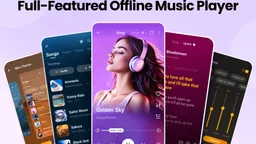
When I need music on a commute, at the gym, or somewhere with an unreliable connection, an offline player can make listening feel refreshingly simple. Music Player & MP3 Player is built around that everyday need: it lets you play music without depending on an internet connection. Rather than framing itself as a streaming service, it focuses on the familiar task of listening to music already available on your device.
A straightforward way to listen offline
The appeal is easy to understand. You choose music, start playback, and take it along for the day. That makes this offline music player a practical option for travel, workouts, and the daily commute, when a dependable connection may not be part of the plan. I like the clarity of that purpose: the app is about playing music, not making you rethink how you listen.
For anyone searching for a music player and MP3 player on Android, that direct approach is a useful starting point. It suits people who already keep music on their device and want a dedicated app for listening. If your main goal is to browse a streaming catalog or discover new releases online, this is a different kind of tool. Its central promise is offline playback, so the experience makes most sense when you bring your own listening library.
From having music to pressing play
The real-world workflow begins before the first song: you need music available to play. Once that starting condition is met, the job of the app is simple—get you from choosing a track to listening without unnecessary ceremony. That makes it easy to picture using it at home before leaving, then continuing with your music while heading to work or starting a workout.
I find this kind of focused setup useful because it keeps the listening goal in view. There is no need to treat every session as a search for something new. You can use the app for the music you already know you want, whether that means setting up a commute playlist in your own routine or picking something to accompany exercise. The important handoff is from your available music to playback, and the offline-first idea gives that handoff a clear purpose.
How the everyday flow feels
A good listening routine is often made of small steps: decide what you want to hear, open the player, choose the music, and get on with the day. Music Player & MP3 Player is positioned for that kind of repeat use. It is not trying to turn a quick listening moment into a bigger project. For me, that is a sensible fit for a utility app, especially when I want background music rather than another service to manage.
For travel, the benefit is having a way to listen when a connection is not convenient. On a commute, it can serve as the dedicated place to start your music before settling in. At the gym, it offers the same basic idea: bring your listening with you and press play when you are ready. These are ordinary situations, but they show why offline playback remains valuable even when online music services are widely used.
The workflow also has a natural boundary. The app can play music that is available to it, while choosing and maintaining that collection is part of the listener’s own routine. I see that as a trade-off rather than a flaw: people who prefer a personal library may appreciate the directness, while listeners who expect a ready-made catalog may find the approach less suited to them.
The handoffs that matter
In an everyday music setup, there are a few handoffs to think about. First, music has to be present on the device. Next, the player needs to take over as the place where playback happens. Finally, the listener has to fit that session into a real activity—walking, working out, or travelling. The app’s offline focus is most relevant at the last stage, because it is meant to keep listening available when connectivity is not central to the plan.
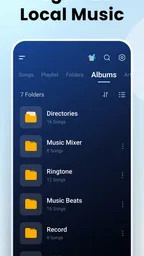
That makes the app easy to understand without a long explanation. It is a local music player in the broad, practical sense of a player for music you can access on your device, and its value depends on how well that matches your habits. If you keep a personal music collection and want a straightforward way to play it, this approach feels familiar. If your music life revolves around online discovery, the handoff from browsing to listening may not be the one you are looking for.
I also appreciate that the intended situations are concrete. “Travel, gym, and commute” are not abstract feature claims; they describe moments when a listener often wants music to be ready without making connectivity the focus. That practical framing helps set expectations. You are choosing a player for routine listening, not a full music-discovery ecosystem.
What you get out of the routine
The result of a good offline listening workflow is simple: less attention spent getting music started, and more time listening. Music Player & MP3 Player aims to deliver that outcome through a focused role. When your tracks are ready and your listening plan is clear, the path from opening the app to hearing music is easy to understand. That simplicity is the strongest part of its appeal.
It is also a useful distinction when comparing music apps. Some are built around streaming, recommendations, and online libraries; this one is presented as an offline music player. That does not make one approach universally better. It means the right choice depends on whether you want access to a service’s catalog or a player for music you already have available. For a commute where I want my own selection, the offline angle is the feature that matters most.
The app has broad reach, with over 100 million installs and a 4.7 average rating from around 4.5 million ratings. Those figures suggest that many Android users have chosen it, though popularity alone cannot tell you whether its style fits your own listening habits. I would treat them as useful context, then make the decision based on the basic question: do you want a dedicated player for offline music?
Where the flow can feel limiting
The same focused workflow that makes the app easy to place in a routine also defines its limits. If you expect the player itself to supply a large online catalog, music discovery, or a streaming-first experience, an offline-focused tool may not match that expectation. The best way to avoid disappointment is to think about what you want to happen after opening a music app: if the answer is “play music I already have,” this concept is a good fit; if it is “help me find something new online,” you may want a different kind of app.
There can also be friction before playback if your music is not ready on the device. That is not a special complication so much as the natural starting condition of an offline player: the listening session depends on having music available. Once you account for that, the workflow is easy to describe, but it is worth considering before choosing this over a service designed around online access.
For the right listener, these boundaries are clear rather than confusing. You are not being asked to make an offline player behave like a streaming platform. You are choosing a tool for a particular job and judging it by how well that job suits your day. I would consider it most useful for people who value a direct route from their own music to playback during travel, exercise, or commuting.
Who should give it a try?
Music Player & MP3 Player is free to download and is made by InShot Inc. It is rated for Everyone, and the app includes optional in-app purchases priced from $0.99 to $6.99 per item. It was released on June 9, 2017, and its current version is 4.4.1.189. Android support starts at version 7.0, making it relevant to a wide range of Android devices that meet that requirement.
I would recommend considering it if you already have music ready to play and want an app with a clear offline purpose. It can make sense for a listener who wants a dedicated place for music during a commute, a trip, or a gym session, without making an internet connection the center of the experience. The key is to match the app to the way you actually listen, rather than expecting it to replace every kind of music service.
Overall, this is a straightforward choice for Android users looking for an MP3 player for offline listening. Its strongest point is the simple workflow: have music available, open the player, and listen when it suits you. The main friction comes from the same source as its focus—listeners who want online discovery or a built-in streaming catalog may prefer another approach. If your priority is carrying your own music into everyday moments, I think Music Player & MP3 Player is an appealing, practical option.
What we like
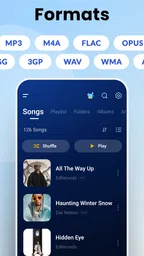
- Supports common audio formats for flexible local playback
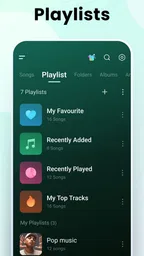
- Playlist controls make it easy to organize listening
- Background playback lets music continue while using other apps
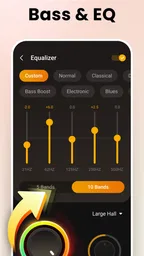
- A built-in equalizer helps tailor the sound
- Offline playback avoids using mobile data
What could be better
- Some advanced features may depend on the device
- Audio quality depends on the source files and headphones
- Large music libraries can take time to scan
- The interface may feel cluttered to first-time users
- Battery use can increase during extended playback





