




StarMaker: Sing Karaoke Songs review
 Analysis by Appsdrops
StarMaker makes most sense if you want singing to be an activity you can record, revisit, and share—not merely a way to follow lyrics while a song plays. I like that it brings karaoke, vocal practice, and a social layer together in one music app. That combination gives it more personality than a basic sing-along tool, though it also means the experience is busier than a private practice session needs to be.
A karaoke app with a social side
At its best, StarMaker turns a spare moment into a small performance project. You pick a song, sing along, and use the recording tools to shape the result. You can keep working on your voice or share a take with other listeners. The appeal is not that every recording will sound studio-polished; it is that making and exchanging performances is part of the experience rather than an afterthought.
That distinction matters when choosing among music apps. A streaming service is better for listening to finished tracks, while a straightforward karaoke player may be better if you only want lyrics and accompaniment. StarMaker sits between those uses: it asks you to participate. The recording and editing angle makes it more useful for someone who wants to hear their own progress, and its social design suits singers who enjoy performing for an audience, even a casual one.
It is a free music and audio app from SKYWORK AI PTE. LTD. Its average rating is 4.3, and it has drawn around 4 million ratings. Those figures suggest broad interest, but they do not tell you whether its social atmosphere or recording workflow will suit your taste. I would judge it by how often you want to sing, not by popularity alone.
What makes the recording loop worthwhile
The most useful part of recording is the feedback it gives you. A song that feels comfortable while you are singing can reveal shaky pitch, rushed phrases, or breath trouble when you listen back. Rather than treating a take as a finished performance, I would use it as a quick practice note: choose one troublesome section, record it, listen once, and try again with a specific adjustment in mind.
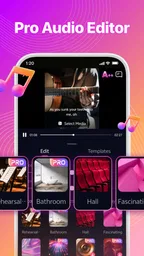
That is a more practical approach than repeatedly singing a whole song and hoping to improve by repetition. If a chorus is the problem, concentrate on the chorus. If the final line loses energy, pay attention to breathing before it. The app’s pro audio editing tools make the result more than a raw voice memo, but the most valuable improvement still comes from listening carefully and deciding what to change.
A small but important trade-off is that editing can make a take more enjoyable to share without making the underlying singing stronger. I would keep an unpolished recording occasionally, too. Comparing it with a later take gives you a clearer sense of what has genuinely improved, rather than what sounds different after adjustments.
Duets and sharing change the feel
Duets add a reason to sing with someone else instead of treating the app as a solitary practice room. They can make a familiar song feel fresh and give a less confident singer a more relaxed way to take part. Sharing also gives recordings a destination: you are not just collecting takes on your device, but putting a performance into a musical community.
The social side will not appeal to everyone. If you dislike having your singing heard, or you simply want an uncluttered rehearsal tool, the emphasis on sharing may feel like extra noise around the main task. I would also separate two goals that are easy to confuse: making something fun to post and building a reliable practice habit. StarMaker can support both, but posting a take is not a substitute for deliberately working on technique.
For a more comfortable first session, I would start with a song whose melody and lyrics you already know. That leaves less attention tied up in following the music and more room to focus on timing and vocal delivery. Record a short section before committing to a full performance, listen back, and decide whether you like the sound and editing process. This simple test helps answer the practical question of whether the app suits your voice and routine.
Where it can feel less convenient
StarMaker is built around performance, so it is not the option I would choose when I only want to listen to an album or play background music. Nor would I assume that editing can compensate for a poor recording environment. A noisy room, a distant microphone, or music that overwhelms your voice can make it harder to judge a take. A quieter corner and a consistent distance from the microphone are sensible first steps before changing anything in the editor.
There is also a difference between useful creative control and a simple practice workflow. Someone who wants to press record, sing privately, and move on may find the app’s social and performance framing unnecessary. In that case, a basic voice recorder is less distracting; a dedicated karaoke player may be preferable if lyric-following is the only requirement. StarMaker’s broader appeal is also its main complication: there is more to engage with, and not every singer wants that.
The app is free to install, but it includes in-app purchases ranging from $0.49 to $199.99 per item. That wide range makes it worth checking the purchase details before spending, especially if you are only testing whether karaoke fits into your routine. You do not need to treat an optional purchase as the first step. Try the free experience and see whether you actually record and revisit performances before deciding whether any paid item is worthwhile.
Who is likely to enjoy it
I would recommend StarMaker to people who already sing for fun and want an easy way to record, refine, and share their attempts. It is also a reasonable fit for a beginner who needs a low-pressure reason to practice: the social element can make singing feel playful instead of like homework. Someone who enjoys duets or likes hearing how a performance changes after a few attempts is more likely to return to it than a listener who only wants a karaoke track in the background.
Consider an ordinary evening after work: you have a few minutes, a song in mind, and no interest in setting up a formal rehearsal. You can record a verse, notice that you are entering the chorus too early, then try again while focusing on the transition. If the second take feels better, you have both a small practice win and the choice to share it. That is a realistic use of the app’s strengths without turning a casual session into a major production.
It is less suited to singers who need a structured vocal course, private recording above all else, or a simple player with no social dimension. The app can help you practice by making repeat performances and listening back convenient, but I would not mistake that for a complete singing curriculum. For instruction-led learning, a dedicated lesson resource is a better match; for private notes, a recorder is simpler.
Compatibility and the cost of trying it
StarMaker is rated Teen, so it is sensible for younger users and families to consider whether a social music environment is appropriate for them. The app has been available since November 11, 2013, and its current version is 9.22.3. It supports Android 7.0 and later. Its reach is substantial, with over 500 million installs, but a large audience does not remove the need to think about comfort with sharing and participation.
For someone deciding whether to install it, I would keep the first test focused: choose a familiar song, record one section in a quiet place, and listen back before exploring everything else. If hearing your own voice is useful and the chance to share or duet sounds appealing, the extra social layer is a real advantage. If you feel more interested in a clean, private practice session, a simpler alternative will probably serve you better.
My verdict
StarMaker is strongest when karaoke is more than a track to sing over. Its combination of recording, editing, practice, duets, and sharing gives singers a reason to repeat a performance and learn from it. I especially like the practical loop of recording a short passage, listening for one fix, and trying again; it turns casual singing into something you can improve without making it feel formal.
The compromises are clear: the social emphasis can distract, editing is not the same as vocal training, and the in-app purchase range calls for a little care. Still, for a singer who wants a playful, participatory music app rather than a plain karaoke player, I think it is worth trying for free. If your priority is privacy, structured lessons, or simply listening, choose a more focused tool instead.
What we like
- Lyrics appear in sync with the music for easier singing.
- Voice effects let you adjust your sound before sharing a recording.
- Duets make it possible to sing alongside other users.
- The catalog includes songs across multiple genres.
- Recordings can be shared with the app community.
What could be better
- Some songs and features require a paid subscription.
- A stable internet connection is needed for most features.
- The free experience may include frequent advertisements.
- Audio quality depends heavily on your microphone and surroundings.
- Public recordings may be visible to other users.





