



Speak: Language Learning review
 Analysis by Appsdrops
I judge a speaking-focused language app by a practical question: can I use it comfortably enough to practise out loud on an ordinary day, not just when I have a quiet desk and plenty of time? Speak is built around spoken practice in Spanish, French, English, and Japanese, so that question matters more here than it would in a flashcard-first course. My impression is that its clearest strength is giving learners a reason to form and say phrases rather than only recognize them. Its biggest caveat follows from the same choice: speaking is not always convenient, and spoken practice will not meet every learner’s needs on its own.
Finding your way through a speaking-first lesson
Speak is an education app from Speakeasy Labs. The basic idea is easy to understand: use your voice as part of learning, rather than treating conversation as something to attempt only after finishing a long stretch of silent study. That focus gives the app a more specific identity than a general-purpose vocabulary trainer. If your main goal is to become less hesitant when speaking one of its supported languages, the approach makes sense.
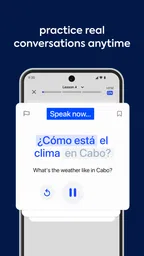
In my view, the most useful way to judge its navigation is by asking whether a learner can keep the task in mind while also listening, reading, and preparing an answer. A speaking exercise has more moving parts than tapping a translation: you need to follow the prompt, understand what kind of response is expected, and then say it. When that sequence feels clear, the lesson can keep attention on language instead of turning into a puzzle about what to do next.
That does not mean the format will feel effortless to everyone. Someone who likes to pause over every word, compare several written examples, or build a grammar rule before trying a sentence may want more explicit reference material alongside the practice. I would use Speak as a place to rehearse language actively, then keep a notebook or another reference source for questions I want to study in depth. The app’s speaking orientation is a useful learning choice, not a complete replacement for every kind of instruction.
The app has a 4.8 average from around 127,000 ratings, and it has been installed over 10 million times. Those figures suggest that many learners find the format appealing, but they do not settle whether it fits an individual’s pace, hearing, speech, or study habits. I would treat them as context, then try a short session and notice whether speaking to the app feels encouraging or self-conscious.
Reading prompts while preparing an answer
For a speaking lesson to work well, written prompts need to be readable at the moment they are useful: just before the learner responds, not only during a later review. I would pay attention to whether I can scan a prompt without losing track of the audio or the sentence I am trying to produce. Learners who benefit from seeing words while hearing them may find that combination helpful, while people who rely mainly on printed explanations may prefer to supplement it with a grammar guide.
A practical habit is to avoid rushing to answer the instant a prompt appears. I would first identify the key meaning, silently plan a short response, and then speak. This gives a beginner a little more control over the task and makes it easier to notice which part caused difficulty: understanding the prompt, finding the vocabulary, or producing the sentence aloud. It also turns a quick exercise into a more informative one without requiring a long study session.
Speaking practice and different bodies
Voice-based learning can be motivating, but it assumes that speaking is a comfortable way to practise at that moment. A learner with speech differences, a temporary sore throat, fatigue, or anxiety about being heard may not want every study session to depend on speaking. I would not force the format on those days. A written exercise, quiet review, or another kind of language practice may be a better fit until speaking feels manageable.
Likewise, anyone who has difficulty hearing spoken prompts may need to combine this app with written material that makes the target language easier to follow. That is not a reason to dismiss speaking practice altogether; it is a reminder that a voice-centred lesson can place extra demands on hearing and spoken response. If audio is hard to process, I would test a brief lesson in a calm environment and see whether the written context is enough to support it.
There is also an emotional side to motor and sensory access. Speaking a new language can feel exposed, especially when a learner is still unsure how a phrase should sound. I find it useful to treat early attempts as rehearsal rather than performance. The aim is to build a repeatable habit of trying, not to deliver a polished line every time. If a learner feels judged by the act of speaking, a lower-pressure written route may be the wiser starting point.
When a voice lesson fits into the day
Speak is easiest to imagine in a setting where a learner can listen and respond without needing to stay completely silent. A short practice break at home, a quiet corner before an appointment, or a pause between tasks can make speaking feel more natural than squeezing it into a crowded commute. The key is not finding a perfect study room; it is choosing a moment when the learner can concentrate and speak without worrying about disturbing people nearby.
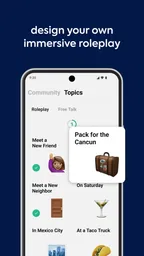
For example, someone preparing for a trip could practise a little before leaving for work, focusing on the phrases they are most likely to need. Later, they might revisit the same language in a notebook, noting any expressions that were difficult to say. That pairing turns the app into an active rehearsal tool and the notes into a personal record of weak spots. It is more useful than trying to complete a session while distracted and then forgetting which phrases felt unfamiliar.
In public spaces, the trade-off is straightforward: a speaking exercise may be awkward even when the phone itself is easy to use. I would not assume that every spare minute is suitable for this app. If speaking aloud is impractical, save the session for later rather than turning practice into a source of embarrassment or distraction. Learners who want to study silently in almost any setting may be better served by a text- or flashcard-led alternative.
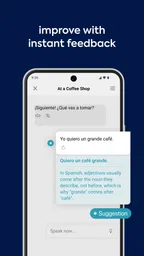
Another useful workflow is to separate confidence-building from accuracy checking. First, respond without stopping at every uncertainty. Afterward, revisit the words that felt difficult and look them up or write them down. Constantly interrupting a spoken attempt to search for every answer can break the rhythm; ignoring recurring gaps entirely can leave them unresolved. A short review after speaking gives the learner a middle path.
Choosing a language and setting realistic expectations
The app focuses on four languages: Spanish, French, English, and Japanese. That makes it a focused option for someone learning one of those, but it will not suit a learner whose current priority is another language. I would also be careful not to confuse practising speech with mastering every part of a language. Conversation involves listening, reading, writing, vocabulary, grammar, and cultural context; a voice-centred tool can strengthen one important part without making the rest unnecessary.
Compared with the usual alternatives, Speak makes more sense for a learner who wants to spend study time producing language, rather than mostly collecting words or answering recognition questions. A flashcard app is often the more convenient choice for silent practice and quick vocabulary checks. A textbook or detailed course can be better for systematic grammar explanations, while a tutor or conversation partner can respond to the learner in a more personal, open-ended way. I would choose between them based on the skill I need to improve, not on the assumption that one app should do everything.
There is room for a combination. I might use Speak to practise saying phrases, a dictionary or grammar reference to resolve questions, and a human conversation partner when I need flexible interaction. For a beginner who freezes when asked to speak, repeated low-stakes attempts could help make speaking feel less unfamiliar. For an advanced learner seeking nuanced feedback on natural phrasing, a human teacher may be more valuable. The right role for the app depends on the gap in the learner’s routine.
Cost, access, and where the friction remains
Speak is free to download, with in-app purchases listed from $14.99 to $349.99 per item. I would check the purchase details in the app store before committing to anything, especially if I am unsure how much practice I will realistically do. A free starting point lowers the barrier to trying the speaking format, but the existence of paid items means learners should make their own decision about whether the available experience and any optional spending suit their budget.
The app is rated for Everyone, and its current version is 4.74.0, with Android 8.0 as the minimum operating system. It was released on March 10, 2019. These details help someone check basic device compatibility and age suitability, but they cannot tell a learner whether the voice-led interaction itself will feel comfortable. I would try the experience on the device I plan to use and assess the real lesson flow before building a study routine around it.
One of the main limitations is not a flaw in a button or menu; it is the context the method requires. Speaking can be inconvenient in shared housing, a library, public transport, or a workplace. Another is that learners who need highly structured explanations may have to look elsewhere for that support. A third is that a voice-centred routine can be less adaptable for people who cannot or do not want to speak during a particular session. These are meaningful trade-offs, and they are reasons to use the app selectively rather than treat it as a universal solution.
For readers comparing language apps, I would ask three practical questions before choosing: Do I want to practise speaking, or mainly memorize vocabulary? Can I regularly find a moment when speaking is comfortable? Am I happy to use another resource for grammar or detailed feedback? If the answers point toward active speech practice, Speak is worth trying. If they point toward silent, highly structured study, another format may be a better everyday companion.
Who I would recommend it to
I would recommend Speak: Language Learning to learners of Spanish, French, English, or Japanese who understand that confidence comes from attempting sentences, not only recognizing them on a screen. It is especially appealing if the learner has a quiet, repeatable time for practice and wants speaking to become a normal part of study. The app’s 10 million-plus installs show that its approach has reached a broad audience, but the individual test that matters is whether a learner feels able to return and speak again.
I would hesitate to recommend it as someone’s only learning resource if they need detailed written instruction, prefer silent study, or want a human partner who can adapt each exchange to their questions. I would also suggest a different option when speech or audio makes practice uncomfortable. That is not a failure on the learner’s part; it is a mismatch between a particular learning need and a voice-first format.
Overall, I see Speak as a focused way to add spoken rehearsal to language learning, rather than a one-stop course for every learner and situation. Its most useful role is helping someone move from knowing a phrase to trying to say it, with other tools filling in the areas that need more explanation or flexibility. If that is the gap in your routine, I would give it a short, low-pressure trial. If your circumstances make speaking difficult, choose a quieter alternative and return to voice practice only when it genuinely fits your day.
What we like
- Short lessons make it easier to fit practice into a busy day.
- Speech recognition offers immediate feedback on spoken responses.
- Practical dialogues focus on useful everyday phrases.
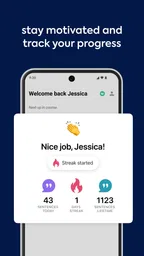
- Progress tracking helps learners monitor their consistency.
- The interface is simple to navigate for new learners.
What could be better
- Speech recognition may misjudge accents or unclear pronunciation.
- Some lessons and features require a paid subscription.
- The free experience may limit how much you can practice.
- A stable internet connection may be needed for key features.
- The course depth may not suit advanced learners seeking fluency.





