





Solv: Find Quality Doctor Care review
 Analysis by Appsdrops
Finding medical care can feel like a task of its own: you know you need help, but you may still have to work out where to go and how to get an appointment. Solv is built to make that first step easier, with a focus on telehealth appointments and urgent care. I see its main value as a clearer path from looking for care to taking action, rather than a replacement for every part of the healthcare experience.
From “I need care” to a next step
Solv: Find Quality Doctor Care is a medical app from Solv Health. Its short pitch is simple: easy telehealth appointments and urgent care. That makes it relevant when you want to explore an appointment option without beginning your search from scratch. The app is free, open to everyone by its age rating, and has a 4.7 average from around 12,000 ratings. Those figures suggest that many users have found it worth trying, though what matters most is whether its approach fits your situation.
I like the practical framing. Rather than presenting healthcare as an abstract directory problem, Solv centers the action most people are trying to take: finding a route to care. The distinction between telehealth and urgent care gives the experience a useful starting point. One route may suit someone looking for a remote appointment, while the other points toward in-person urgent care. The app’s role is to help users move toward a choice, not to make the medical decision for them.
Starting with the need, not the paperwork
In a real-world situation, the first hurdle is often uncertainty. You may be weighing whether a concern can be discussed remotely or whether an urgent-care visit makes more sense. Solv’s emphasis on both options gives that early decision some structure. Instead of treating every search as identical, it acknowledges that people arrive with different needs and are looking for different kinds of access.
That focus is useful, but it is important to keep expectations grounded. An app can help organize a search and make appointment-seeking feel more approachable; it cannot assess symptoms the way a clinician can. I would use Solv as a practical starting point for finding care, not as a substitute for professional medical advice or emergency services when those are needed.
Moving through the appointment search
The overall journey is easiest to understand as a sequence: recognize that you need care, consider the available care route, and use the app to pursue an appointment. Solv’s promise is to make that process easier, especially for telehealth and urgent care. That’s a sensible scope. It puts the attention on access and the next action instead of suggesting that an app alone can solve a health concern.
When I think about the first step, clarity matters more than a long list of features. A person who is worried or short on time benefits from knowing what kind of care they are looking for. Solv’s two-part emphasis gives the search a basic direction. It can make the process feel less like an open-ended hunt, particularly for someone who has already decided that telehealth or urgent care is the relevant kind of help.
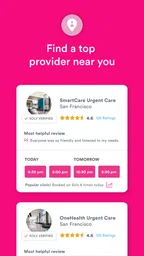
The next part is turning that direction into an appointment. This is where a care-finding app has to connect a user’s intent with an actionable option. Solv is positioned around easy appointment access, so the central question is whether it helps you move forward without making the process feel unnecessarily complicated. That is a useful standard for judging it: not whether it replaces every phone call or decision, but whether it makes the first move more manageable.
For a user who prefers remote care, telehealth can offer a different way to begin a clinical conversation. For someone seeking urgent care, the app’s other focus points toward an in-person route. Keeping those possibilities visible is a practical design choice because it reflects how people actually approach care: they want an option that fits the need in front of them, not a generic instruction to search elsewhere.
Where the handoffs happen
Healthcare apps sit between a person looking for help and the care provider who can deliver it. That means there is always a handoff: the user moves from browsing or planning toward an appointment and, ultimately, a conversation with a medical professional. Solv’s job is to support the access part of that journey. The clinician remains responsible for evaluating the concern and advising on treatment.
This division of responsibility is worth remembering. A smooth appointment search can reduce some of the effort involved in getting started, but it does not guarantee that every later step will feel equally simple. The experience can depend on the care option and the provider involved. I would treat the app as a bridge to care rather than the care itself, and I would keep any important medical details ready for the clinician once the appointment begins.
There can also be a mental handoff between deciding what kind of appointment to seek and feeling ready to follow through. That is where a straightforward, purpose-led app can help: it keeps the next action in view. Solv’s emphasis on urgent care and telehealth makes its purpose easy to grasp, which is helpful when the user does not want to spend time figuring out what the app is for before using it.
What a good outcome looks like
For me, the best outcome is not simply opening an app; it is getting closer to appropriate professional care with less confusion along the way. Solv is designed around that access goal. It can be useful to people who want to explore a telehealth appointment or urgent-care option and prefer a digital starting point for the search.
The app also has a substantial audience: it has over one million installs and around 1,800 reviews. That reach gives it visibility among people looking for care, but popularity alone cannot tell you whether a particular appointment route is right for you. I’d still judge the experience by whether it helps me identify a sensible next step and whether that step suits the kind of care I’m seeking.
Solv is free to download and use, which lowers the barrier to trying it as part of an appointment search. It was released on December 18, 2019, and its current version is 5.0.0. It supports devices running version 7.0 or later. Those basics make it easier to know whether the app is a practical option for your phone, while the more important question remains whether its care-access focus matches your needs.
Where the flow can feel less straightforward
No appointment-finding process is friction-free. Even when an app makes the search easier, the user still has to choose a care route and continue through the steps required to reach a provider. That can feel like extra work if you are already stressed, unsure what kind of care you need, or hoping for immediate answers. Solv’s clear focus helps orient the search, but it does not remove the need to make decisions or speak with a healthcare professional.
The app is also most relevant when telehealth or urgent care is the route you are considering. Someone looking for a different kind of healthcare experience may not find that this focused purpose addresses the whole task. That is not necessarily a flaw; it is a reminder to use the tool for what it is built around. A dedicated care-finding app works best when its central options line up with the user’s actual need.
Another point to keep in mind is that discovering an appointment option and receiving care are separate stages. A user may feel that the search is moving well, then encounter the ordinary coordination involved in attending an appointment and communicating with a provider. The app can help with the starting point, but the medical conversation and follow-through still belong to the healthcare relationship.
For urgent or severe symptoms, convenience should not delay getting appropriate help. An appointment app is a way to explore access to care, not a triage authority. If you are uncertain about the seriousness of a situation, seek guidance from a qualified medical professional or emergency services as appropriate. That boundary keeps the app’s role clear and helps prevent a search tool from being mistaken for clinical judgment.
A practical fit for care-seeking
Overall, Solv makes sense for people who want a digital starting point for telehealth appointments or urgent care. Its appeal is the straightforward purpose: it aims to make finding care easier and help users move from a need to an appointment-seeking action. I appreciate that focus because it gives the app a clear job without implying that technology can replace a clinician.
My take is that Solv is most useful as a bridge between deciding you need care and pursuing a suitable appointment. It can make the initial search feel more organized, while the important handoffs—to a provider, a clinical conversation, and any next steps—remain part of the real healthcare process. If telehealth or urgent care is what you are looking for, Solv is a sensible app to consider; just keep your expectations centered on access rather than diagnosis or treatment.
In short, Solv: Find Quality Doctor Care is a focused medical app for people trying to get started with telehealth or urgent care. It offers a clear entry point, has broad adoption, and costs nothing to try. Its value ultimately comes down to whether that route fits your situation. Used with realistic expectations, it can help make the first step toward professional care feel a little more manageable.
What we like
- Search for doctors by specialty and location.
- Book appointments with participating providers.
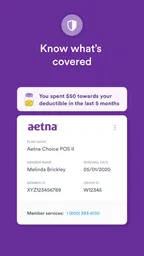
- Insurance details can help narrow provider searches.
- Telehealth options may be available for some care.
- The app can keep appointment information in one place.
What could be better
- Provider availability varies by location.
- Some doctors may not accept your insurance.
- Appointment choices depend on participating clinics.
- Telehealth access is not available for every provider.
- You may need an account to use booking features.





