



Simply Guitar - Learn Guitar review
 Analysis by Appsdrops
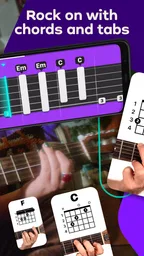
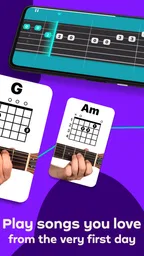
I like the idea behind Simply Guitar: instead of asking a beginner to translate pages of theory into finger movements, it turns practice into an interactive lesson that listens as you play. That makes it less intimidating than opening a video and trying to keep up alone. In my view, its strongest use is helping a new player build a regular habit and get past the awkward first steps—not replacing a teacher, a carefully chosen course, or years of practice.
Getting started without mistaking setup trouble for a bad lesson
Simply Guitar is an education app from Simply Ltd, and the appeal is its direct, hands-on approach to learning. It is free to download, rated for Everyone, and has reached over 10 million installs. Its 4.6 average from around 368,000 ratings suggests that many learners find the format useful, though a high rating cannot tell you whether its listening method will suit your room, guitar, or playing style.
The first useful check is the instrument itself. The app is intended to work with any guitar, so you do not need a special branded model to begin. Still, “any guitar” does not mean every setup will be equally easy for a listening-based lesson. A guitar that is badly out of tune, very quiet, or difficult to hear clearly can make early practice feel less reliable. Before blaming a lesson, tune the instrument using a method you trust and try a few clear, unhurried notes in a reasonably quiet space.
Keep the phone or tablet close enough to hear the guitar clearly, but do not place it where your strumming hand will knock it over. If the app seems not to register a note, pause and play one string at a time with a firm, clean attack. Beginners often press too lightly or let a fingertip touch a neighboring string; both can make a note sound muted or messy. That is not merely a technical nuisance: learning to notice the difference between a clean note and a dead one is part of developing good guitar habits.
It also helps to separate instrument setup from lesson difficulty. If the app responds inconsistently, first check tuning, room noise, and how clearly you are picking. If one note is repeatedly difficult to play cleanly even when you slow down, inspect your fretting-hand position rather than rushing through the exercise. These simple checks cannot solve every recognition issue, but they are a sensible first pass before restarting a lesson or deciding the app is not working.
Make the first session small enough to finish
A common beginner mistake is treating the first session like a test of commitment: sit down for a long stretch, force stiff fingers through several exercises, then avoid the guitar for a week. I would do the opposite. Set aside a short, repeatable practice window and stop while you can still play attentively. The app is most useful when the lesson becomes a cue to pick up the guitar, not a reason to attempt an exhausting marathon.
For example, imagine you have a spare quarter-hour after dinner. You can take out the guitar, make sure it is in tune, work through a focused lesson, then replay a troublesome passage slowly before putting the instrument away. That modest routine is more realistic than waiting for a free afternoon. It also gives you a clear way to judge progress: are the same notes becoming cleaner, and are you more comfortable moving between the shapes you have practised?
One practical tip is to leave a brief note for yourself after practice: which movement felt awkward, and what should you try first next time? That small reminder helps you return with a specific goal instead of tapping through lessons without noticing what needs work. It is especially useful when your practice sessions are short or spread across busy days.
Recover your rhythm when a lesson goes wrong
When a passage falls apart, repeating it at full speed can teach your hands to repeat the mistake. I would stop, identify the part that fails, and simplify the movement. For a difficult chord change, form the next shape slowly before strumming; for an unclear single note, place the fingertip close behind the fret and pick only that string. Then return to the lesson and see whether the sound is cleaner. The point is not to outsmart the app, but to make the physical action easier to hear and correct.
If the lesson seems to lose track of your playing, avoid changing several things at once. Pause, check that the guitar is still in tune, reduce nearby noise if possible, and try the same short phrase again with an even attack. If it still feels inconsistent, stepping away and returning later may be more productive than fighting the screen. A phone microphone can only work with the sound it receives, and room conditions or playing technique can affect what it hears.
Use repetition selectively. Replay the smallest section that exposes the problem rather than restarting a whole practice session every time one change is clumsy. That is a useful workflow for beginners because it reduces frustration and makes improvement easier to notice. If a lesson feels too easy, on the other hand, do not rush just to clear it: clean timing and relaxed movement are more valuable foundations than moving ahead with tense hands.
What the app can teach—and what still takes practice elsewhere
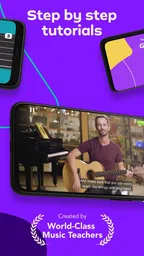
Interactive lessons have a real advantage over passive videos: you are expected to pick up the guitar and respond, rather than simply watch someone else play. For a beginner who does not know where to start, that structure can make practice feel less vague. It is also less socially demanding than arranging lessons in person, and more guided than searching for disconnected tutorials whenever a new question appears.
But a guided app and a human teacher solve different problems. A teacher can watch your posture, notice tension, adapt an explanation, and answer a question in the moment. Simply Guitar is a better fit when you want a convenient starting point and can work independently; personal instruction is preferable if discomfort persists, you need tailored feedback, or you have a specific musical goal that a general learning path does not address.
It is also not the best choice for every guitarist. If you already play comfortably and mainly want advanced harmony, improvisation, detailed music reading, or feedback on expressive performance, a beginner-oriented interactive lesson format may not go deep enough for your needs. A book or theory course can be better for systematic notation study, while a focused video resource may suit someone who wants to learn a particular song or technique. The right alternative depends on whether you need structure, depth, or a person who can respond to your playing.
There is a practical difference between learning guitar and learning to follow a lesson sequence. App guidance can help you practise the material it presents, but you will still need patience to build fingertip comfort, coordination, timing, and the ability to make music beyond an exercise. If you want to accompany songs, consider setting aside some practice time to apply what you have learned to music you enjoy. That transfer is where a routine begins to feel rewarding rather than like a series of screen prompts.
Costs, compatibility, and choosing how far to commit
The app is free to install, with in-app purchases ranging from $9.99 to $269.99 per item. That broad range is worth considering before treating the free download as a promise that every learning option will cost nothing. I would first see whether the lesson style suits your attention and your guitar, then make a deliberate decision about any purchase rather than paying because a practice session has become frustrating.
Its current version is 9.8.1, and it requires Android 7.0 or later. Those details matter if you are setting it up on an older device: check the device’s software version before planning your practice around the app. The Everyone age rating makes it suitable for a broad audience, but younger learners may still benefit from an adult helping with instrument setup and keeping practice sessions manageable.
Because the app depends on listening to your instrument, the physical setup matters more than it would for a text-based course. A quiet corner, a tuned guitar, and a stable place for the device can remove avoidable friction. If you practise in a noisy shared room, try a calmer time or location before judging the lessons. If your guitar itself is uncomfortable to play or frequently sounds poor, getting the instrument checked or asking an experienced player for help may do more than changing apps.
My verdict: a useful first guide, not a substitute for every kind of learning
I would recommend Simply Guitar to someone who owns a guitar, feels unsure how to begin, and wants a guided reason to practise regularly. Its interactive approach makes the first steps more approachable than piecing together random videos, and the ability to use an ordinary guitar keeps the starting point practical. It is particularly appealing if you learn best by trying something immediately and hearing whether your attempt is close.
I would be more cautious if you expect the app to diagnose every mistake, teach advanced musicianship, or make progress effortless. Listening feedback can be affected by tuning, technique, and surroundings, and no lesson path can do the physical practice for you. If you get stuck, check the guitar and playing conditions first, slow the troublesome movement, and give yourself time to repeat it cleanly. If what you need is individualized correction or a more advanced curriculum, a teacher or a specialist resource is likely a better fit.
Overall, I see Simply Guitar as a practical doorway into learning, with the best results coming from brief, attentive sessions and realistic expectations. The app can help turn “I should learn guitar someday” into a repeatable routine. Whether that routine is enough depends on your goals: for a beginner who wants structure and a friendly nudge to pick up the instrument, it is a sensible place to start; for deeper or highly personal instruction, it should be one tool among others.
What we like
- Guided lessons make it easier for beginners to get started.
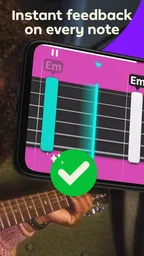
- The app listens while you play and offers immediate feedback.
- Short practice sessions fit easily into a daily routine.
- Lessons cover songs alongside foundational guitar skills.
- The interface is clear and straightforward to navigate.
What could be better
- A guitar is required to use the interactive lessons.
- Some content may require a paid subscription.
- Background noise can affect note recognition.
- Progress depends on consistent practice outside the app.
- The lesson path may feel restrictive for experienced players.





