
Simply Draw: Learn to Draw review
 Analysis by Appsdrops
I like drawing apps best when they help me get past the blank page instead of promising instant artistic talent. Simply Draw: Learn to Draw is an education app built around guided lessons, and its appeal is straightforward: it gives beginners a sequence to follow rather than asking them to figure out every line alone. I’d consider it for someone who wants a low-pressure way to practise drawing, especially in short sessions at home or during a break.
What the free starting point is worth
Simply Draw is free to download, which makes trying its approach an easy decision. The app also offers in-app purchases, with listed items ranging from $14.99 to $119.99 each. That is a wide span, so I would not treat “free” as proof that every lesson or learning path is included at no cost. Before committing to a purchase, I’d check the exact item and what it unlocks in the app store.
That distinction matters more here than it would in a one-off drawing tool. Lessons are the product’s central idea, so the value depends on how much guided practice you can use without paying and whether a paid option matches your goals. If you only want to try drawing a few times, start free and see whether you enjoy following the instruction. If you already know you want a regular course-like routine, compare the purchase options carefully rather than assuming the largest item is automatically the best value.
The app is made by Simply Ltd and sits in the education category. It has a 4.7 average from around 361,000 ratings, with about 4,600 written reviews, and has passed 10 million installs. Those figures suggest that many people have tried it, but they can’t tell you whether its teaching style suits you. For that, the most useful test is whether you can follow a lesson comfortably and feel motivated to finish the drawing.
How guided practice changes the drawing experience
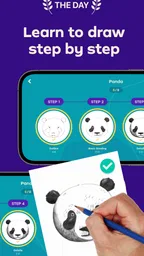
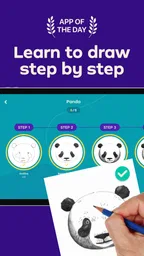
The main benefit of step-by-step instruction is not that it removes the need to practise; it gives practice a shape. Instead of staring at a reference and wondering where to begin, you can focus on the next small task. That is especially helpful if you have never learned to break a subject into parts, or if you tend to abandon sketches because the first lines don’t look right.
I’d use a lesson as a warm-up rather than treating each finished picture as a test of talent. Follow the sequence once, then try drawing the same subject again from memory or with the instructions put aside. That second attempt is a more honest check of what you learned. It also turns a guided exercise into a practical skill, instead of a picture you can only reproduce while being prompted.
A useful everyday scenario is a short evening session after work or school. You can choose a lesson, set aside a few minutes, and work through one part at a time rather than needing to plan a whole study session. If you have a notebook and pencil nearby, keep them ready before opening the app; switching between an instruction screen and a separate drawing surface can interrupt concentration. If you draw directly on a phone or tablet, the comfort of that setup will depend on your device and how much space you like to work with.
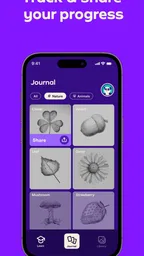
One small but valuable habit is to pause before each new step and predict what it will ask you to do. That turns passive following into active observation. Another is to save or keep your attempts in sequence, if your own setup allows it: comparing an early sketch with a later one can make improvement easier to notice than judging a single drawing in isolation. These are simple ways to get more learning from a guided lesson without expecting the app to do the practising for you.
At the time of writing, the current version is 1.21.0, and the app’s listed release date is October 30, 2025. The minimum operating system is 11, so device compatibility is worth checking before you plan to use it. Its content rating is Everyone, which makes it broadly suitable for a shared household, though a parent should still decide whether any purchase is appropriate for a child using the device.
Where it may feel limiting
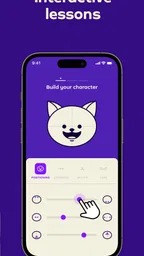
Guided lessons are a helpful starting point, but they can also narrow the kind of drawing you do. If you want to invent characters, develop a personal style, work from complex references, or learn anatomy and perspective in depth, following a sequence may not take you far enough. In those cases, a structured art course, a dedicated reference library, or a blank-canvas drawing app may suit you better. Those options ask more of you, but they can give you greater freedom to choose the subject and method.
There is also a difference between copying a result and understanding why it works. A step-by-step prompt can help you complete a drawing while leaving questions about proportion, light, or shape unanswered. To avoid getting stuck in imitation, occasionally change the subject, draw it at a different size, or sketch it without looking at the lesson. If that feels difficult, it is a sign to slow down and practise the underlying shapes rather than simply moving on.
The purchase range calls for a little restraint. A higher-priced item may be worthwhile for someone who uses the lessons consistently, but the price alone cannot establish how much content it covers or how long that content will remain useful to a particular learner. I’d first try the free experience, note which parts I actually return to, and then decide whether a purchase solves a real problem. That approach is safer than paying because the app feels promising on the first day.
Another trade-off is screen-based instruction. Some people learn well by watching or following directions on a device; others prefer a teacher who can respond to their individual mistakes. Simply Draw’s guided format can give you a route through practice, but it should not be mistaken for personal critique. If your main goal is feedback on your own drawings, look for a class, community, or instructor alongside any app-based practice.
Who is most likely to get value from it?
I’d recommend trying it if you are a beginner who wants a clear first step, or if you have drawn before but struggle to practise regularly without a prompt. It may also work well for a parent looking for an approachable creative activity to explore with a child, provided the adult handles decisions about optional purchases. The Everyone age rating is reassuring for broad access, but it doesn’t replace a family’s own rules around screen time and spending.
It is less suited to someone who already has a strong drawing routine and wants advanced technical instruction, detailed critique, or complete freedom to build a project from scratch. It may also disappoint anyone expecting an app to make them noticeably better without repeated effort. The best fit is a learner who enjoys small, directed tasks and is willing to repeat them, experiment, and occasionally draw without prompts.
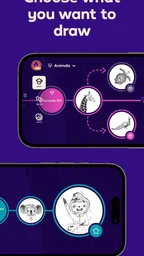
Compared with a blank-canvas art app, Simply Draw prioritizes instruction over tools for creating and editing artwork. Compared with free drawing videos, its appeal is the guided, lesson-focused format; the trade-off is that you should judge its paid options against the amount of structured practice you personally want. If you mainly need brushes and an open workspace, choose a drawing app. If you want help deciding what to draw and how to begin, this is the more natural place to start.
My buy-or-skip verdict
I’d start with the free download, try several sessions, and pay only if the way the lessons guide you makes drawing easier to return to. The app has a strong user rating and broad reach, but neither is a substitute for checking whether its teaching style clicks with you. Its free entry point lowers the risk of testing that fit, while the in-app purchase range makes it sensible to inspect each option before spending.
Simply Draw: Learn to Draw is most worth considering as a beginner’s practice companion, not a complete art education. I’d keep it if I found myself drawing more often and learning to break subjects into manageable steps. I’d skip a purchase—or choose a different tool—if I wanted advanced instruction, personal feedback, or an unrestricted canvas more than guided lessons. That is the clearest way to judge its value: not by how impressive a finished picture looks, but by whether it helps you pick up a pencil again tomorrow.
What we like
- Step-by-step lessons make drawing easier for beginners.
- Short exercises are convenient for quick practice sessions.
- Simple instructions help users follow each drawing stage.
- A range of subjects offers variety for practice.
- Finished drawings can provide a sense of progress.
What could be better
- Some lessons or features may require a subscription.
- The guided approach offers limited room for creative freedom.
- Progress may feel slow for users seeking advanced techniques.
- Small screen space can make precise drawing difficult.
- The app depends on a compatible touchscreen device.





