
Remind: School Communication review
 Analysis by Appsdrops
When I judge a school communication app, I care less about how many tools it claims to have and more about whether a message reaches the right people without adding another chore to a teacher’s day. Remind is built around that practical problem: it gives educators, families, and students a shared place for school-related communication. I see its strongest case in communities that need a clearer channel than scattered texts, paper notices, and email threads.
Deciding whether Remind fits your school routine
Remind is an education app from Remind101, and its focus is communication rather than managing every part of a class. That distinction matters. If your main need is to pass along a schedule change, remind a group about an assignment, or keep families informed, a dedicated communication app can be easier to use than a general-purpose classroom platform with many unrelated tools.
The app is free, has an Everyone age rating, and is listed at version 15.8.3 for devices running OS 9 or later. Its average rating is 4.3 from around 227,000 ratings, with about 72,000 written reviews and over 10 million installs. Those figures suggest broad adoption, but they do not guarantee that a particular school or family will use it consistently. The important question is whether the people you need to reach are willing and able to use the same channel.
I would start by asking three things: who needs to send messages, who needs to receive them, and what communication habit the app is meant to replace. If families currently miss notices because they arrive through several different routes, a shared school-focused channel may help. If everyone already checks one reliable platform, adding another app could create more noise instead of reducing it.
What it does well in everyday school communication
The most persuasive use case is routine, time-sensitive information. Imagine a teacher needs to tell families that a classroom activity has changed, or a school wants to send a reminder before an event. A dedicated channel makes the message easier to distinguish from personal conversations and unrelated email. For parents balancing work, appointments, and school commitments, that separation can make a practical difference.
It can also help educators keep communication connected to a class or school context. A teacher who wants to share a reminder with a group does not have to treat every update as an individual conversation. That is a useful shift in workflow: instead of sending the same basic note repeatedly, the educator can think in terms of a common audience and reserve personal follow-up for situations that genuinely need it.
One non-obvious benefit of using a single school channel is the way it can reduce ambiguity about where a message belongs. If an announcement concerns a class, families can look for it in the place they associate with that class rather than searching through a general inbox. This works best when teachers establish predictable habits—using the channel for school updates and keeping unrelated discussion elsewhere. The app cannot create that consistency by itself, but it can support it.
For families, the value is not only receiving information; it is knowing where to look. A parent who has more than one child in school may find a focused school communication tool easier to mentally separate from workplace messages and personal chats. The trade-off is that every additional app asks for attention. I would recommend agreeing on what deserves a message and what can wait for a regular school update, so reminders remain useful rather than becoming background noise.
Small workflow choices that make it more useful
Before relying on Remind for an important announcement, I would make sure the intended group is the right one and that the people who need the information know to check the app. This sounds basic, but group communication is only effective when audience and channel line up. A short test message about a low-stakes topic can help a teacher learn whether families are seeing updates before using the channel for something urgent.
I would also keep messages self-contained. Put the key action, relevant time, and any necessary context together instead of assuming every reader remembers an earlier conversation. That is especially helpful for families who check messages between tasks or return to them later. A focused note is easier to act on than a long chain of loosely related updates.
Another useful habit is to separate announcements from conversations in the teacher’s own planning, even when both concern the same class. A reminder should make the next step clear; a personal question may need a more considered reply. Treating every message as an invitation to an immediate back-and-forth can turn a simple communication tool into an always-open workload. I would set reasonable expectations with families about what kinds of messages belong there and when a response is likely.
For schools, the app is most helpful when staff share a basic communication convention. If one teacher posts every minor detail while another uses the channel only for major changes, families may struggle to judge what deserves attention. A simple local agreement—what to send, how clearly to label it, and which matters need another route—can be more valuable than adding more messages.
When a different kind of tool is a better choice
Remind is not automatically the best answer for every classroom. If your priority is building and grading assignments, organizing learning materials, or tracking academic work in depth, a learning-management or classroom platform may be a better primary tool. Those products are designed around teaching workflows; a communication-focused app is better viewed as a channel for keeping people informed.
Likewise, a school that already has a dependable parent portal may not need families to adopt another place for announcements. A portal can make sense when the school wants communication to sit alongside records or other administrative tasks. Email may remain preferable for longer, formal messages that staff and families need to file or discuss in detail. Text messaging can feel more immediate for a small, informal group, though it may blur the boundary between personal and school communication.
These alternatives are not interchangeable, and I would avoid choosing based on a feature checklist alone. The right option depends on the existing habits of the community. If families already open a particular school system every day, moving a few notices to Remind may split attention. If messages currently arrive through a confusing mix of channels, a dedicated app may be the cleaner choice—provided the school commits to using it consistently.
There are also situations where a digital app should not be the only route. A family may have limited access to a compatible device or may not check app notifications regularly. For important information, schools should consider how they will reach people who are not active in the channel. Remind can support communication, but a school still needs a sensible backup plan for essential notices.
The real cost of changing channels
Because the app is free, the main cost is not a purchase; it is the effort of getting a community to change habits. Teachers may need to explain where updates will appear, families may need time to adopt the routine, and administrators may have to decide which existing channels remain in use. If staff continue sending the same announcement everywhere, the new app can increase duplication rather than simplify anything.
I would make the transition in stages. First, identify the messages that are currently most likely to be missed, then use Remind for that specific purpose while clearly telling families what will—and will not—be sent there. Once the routine feels dependable, the school can decide whether to move more communication into the app. This is less disruptive than abruptly expecting every family to abandon familiar channels.
Switching also has a social cost: people can interpret silence differently. A teacher may assume a family has seen a notice; a family may assume that an app message is not important because earlier updates were optional or duplicated. Clear expectations matter. For urgent matters, I would not rely on a new communication habit until the school has established that the relevant people are actually receiving and checking messages.
With an Everyone age rating, the app is positioned for a broad audience, but that does not remove the need for sensible school communication practices. Adults should be clear about who is expected to use the channel and how students or families should raise questions. The tool is most effective when it supports a school’s existing responsibilities rather than being treated as a substitute for thoughtful contact.
My recommendation for teachers and families
With over 10 million installs, Remind is a familiar option in school communication, and the 4.3 average gives prospective users a useful broad signal rather than a guarantee of fit. I would recommend it to teachers and schools that need a focused way to send class or school updates and are prepared to build a consistent routine around it. Families who want school messages kept apart from personal chats may find that focus especially helpful.
I would skip it as a central solution if your school already has a well-used communication system, if you need a full platform for lessons and assessment, or if the community cannot agree on one reliable place to check. In those cases, using the established portal, email, or classroom system may be less confusing. The app’s value depends on adoption, not simply installation.
My practical advice is to try it for one clearly defined communication need, such as routine class reminders, and judge whether it reduces missed messages without creating duplicate alerts. If the answer is yes, expand its role carefully. If it adds another inbox that families rarely check, choose a channel they already use. Remind is at its best when it makes school communication more predictable, not when it becomes one more place everyone is expected to monitor.
What we like
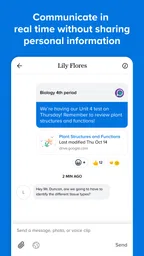
- Parents can message teachers without sharing personal phone numbers.
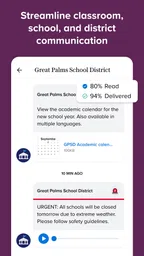
- Class announcements help families stay informed about school updates.
- Users can manage communication for multiple students in one account.
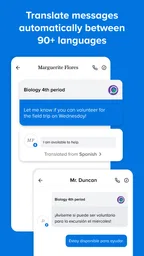
- Messages can be translated to support multilingual families.
- The app is free for families to use.
What could be better
- Access depends on the school using Remind.
- Some features require a school or district subscription.
- Message notifications can become distracting.
- Older announcements may be hard to find in busy conversations.
- Account setup may require a class or school invitation.





