



Realtor.com Real Estate & Rent review
 Analysis by Appsdrops
When I start looking for a home, I rarely have a perfect brief. I may know the part of town I want, the rent I can manage, or that I need an extra room, but not yet which trade-offs matter most. Realtor.com Real Estate & Rent is useful at that early, messy stage: it gives me a place to browse homes for sale and rentals, compare possibilities, and turn a vague idea into a more focused search. I see it as a practical starting point, not a substitute for checking a property in person or asking the right questions before making a commitment.
From a loose idea to a workable search
The app sits in the House & Home category and is developed by realtor.com®. It is free to use, rated for Everyone, and has a 4.7 average from around 569,000 ratings. More than 10 million installs suggest that it has become a familiar option for people exploring a move, though popularity alone cannot tell me whether its listings suit my particular area.
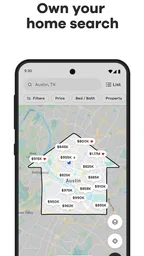
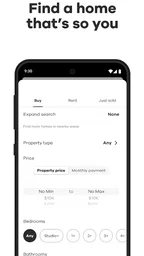
My first useful step is to decide what I am trying to accomplish before I start scrolling. Searching to rent soon is different from casually tracking sale prices, and mixing those intentions can make a large set of listings feel overwhelming. I would begin with the broad location and property type I care about, then narrow the search around the needs that would genuinely rule a home in or out.
That order matters. If I set every preference immediately, I risk filtering away a place that could work with one small compromise. If I leave everything open, I spend time comparing properties that were never realistic. I get better results by treating the first pass as a map of the market, then tightening the criteria after I see what is available.
For example, someone relocating for work might begin by comparing a few neighborhoods rather than deciding on one before understanding the local options. A renter could first identify the areas that make a commute manageable, then sort out whether an extra bedroom or a different layout is worth more than being closer to the office. The app is most helpful when I use it to make those choices visible, rather than expecting it to make them for me.
How I would work through listings
I would scan results in short sessions, opening promising listings and comparing them against the same small set of personal priorities. That prevents a common browsing trap: remembering a bright kitchen from one home, a lower rent from another, and then losing track of which property actually met the essentials. A simple note outside the app can help if I am comparing several serious candidates or sharing the search with someone else.
My first pass would separate essentials from preferences. A suitable area and a workable overall cost might be essentials; a particular finish or extra space could be negotiable. This is more useful than trying to rank every detail at once. When a listing looks appealing, I would pause to ask what information is still missing for a real decision, such as the practical fit of the location or whether the home’s condition matches its presentation.
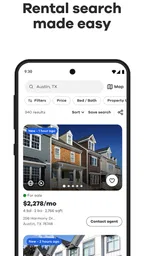
A concrete everyday use case is a renter checking options during a lunch break. Rather than trying to settle on a home in that short window, I would save the time for identifying a few candidates and noting what needs follow-up. Later, I could compare those choices with a partner or housemate. The app supports the discovery stage; the careful decision-making still happens through questions, conversations, and eventually a viewing.
For buyers, I would use the same process but resist treating a listing as a verdict on affordability or suitability. A sale price is only one part of the decision, and the app cannot replace a full review of financing, condition, location, or the costs of owning a particular property. It can help me spot homes worth investigating, but I would not let an attractive listing shortcut the work that comes before an offer.
Passing the search from screen to real life
Finding a promising property is only a handoff, not the finish line. I would use the listing as a prompt for the next conversation: contact the relevant person, confirm that the property is still available, ask questions that affect my decision, and arrange an in-person look where appropriate. Availability and details can change, so I would verify important points directly instead of assuming that a screen reflects the situation at the moment I act.
That distinction is especially important when several people are involved. A couple may disagree about location, while a parent helping an adult child may focus on different concerns from the person who will live there. The app can give everyone a shared set of candidates, but it cannot resolve those priorities. I find it useful to agree on a few deal-breakers before passing listings around; otherwise, the conversation can become a stream of attractive homes that do not fit the same plan.
There is also a handoff from browsing to judgment. Photos and listing details are a first impression, not a reliable substitute for checking noise, light, layout, upkeep, or the feel of a street. I would use the app to prepare questions for a viewing, then compare what I see with what drew me to the listing. If the answers do not line up, I would move on rather than letting the time spent browsing become a reason to overlook a mismatch.
For a person who is not ready to move, browsing can still be useful as a low-pressure way to understand what different areas offer. I would keep that exercise separate from an active search, though. Looking at possibilities can help refine preferences, but it can also create false urgency if I start treating every appealing home as an opportunity I must pursue.
What the app does well, and where I would be cautious
The main strength is the role it plays between curiosity and action. Instead of jumping immediately from a general housing search to calls or viewings, I can explore options and decide which ones deserve attention. That makes it a sensible companion for a first pass, especially when I am weighing neighborhoods or trying to understand whether my initial expectations match what is available.
Its scale is reassuring in a limited way: Realtor.com Real Estate & Rent has more than 83,000 written reviews and a 4.7 average. I read those figures as evidence that many people find the app useful, not as a guarantee that every listing is current, complete, or right for me. The app has been available since November 3, 2010, and version 27.6.0 is the current version. Those details give context, but my own experience would still depend on the listings and search needs in my area.
The trade-off is that a broad catalog can create a lot of comparison work. A list of candidates is not the same as a short, verified shortlist, and the user has to decide what deserves a closer look. I would not browse indefinitely hoping that the perfect property will announce itself. Setting a time limit for an initial scan and a few criteria for follow-up helps keep the app from becoming another source of decision fatigue.
I would also avoid assuming that the app replaces local knowledge. Someone who already knows a neighborhood may care about block-by-block differences that a listing cannot convey. A local agent, property manager, trusted resident, or in-person visit can answer questions that browsing cannot. In that sense, the app works best alongside other sources, not as the sole authority on a home.
When another approach may suit you better
If I wanted professional advice about the buying process, a dedicated conversation with a real estate professional would be more useful than simply viewing more listings. If I had already chosen a rental building and needed to handle a specific application or communicate with its management, I would go directly to the relevant provider rather than expecting a general search app to manage that relationship. The app is strongest before that point, while I am identifying and comparing possibilities.
It may also be a poor fit for someone who wants a fully guided service or finds browsing stressful. There is no benefit in having a large set of options if the next step is unclear. In that situation, I would ask a knowledgeable person to help define the search or use a more focused local resource. Likewise, if I am only seeking neighborhood advice, a map, a local community source, or a visit may answer the question more directly than property listings.
For an active search, I would keep the process grounded: use the app to discover candidates, write down what matters, verify details with the people responsible for the property, and inspect the place before making a serious decision. That routine helps prevent polished presentation from overpowering practical concerns. It also makes it easier to walk away when a listing looks good but fails an essential test.
My take after following the whole journey
I recommend Realtor.com Real Estate & Rent to people who want a free, approachable way to explore homes for sale or rent and organize the early part of a move. Its value is less about delivering a final answer than helping me reach a better next step: a shortlist, a useful question, or a viewing worth arranging. I would use it for discovery and comparison, while treating direct confirmation and an in-person assessment as essential parts of the process.
With a release date of November 3, 2010, the app has had time to become a familiar name in property search, and its current version is 27.6.0. I would still judge it by how well its available listings match my location and needs. If I am willing to do the follow-up work and keep a clear distinction between browsing and committing, it is a helpful tool. If I want someone else to verify every detail or guide the entire transaction, I would pair it with professional help rather than ask the app to do a job it cannot do.
What we like
- Saved searches make it easier to revisit properties that match your criteria.
- Open-house details help you plan visits without contacting every listing agent.
- School information adds useful context when comparing neighborhoods.
- Price and status updates can help you keep track of changing listings.
- Mortgage tools provide a quick starting point for estimating monthly costs.
What could be better
- Listing details and photos may be outdated or incomplete.
- Some property information can vary in accuracy by location.
- The app may request location access to show nearby listings.
- Contacting agents can lead to follow-up calls or messages.
- Mortgage estimates may not include all fees or personal costs.




