






Homes.com Real Estate & Rent review
 Analysis by Appsdrops
When I’m looking for a place to live, I want to compare more than asking prices. I also need to understand the neighborhood, keep track of promising homes, and see whether renting or buying makes more sense for my situation. Homes.com brings home searches, rentals, agents, and schools into one real-estate app, which makes it a practical starting point for that broader search. I’d recommend it to someone who wants to explore options on a phone, though I wouldn’t treat any property app as a substitute for checking details directly before making a decision.
A home search that reaches beyond listings
The app is in the House & Home category, and its focus is clear: help people find homes and rentals while giving them ways to explore related parts of a move. That wider scope is useful. A listing is not just a price and a set of photos; the choice may also depend on the surrounding area, schools, and whether there’s an agent who can help with the next step.
In my view, the strongest reason to try Homes.com is that it can serve as a single place to begin comparing those pieces. Instead of jumping immediately between a property search, a rental app, and a school lookup, I can start with the kind of move I’m considering and narrow my attention from there. That is especially helpful early on, when I may not yet know which neighborhood or housing type is realistic.
The app is free, has an Everyone age rating, and is developed by CoStar Homes.com Android Team. It has a 4.7 average from around 31,000 ratings, with more than a million installs. Those figures suggest that it has found a substantial audience, but they don’t tell me whether a particular listing is current or whether the app fits every local market. I’d use the app’s reach as a reason to give it a look, not as a replacement for careful checks.
Useful for both planned moves and early browsing
Homes.com is relevant to several kinds of search. A renter can use it to explore available housing; a buyer can begin comparing homes; and someone still weighing a move can look across options before deciding what to pursue. Bringing agents and schools into the same overall search is a sensible touch because those details often become important once a person moves beyond casual browsing.
A realistic use case is a renter whose lease is ending in a few months. They might first compare rental options near work, then broaden the search to nearby areas if the initial choices are too expensive or inconvenient. Looking at schools can also matter for a household planning ahead, while agent information may become more relevant if the search shifts from renting to buying. The value is not that one screen answers every question; it is that the app supports a search that changes as priorities become clearer.
For a buyer, I’d use it to build an initial shortlist rather than make a decision from a listing alone. Save or note the homes that appear worth revisiting, compare them against the same practical criteria, and then verify important details before arranging a viewing. This prevents attractive photos or a tempting price from dominating the process. The app is most useful when it helps organize attention, not when it encourages rushed conclusions.
How I’d make the search more effective
One helpful habit is to decide on a few non-negotiables before browsing: the kind of home, the areas worth considering, and the budget range that feels workable. Without that frame, searching can turn into an endless scroll through properties that look appealing but do not fit daily life. I’d also separate “must have” needs from preferences, such as a particular layout or a school-area consideration, so that one attractive feature doesn’t distract from a serious mismatch.
A second useful workflow is to compare homes by the cost and effort of living in them, not just by the advertised price. A property farther from work may have a lower asking price but create a more difficult commute. A rental that looks suitable may still be a poor match if the surrounding area does not work for the household. Homes.com’s combination of housing search with related agent and school discovery makes it easier to remember those broader questions while browsing, even though the final checks still belong to the user.
I’d also revisit a shortlist after a pause. When I look at many listings in one sitting, details blur together; a second pass makes it easier to notice which homes genuinely meet my needs. Keeping a short note for each candidate—why it made the list, what needs checking, and what would rule it out—turns the app from a browsing pastime into a more deliberate planning tool. That approach is useful whether I’m comparing rentals or considering a purchase.
Where it sits among real-estate alternatives
Compared with using a general web search or several separate apps, Homes.com’s appeal is its real-estate focus and the way homes, rentals, agents, and schools fit into one search experience. A general search may be better for finding a specific local service or checking information outside property listings. A specialist rental service may suit someone who only wants to find a lease and has no interest in homes for sale or agents. The better choice depends on how broad the move is.
If I were already certain that I only wanted one narrow type of listing, a dedicated service with the local inventory and filters I care about might be faster. On the other hand, when I’m still deciding where to live or whether to rent or buy, Homes.com’s wider scope is an advantage. I would not assume that every market has the same depth of listings or that every relevant property appears in one app. I’d compare results with other local sources when the search becomes serious.
That distinction matters because property searches are local by nature. A broad app can make it easier to explore, but the usefulness of its results depends on what is available in the area I’m researching. If I’m not seeing enough suitable options, I’d widen the search, check other services, and contact a local professional rather than conclude that the market has no alternatives.
What the version history can—and cannot—tell me
The Android app was released on September 10, 2012, and its current version is 18.8.0. That long-running presence and the current version number show that this is an established product rather than a newly launched experiment. They do not, by themselves, reveal exactly which features changed between releases, so I wouldn’t infer a particular redesign or new tool from the version number alone.
For existing users, the practical point is that the app has continued to be maintained as a current Android offering. Anyone returning after a while should take a moment to look around the installed version and confirm that the search flow still matches their habits. My advice is to judge it by whether it helps you find and compare relevant homes now, rather than expecting the version label to explain the product’s evolution.
It requires Android 10 or later. That is worth checking before planning to rely on it, particularly if you use an older phone. The app’s free price lowers the barrier to trying it, but the best test is a search in the area where you actually intend to move. A useful experience in one city does not guarantee equally helpful results elsewhere.
Friction to keep in mind
Real-estate browsing can be tiring even when the app itself is straightforward. Listings invite comparison, but a long search can produce more candidates than a person can reasonably evaluate. I’d set a time limit for casual browsing and switch to a shortlist once I have enough options. That keeps the process focused and reduces the chance of repeatedly looking at homes that do not meet the basic requirements.
Another limitation is the gap between discovering a property and confirming that it suits you. An app can help surface possibilities, but a listing should not be treated as a final answer about the property, its condition, availability, or its fit for your needs. Before taking action, I’d verify the details through the relevant listing contact or agent and ask questions that matter to my own situation. This is particularly important when a move involves a tight deadline or a major financial commitment.
The breadth that makes Homes.com useful can also make it less focused for someone with a very simple task. If all I need is a quick way to find one rental type in one specific neighborhood, the extra areas of the app may not add much. If I’m only researching schools or looking for an agent, I may prefer a dedicated local resource for deeper information. The app is best as a connected starting point, not necessarily the only tool for every part of a move.
Who I’d recommend it to
I’d suggest Homes.com to renters, buyers, and households in the early stages of planning who want to compare housing options and consider nearby schools or agent help along the way. It also makes sense for someone who has not settled on renting versus buying and wants to explore both directions without starting from scratch in separate places.
I’d be less likely to recommend it as a person’s only source when the search is urgent, highly specialized, or limited to a market where its results seem thin. In those cases, combining it with local services and direct conversations is the more sensible approach. People who dislike browsing on a phone may also prefer to do serious comparisons on a larger screen, using the app primarily to check possibilities while away from home.
Overall, I see Homes.com as a useful, free tool for turning a vague moving idea into a more organized search. Its broad mix of homes, rentals, agents, and schools gives it an edge over a narrowly focused listing app when my plans are still taking shape. Its limits are the familiar ones of property search: results need local context, and a listing is only the beginning of due diligence. I’d install it if I were exploring a move, use it to form a thoughtful shortlist, and watch how well its current results serve my particular area before relying on it as my main resource.
What we like
- Search for homes to buy or rent across a wide range of locations
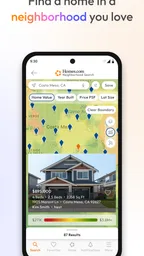
- Map view helps compare properties by neighborhood
- Save favorite listings for easier comparison later
- Property photos offer a useful first look before arranging a visit
- Listing alerts can help you spot new properties that match your search
What could be better
- Some listing details may be outdated or incomplete
- Property availability can change before you contact the agent
- Search results may vary in coverage by location
- The large number of listings can make browsing time-consuming
- Contacting agents may involve follow-up outside the app




