


Redfin: Buy, Sell & Rent Homes review
 Analysis by Appsdrops
I’d use Redfin: Buy, Sell & Rent Homes as a practical starting point when I want to get a feel for homes on the market without turning the search into a full-time project. It is a free real estate app from Redfin, built around listings for homes for sale and apartments for rent. For a first-time user, its main appeal is having a focused place to browse, compare possibilities, and narrow down what is worth investigating further.
That does not make it a substitute for visiting a home, checking the details with a qualified professional, or deciding what I can comfortably afford. I see it as a discovery and organization tool: useful for spotting candidates and clarifying my preferences, but not a guarantee that a listing is still available or that an online description answers every important question.
What to expect when you open it
The app is in the House & Home category, and its core purpose is clear: help people explore residential listings, whether they are thinking about buying or renting. It is powered by MLS listings, which gives the search a real-estate focus rather than the broad mix of posts and informal listings I might encounter on general classified platforms.
Its scale is reassuring for a newcomer. It has more than 10 million installs and an average rating of 4.7 from a large pool of users. Those figures suggest that many people find it useful, but they are not a promise that every home in every area will appear or that every listing will suit your situation. Local coverage and the freshness of an individual listing matter more than a headline number when you are making a real decision.
The app is free, carries an Everyone age rating, and is developed by Redfin. It has been available since July 14, 2011, and its current version is 651.0. It requires iOS 12 or later. I would treat those as helpful compatibility and background details, not as a reason to expect a particular feature or search result.
For a first look, I would keep the goal modest. Instead of trying to find “the perfect home” immediately, decide whether you are browsing to understand local options, looking for a rental, or building a shortlist for a purchase. That simple distinction makes the results easier to judge and reduces the temptation to compare homes that solve completely different needs.
Start with a useful search, not an idealized one
Before searching, I would write down a few non-negotiables: the places I can realistically live, the kind of property I need, and a budget range that reflects my actual limits. Then I would separate those from preferences such as a larger kitchen, a particular style, or extra outdoor space. This prevents attractive photos from quietly moving the goalposts.
One useful approach is to run two mental searches: the practical search and the aspirational one. The practical version answers, “What could work for me now?” The second reveals what I value enough to keep looking for. Even if I do not save anything, comparing those lists helps me notice whether location, space, or cost is driving my choices.
First setup: make the search reflect your situation
On a first session, I would choose the area and whether I am looking to buy or rent before spending time scrolling. If I am moving to an unfamiliar place, I would begin with a broad area and narrow it only after seeing the range of homes. Starting with a tiny patch can make a perfectly good search look empty, while searching too widely can produce a stream of options that are impossible to compare meaningfully.
I would also decide on a realistic price ceiling before browsing. It is easy to become attached to a polished listing and then work backward to justify a number that does not fit. A budget is more useful when it reflects the total housing decision I can live with, not just the most appealing figure shown beside a property. The app can help me explore listings; it cannot decide what level of cost is safe for my circumstances.
For someone renting, I would keep the search focused on the move itself: where daily travel needs to work, what kind of home is suitable, and when I need to be settled. For a buyer, I would compare the compromises in each candidate rather than treating the asking price or photos as the whole story. In both cases, I would make a shortlist based on evidence I can verify later, not excitement alone.
The first meaningful success is a shortlist you can explain
A good first result is not necessarily arranging a viewing. It can simply be finding a small set of listings that each meet the same basic needs. For example, if I were relocating for work, I might search the area around my likely commute, compare a few homes at a similar budget, and note which trade-off I prefer: more room farther out or a smaller place closer in. That is a concrete decision, even before I contact anyone.
To make that comparison useful, I would look beyond the lead image. I would check the listing details and examine the available photos for practical clues: the layout, the condition visible in different rooms, and whether the home seems to match the description. A picture can make a room look spacious without showing how furniture would fit, so I would treat photos as prompts for questions rather than proof that a property will work.
Here is a workflow I find especially helpful: keep a short note for each candidate with one reason it fits, one concern, and one question to verify. “Close to work” is a reason; “the second bedroom may be too small” is a concern; “is there enough storage?” is a question. This stops a parade of attractive interiors from blurring together and gives me something specific to ask when I follow up.
Another useful trade-off is to compare homes by the problem they solve, not by a vague sense of which one looks best. If a rental is convenient but cramped, while another offers space but adds travel time, write that contrast down. The exercise exposes what matters most to you and makes it easier to reject a listing that is appealing in isolation but wrong for your routine.
Where the search can feel confusing
Real estate listings change as homes are listed, updated, rented, or sold. I would not assume that seeing a property in the app means it is still available at the moment I am ready to act. Before making plans around a specific home, I would confirm its status and important details through the appropriate contact or listing process. That small check can save a wasted trip and a lot of frustration.
It is also easy to confuse a search result with a complete picture of a property. A listing gives you a way to identify possibilities, but it does not replace an in-person visit, a careful reading of relevant documents, or advice from someone who understands the local process. If a description leaves a major question unanswered, I would keep that uncertainty visible instead of filling it in with optimistic assumptions.
Coverage can vary by location, so a quiet result page does not necessarily mean there are no suitable homes anywhere nearby. I would widen the search area, adjust the type of home I am considering, or check again later before drawing that conclusion. Conversely, a busy results page does not mean every option is a realistic match; a longer list can make disciplined filtering more important, not less.
There is another first-timer trap: treating online presentation as a ranking of quality. A beautifully photographed home may be less suitable than a less striking one once I consider the layout, surroundings, and practical costs. I would use the app to decide what deserves closer attention, then evaluate the property on its actual merits.
How it compares with other ways to look
Compared with broad classified apps, Redfin is more specifically oriented toward residential real estate and MLS-powered listings. That focus can make it a sensible first stop when I want to browse homes for sale or apartments for rent without sifting through unrelated goods and services. It is particularly handy for someone who is still learning what different areas and property types offer.
A local agent, property manager, or rental specialist can be more useful when I need context, a current answer, or help navigating a transaction. A general search engine may be better for researching neighborhoods or finding local information beyond listings. I would not expect one app to do all of those jobs equally well; Redfin helps me find candidates, while people and other sources help me verify, interpret, and act on them.
For people who already have a clear target and an established local contact, an app may be less important than direct communication. On the other hand, if I am early in the process, comparing neighborhoods, or trying to understand what my budget can reach, a listing-focused app offers a low-pressure way to build context before making calls.
Who will get the most from it—and who may not
I think it is most useful for renters and buyers who want to explore options at their own pace, especially first-timers who need to turn a vague wish into a more realistic shortlist. It can also help someone preparing for a move compare the kinds of homes available in different areas before committing to a location. The best results come when the user is willing to question listings and keep a clear record of what matters.
I would skip it as a primary tool if I need guaranteed live availability, a complete financial assessment, or a professional opinion about a property. It is also not the right answer for someone who expects an app to choose a home for them. The final decision depends on details beyond a listing, and browsing can create false confidence if I mistake an appealing screen for a complete inspection.
If I were only curious about general housing trends, I would use the app as one source of examples rather than treating its results as a definitive picture of the entire market. If I were ready to make an offer or sign a rental agreement, I would move from browsing to verification and direct discussion. Knowing when to leave the search screen is part of using the app sensibly.
My next step after finding a promising place
Once I have a shortlist, I would revisit each candidate and check whether it still fits my original priorities. Then I would identify what I need to confirm before arranging a viewing or taking further steps: availability, the details that matter to my budget, and anything in the description that remains unclear. A short, prepared list of questions is more useful than relying on memory after looking at several homes.
I would also keep one or two alternatives in reserve. That is not pessimism; listings can change, and seeing comparable options helps me judge whether a feature is genuinely worth paying or compromising for. If the strongest candidate disappears, I can continue with a clear sense of what I learned rather than restarting from scratch.
Overall, Redfin: Buy, Sell & Rent Homes is a worthwhile free place to begin a home search, especially when I want to move from casual browsing to a shortlist with reasons behind it. Its strongest value is helping me explore and compare possibilities; its limits are the same ones I would expect from a listings app, since availability and suitability still need human verification. I would recommend it to a first-time renter or buyer who approaches it with a budget, a few clear priorities, and the patience to check the details before making a decision.
What we like
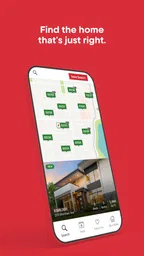
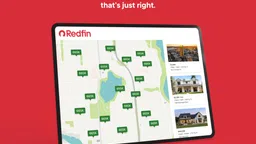
- Map search makes it easy to browse homes by location.
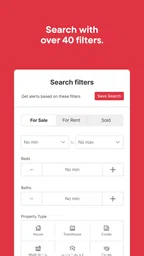
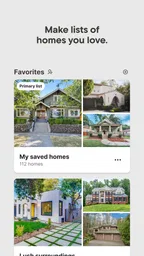
- Saved searches help you keep track of suitable listings.
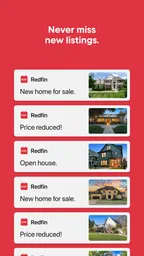
- Price and status updates can help you monitor homes.
- Rental listings are available alongside homes for sale.
- The app includes options to contact Redfin agents.
What could be better
- Listing availability can vary by area.
- Some property details may be incomplete or outdated.
- The app requires an internet connection to load listings.
- Home estimates are not a substitute for a professional valuation.
- Agent services may not be available in every location.





