
RainDrop: Virtual Rain Gauge review
 Analysis by Appsdrops
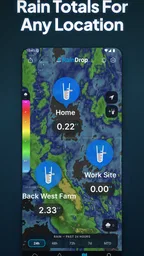
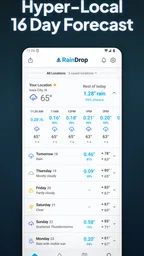
I would think of RainDrop as a small household tool rather than a replacement for a full weather service. Its focus is the amount of rain that has fallen, which is useful when several people share responsibility for a garden, outdoor plans, or a property. The practical question is not simply whether rain is expected, but whether enough has already fallen to change what someone should do next. That narrow purpose gives this weather app a clearer role than a forecast packed with maps and alerts.
When more than one person needs the same rain picture
Imagine one person is deciding whether the garden needs watering while another is checking whether it is sensible to plan an outdoor job. A rain gauge app can help make those conversations more concrete by keeping attention on rainfall totals rather than a vague impression that it “rained a bit.” RainDrop is aimed at that kind of everyday tracking, and I can see the appeal for households that want to check the same rain-related question during the day.
That shared-use idea needs a little care, though. I would not assume that installing the app on multiple phones automatically creates a shared household record or keeps everyone’s readings in sync. If coordination matters, agree on which device or person is the reference point, and compare the same location and time period when discussing totals. That simple habit avoids treating two separate checks as though they necessarily describe one shared measurement.
The app’s name, RainDrop: Virtual Rain Gauge, makes its purpose easy to recognize, but the word “virtual” is worth keeping in mind. I would use it as a convenient way to follow rainfall information, not as a substitute for a physical gauge when a precise, on-site measurement is important. For routine decisions, an easy reference can be enough; for a formal record or a task with strict water requirements, a dedicated gauge or another carefully maintained measurement method is the safer choice.
Set expectations before adding it to a shared device
For a shared tablet or family phone, I would first decide who is responsible for checking the app and how the result will be used. This is less about setting up a complicated household system and more about avoiding confusion: one person might be checking rain for the garden, while another expects a general forecast. RainDrop’s central job is rainfall tracking, so it makes sense to treat it as a focused utility rather than a complete household weather hub.
I would also keep personal accounts and device access separate where that is already part of the household’s routine. Nothing about the app’s basic role means a family should assume it includes account-sharing controls, child profiles, or a common dashboard. If people use different devices, decide how you will pass along a useful total—by discussing it, for example—rather than relying on an unconfirmed synchronization feature.
A helpful setup habit is to settle the location question before anyone begins relying on a reading. Rainfall can vary across a neighborhood, especially when weather is local, so a result tied to one place may not represent a garden or property somewhere else. I would check that the app is being used for the spot relevant to the decision, and avoid comparing results without confirming that both people are looking at the same location and period.
There is also a practical distinction between checking after a shower and maintaining a useful history. If a household wants to understand whether watering can wait, regular checks at roughly consistent times are more useful than an occasional glance made whenever someone remembers. This is a workflow choice, not a special feature claim: consistency makes the information easier to interpret and discuss.
Use the rainfall information to coordinate real chores
The strongest household use case is a small decision that comes up repeatedly. Before watering pots or a lawn, someone can check rainfall rather than relying only on what the ground looks like from the kitchen window. Before moving outdoor equipment or rescheduling a task, another person can use the same rain-focused reference as part of the decision. The app does not make the choice for you, but a shared point of reference can reduce guesswork.
For garden care, I would not treat one rainfall total as a direct instruction to skip watering. Soil type, plant needs, drainage, and whether rain actually reached a sheltered area all matter. A useful approach is to combine the app’s rain information with a quick check of the soil or containers. That is a good example of where the app can inform a decision without pretending that rainfall alone answers every question.
For planning an outdoor chore, timing matters too. A total can tell you something about what has accumulated, but it is not the same thing as knowing whether the next hour will be dry. I would pair RainDrop with a conventional forecast when the decision depends on what is coming next, such as choosing a time to paint, hang laundry, or start a long walk. A broad weather app is better for forecasts and conditions; this one is more purpose-built for tracking rain.
That comparison is the main trade-off. Many general weather apps make forecasts, temperatures, and alerts the center of the experience, with precipitation as one item among many. RainDrop’s appeal is the narrower focus on rainfall totals. If you already have a weather app you like, this may complement it rather than replace it. If you want one app to answer every weather question, you may find a full forecast service more convenient.
Age, trust, and sensible limits
RainDrop is marked for Everyone, which makes its subject matter suitable for ordinary household use across ages. Still, an age label is not a promise that the app provides family supervision or controls for children. I would let younger users check it with an adult if the result is being used to make a consequential decision, such as changing a watering schedule for delicate plants or deciding whether an outdoor activity is safe.
For trust, I would treat rainfall figures as a useful reference rather than unquestionable ground truth. A virtual gauge is convenient, but a household with a rain barrel, garden gauge, or another local measuring method may find that direct observation is more relevant for a very specific spot. Differences do not automatically make the app useless; they are a reminder that location and measurement method affect what a number means.
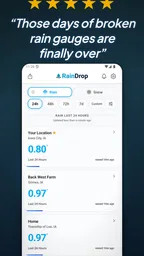
The developer is RainDropGauge, and the app is free to install. It has an average rating of 4.3 from around 2.3 thousand ratings, with more than 100 thousand installs. Those figures suggest that it has found an audience, but I would use them as context rather than proof that it suits every household. In-app purchases range from $2.99 to $99.99 per item, so I would review any purchase screen carefully and make sure the person using a shared device understands that optional spending may be offered.
Its release date is June 4, 2024, and the current version is 3.1.85. It supports devices running version 7.0 or later of its operating system. Those details are useful when deciding whether an older shared device can run it, but I would still check the app store on that device before making it the household’s designated rain-checking screen.
Where it fits—and where I would choose something else
I would recommend RainDrop to someone who repeatedly asks, “How much rain have we had?” and wants a simple rain-centered reference for household routines. It is especially relevant when gardening, outdoor chores, or property upkeep make accumulated rainfall more useful than a general snapshot of the weather. The focused purpose can also make it easier to explain to another household member than a feature-heavy weather app.
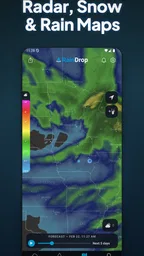
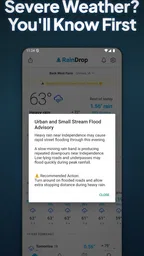
I would skip it as the only weather app if you need dependable short-term forecasts, storm alerts, radar, or a wide range of conditions in one place. I would also choose a physical rain gauge when exact rainfall at a particular point matters more than convenience. And if several people need a guaranteed shared record, I would first establish that the app’s actual behavior on their devices meets that need rather than assuming shared access or automatic coordination.
One useful way to try it is to make a small decision routine: check the rainfall information before watering, then compare it with the soil and the needs of the plants. If that saves unnecessary watering or helps the household coordinate, the app is doing something worthwhile. If it simply adds another screen without changing a decision, a standard forecast app or a physical gauge may be enough.
My household verdict
For me, RainDrop makes sense as a focused companion for rain-related decisions, not as an all-purpose forecast replacement or a guaranteed family-sharing system. Its value comes from giving rainfall totals their own place in the routine: useful for a garden, an outdoor task, or a quick household conversation, provided everyone understands what location and period they are discussing.
I would install it on a shared device when the household has a clear reason to track rain and one person can keep the routine consistent. I would pair it with a broader weather app for future conditions, and with direct observation when the exact amount at a particular spot matters. Used with those boundaries, RainDrop: Virtual Rain Gauge is a practical, low-friction choice for people who want to make rainfall—not the whole forecast—the center of a small everyday decision.
What we like
- Quickly logs rainfall readings for a chosen location.
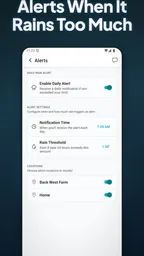
- Customizable alerts can help you track changing rain conditions.
- A simple gauge makes rainfall amounts easy to understand.
- Useful for gardeners monitoring water needs.
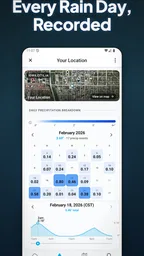
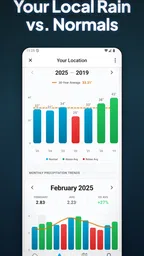
- Rain records help compare conditions over time.
What could be better
- Rainfall readings may depend on data availability at your location.
- Accurate local tracking may require manual gauge readings.
- Notifications can be less useful if alerts are not customized.
- Past records may not capture every local weather variation.
- Some features may require an internet connection.





