


Quiz AI: AI Homework Helper review
 Analysis by Appsdrops
Quiz AI: AI Homework Helper is most useful when a study question appears at an inconvenient moment: at the kitchen table, between errands, or while someone else is using the family tablet. I’d treat it as an on-demand study assistant rather than a complete learning system. Its appeal is quick access to help with schoolwork, especially math, but the quality of the experience depends on how carefully the person using it checks and learns from the answers.
When one device becomes a study desk
In a household where a phone or tablet is shared, a homework helper can be handy because it gives a student somewhere to start when a question feels confusing. Quiz AI is an education app from INTSIG PTE, and its focus on solving study questions makes it different from a general note-taking or school-planning tool. The app is free to install, though it offers in-app purchases, so I would check the purchase options before letting a child use it without supervision.
A realistic use case is a student working through a page of algebra while a parent prepares dinner nearby. Instead of waiting for someone to be free, the student can use the app to seek help, then explain the reasoning back to the parent. That last step matters: a solution is most useful when it becomes a clue for understanding, not a shortcut to copying an answer.
For a shared device, I’d make a simple household rule before opening any homework app: one person’s schoolwork stays their responsibility, and the next person should not assume that the previous user’s screen or activity belongs to them. I would also avoid entering private details into study questions. This is ordinary good practice for shared devices, not a special feature of Quiz AI.
Use the answer as a starting point
With a math question, the best workflow is to read the problem yourself first, identify the part that is unclear, and then use the app for help. After seeing a result, close or set aside the answer and try a similar problem independently. This small check tells you whether the explanation actually helped. If you can only reproduce the displayed result, you may have seen an answer without learning the method.
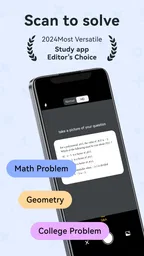
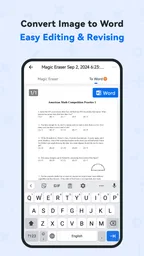
When a question is photographed or scanned, clarity becomes part of the work. Keep the page flat, include the complete problem, and make sure symbols are legible. A faint minus sign, exponent, or fraction bar can change the question entirely. If the result seems odd, compare the interpretation with the original page before trusting the solution. That habit is especially valuable when the device is passed around and the next person may not know what was cropped or entered.
The app is also positioned as a study assistant beyond a single math calculation, with an AI chatbot in its store summary. I’d use conversational help to ask for a simpler explanation or a way to check the reasoning, rather than treating a fluent response as proof. AI can sound confident even when a question has been misunderstood, so the student still needs to judge whether the answer fits the assignment.
Set boundaries before handing over the device
Quiz AI is listed for Everyone, but an age label does not replace an adult’s judgment about how a child should use an AI homework tool. Younger students may need help distinguishing an explanation from a final answer. For older students, the main boundary is academic: use assistance to understand a concept, not to submit work that you have not worked through yourself.
If several people use the same device, agree on who is using the app and for what before beginning. A parent can ask the student to show the original question, the help they received, and their own attempt afterward. This keeps the activity focused on learning without assuming the app offers family profiles, parental controls, or any particular account arrangement.
There is also a practical account boundary to consider. If an app prompts for sign-in or offers paid options, pause and decide whose account and payment method should be used. Quiz AI is free to download, with in-app purchases ranging from $0.99 to $299.99 per item. That broad range makes it sensible to review purchase prompts together rather than letting a child tap through them casually.
Coordinate without turning help into an answer race
For siblings sharing a tablet, a little coordination can prevent the app from becoming a source of arguments. One student can finish a question and write down the key idea before handing over the device; the next can start with their own problem rather than relying on the previous person’s answer. If a parent is helping, ask each student to describe what they tried first. That makes it easier to spot whether the difficulty is a missing step, a confusing instruction, or a broader gap in the topic.
I would not use a shared AI helper as the household’s record of school progress. It can be useful in the moment, but students still benefit from keeping their own notes: the question, the mistake they made, and the method that finally worked. A short paper note or personal study document turns one solved problem into something they can revisit before a test.
Compared with a standard calculator, Quiz AI is aimed at a broader kind of help: a calculator is dependable for arithmetic once you know what to enter, while an assistant may help when you are unsure how to approach a question. Compared with a textbook or teacher, though, it cannot provide the same dependable context about a class’s methods or expectations. I’d use those tools together: ask the app to clarify a sticking point, then check the approach against the lesson or teacher’s instructions.
Trust the process, not just a polished response
AI-generated help can be a useful nudge, but I would not assume every result is correct or appropriate for the student’s grade level. Check whether the answer addresses the exact wording of the question and whether the steps make sense. If the explanation skips a step, ask for that step in a different way or work through it with a teacher, parent, or textbook.
There is a trade-off between speed and depth. A quick answer can rescue a student who is stuck, but repeated answer-checking may train them to reach for the screen before making an attempt. I’d set a simple rule: try the problem first, then ask for help on the part that blocks you. For a concept that remains confusing after several explanations, a human tutor or classroom teacher is the better next step.
The app has an average rating of 4.6 from around 12 thousand ratings, and it has been installed over a million times. Those figures suggest it has found an audience, but they are not a substitute for checking whether its style of assistance suits a particular student. People looking for a highly structured course, a teacher-led curriculum, or a place to organize all assignments may be better served by a dedicated learning platform or the school’s own tools.
What to expect from the app over time
Quiz AI was released on July 22, 2022, and its current version is 4.27.8.20260922. It requires Android 10 or later. If you are considering it for an older family device, check the operating-system requirement first; a device that cannot run the app is no help during a homework crunch.
Its 498 written reviews offer another way to get a feel for how other users describe their experience, though I would read them with a specific question in mind rather than treating any review as a guarantee. For example, look for comments about the kinds of questions people use it for and whether the explanations suit their needs. Then try a representative problem yourself before building it into a child’s regular study routine.
Because the app includes paid items, the free starting point should not be confused with a promise that every possible feature or use will remain free. I’d explore the available options with the person who will use it and decide in advance whether purchases are allowed. On a shared family device, that conversation is more useful than discovering an unexpected prompt in the middle of homework.
My household verdict
I’d recommend Quiz AI: AI Homework Helper to a student who wants a quick way to get unstuck, especially when working through math, and to a parent who is willing to guide how AI answers are used. It is a practical companion for brief study sessions, not a replacement for instruction, careful checking, or the student’s own effort. The strongest household routine is to let the app clarify a step, then have the learner solve a fresh example without looking.
I would skip it for a child who is likely to copy answers without reflection, for a family that wants a structured course with progress tracking, or for anyone who needs a fully reliable authority on a difficult subject. In those cases, a teacher, textbook, calculator, or dedicated course may be a better fit. For a family that can set clear expectations around shared-device use, purchases, and independent work, the app can be a helpful extra voice at the study table.
My main advice: keep the student in charge of the learning. Ask them to show what they tried, what the app clarified, and how they would solve a similar question on their own. That approach makes the tool more valuable than simply scanning for an answer, and it gives parents a straightforward way to support homework without taking it over.
What we like
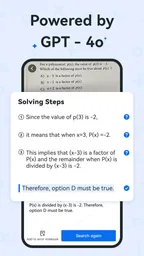
- Offers step-by-step explanations for many homework questions.
- Can save time when checking answers or reviewing difficult topics.
- Supports photo-based question input for convenient problem solving.
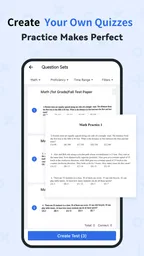
- Covers several common school subjects in one app.
- May help learners understand where they made a mistake.
What could be better
- AI answers can be incorrect or misleading.
- Some features may require a paid subscription.
- Photo recognition may struggle with unclear handwriting.
- Requires an internet connection for AI assistance.
- Relying on solved answers can discourage independent practice.





