
PulsePoint Respond review
 Analysis by Appsdrops
I think PulsePoint Respond is easiest to understand as a community emergency tool, not a replacement for calling emergency services or learning CPR. It is a free medical app from PulsePoint Foundation, built around a practical idea: when a nearby cardiac emergency is reported, CPR-trained people may be able to help while professional responders are on the way. That makes its usefulness unusually dependent on where you live and whether you can act safely—not just on how polished the app feels.
What free access is worth here
There is no purchase decision to weigh: the app is free. That matters because someone curious about contributing to emergency response can try it without first deciding whether a subscription or one-time payment is worthwhile. I would still think of “free” as access, not a promise that the app will be equally useful in every location. Its value depends on local coverage and whether an alert is relevant to you.
PulsePoint Foundation is the developer, and PulsePoint Respond has been available since December 22, 2011. The current version is 26.10.6988, and the listed minimum operating system is 10. The app is rated for Everyone. Those details make it straightforward to assess basic compatibility, though the most important practical question is still whether the service operates meaningfully in your area.
Its audience response is strong: it has a 4.8 average from around 38,000 ratings, with about 11,000 written reviews and over one million installs. I see that as evidence that many people find the concept worthwhile, not proof that every alert will lead to a response or that local coverage is uniform.
Value comes from readiness, not constant use
Many medical apps are designed for repeated personal tasks: logging symptoms, checking medication information, or keeping health records. PulsePoint Respond serves a different purpose. You may open it only occasionally, but having it set up could matter when an urgent event happens nearby. That makes its value less like a daily tracker and more like being prepared to respond when circumstances allow.
The key benefit is the possibility of connecting a CPR-trained bystander with a nearby emergency. The app’s role is not to make a user a substitute for a dispatcher, paramedic, or clinician. I would treat it as a way to support a response, while keeping the ordinary emergency route—calling local emergency services—at the center of any serious incident.
That distinction is important for expectations. Installing the app does not mean you are always available, qualified for every emergency, or required to intervene. An alert should prompt a quick, realistic judgment: Can I reach the location safely? Do I have the training to help? Is there a clear way to coordinate with emergency services? If any answer is no, staying out of danger and following professional instructions is the better choice.
How I would use it in an ordinary week
Imagine I have CPR training and am walking through a familiar public area when an alert appears. I would first check whether the location is close enough to reach promptly, then consider whether I can help without creating a second emergency. If I decide to respond, I would still follow the dispatcher’s directions and the guidance of emergency personnel. If I am driving, far away, or unsure I can act, I would not treat the notification as an obligation.
That is a more useful mindset than leaving notifications on and assuming every alert is actionable. A person who is often at work, caring for children, or in places where they cannot leave may receive alerts they cannot answer. That does not make the app pointless, but it does mean users should judge its fit against their real routine rather than an idealized version of themselves.
One practical tip is to make the decision about participation before an emergency occurs. Think through whether you are willing and able to respond, what kinds of places you could reach, and how you would keep professional responders in the loop. Deciding those boundaries in advance can prevent a sudden alert from turning into confused or unsafe improvisation.
Where it differs from familiar medical apps
Compared with a symptom checker or first-aid reference, PulsePoint Respond is oriented toward an event that is happening now and nearby. A reference app can help someone look up general guidance, while a personal health app can organize information about one individual. This app’s distinctive value is community response, so it is a poor substitute for either category when the goal is medical education, ongoing health management, or advice about a non-urgent condition.
It also differs from simply calling emergency services: a call connects a person with professional help, while a community-response app can potentially bring a trained bystander into the picture. These roles should complement each other rather than compete. If you are witnessing an emergency, contact the appropriate emergency service and follow its instructions; do not delay that step while trying to explore an app.
A second useful tradeoff is that community response depends on context. An alert may be irrelevant if you are too far away, unable to leave, or not prepared to provide CPR. A notification is not the same as a safe or appropriate opportunity to help. I would value the app most when a user understands that distinction and treats each alert as a prompt to assess, not a command.
Limitations worth considering before installing
The biggest limitation is local usefulness. A tool built around nearby incidents can only help a user when its service and the surrounding circumstances make a response practical. Before relying on it, check whether PulsePoint is relevant in your community and whether you understand what its alerts mean there. If local availability is limited, the app may have little day-to-day value even though its purpose is compelling.
Another limitation is the emotional weight of receiving an emergency notification. Some people will find the chance to help motivating; others may feel pressure, anxiety, or uncertainty. If alerts would distract you at work, while driving, or during responsibilities you cannot leave, that is a real reason to be cautious. It is better to set boundaries or skip the app than to feel compelled to respond when you cannot do so safely.
Training also matters. The app’s appeal is strongest for people who already have CPR skills and are willing to use them. If you have never learned CPR, installation alone does not prepare you to provide care. I would prioritize recognized training and keep following dispatcher guidance rather than treating a phone notification as instruction.
There is also a practical distinction between being notified and being able to reach a scene. Distance, access to the location, traffic, and personal circumstances can all change whether responding makes sense. A user should not assume that a nearby alert means they can arrive in time or that they should enter an unfamiliar or unsafe situation. Good judgment is part of the tool’s real-world value.
Who is most likely to benefit
I would recommend trying PulsePoint Respond if you have CPR training, live or spend time in a community where it is useful, and can imagine responding without putting yourself or others at risk. It may also suit people who want a concrete way to contribute locally but understand that they will not be able to answer every alert.
It is less suitable for someone seeking a personal medical reference, symptom diagnosis, health tracking, or a substitute for emergency services. It may also be a poor fit if alerts would add stress or if work, mobility, caregiving, or other commitments make it unrealistic to leave for an emergency. In those cases, a first-aid resource or a CPR course may offer more direct value.
For readers who are unsure, I would separate two decisions: whether the app is locally relevant, and whether they personally want to receive and consider alerts. The first is about the service in your community; the second is about your skills, availability, and comfort. Thinking about both is more useful than installing it simply because the concept sounds admirable.
My verdict on the free app
For me, PulsePoint Respond earns its place on a phone when the user understands its narrow but meaningful purpose. It offers free access to a community-oriented emergency response tool, and its medical focus is unusually practical for people with CPR skills. The strong average of 4.8 and more than one million installs suggest broad interest, but neither figure can tell you how useful it will be on your own streets.
I would install it if I were trained, locally served, and genuinely open to assessing an alert when one arrives. I would skip it if I wanted everyday medical advice, could not respond safely, or would feel distressed by emergency notifications. The app’s value is not that it guarantees a rescue; it is that, in the right place and for the right person, it may help turn CPR knowledge into timely action. Its best feature is the chance to make existing skills useful nearby, while its most important limit is that readiness and good judgment still belong to the person holding the phone.
What we like
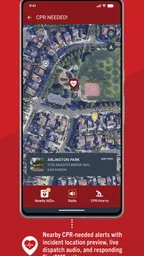
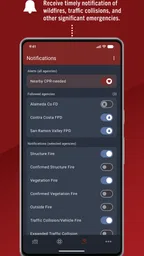
- Shows nearby emergencies that may need CPR assistance.
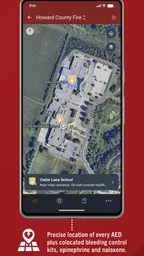
- Can help bystanders find the closest registered AED.
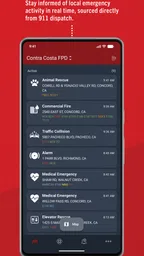
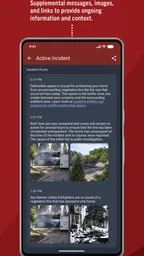
- Provides incident details and status updates in supported areas.
- Includes preparedness resources such as CPR guidance.
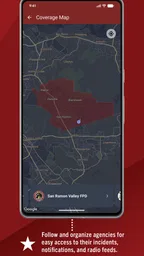
- Lets users follow selected agencies and locations.
What could be better
- Alerts depend on emergency services sharing data with PulsePoint.
- Coverage and feature availability vary by location.
- Some users may find emergency notifications stressful.
- AED listings may be outdated or incomplete.
- Responding to an alert can involve safety and privacy concerns.





