
Publix Pharmacy review
 Analysis by Appsdrops
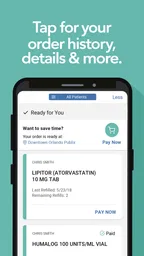
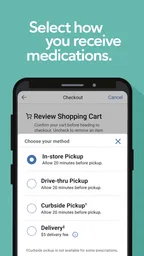
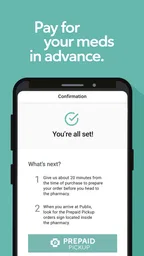
I find the Publix Pharmacy app most useful when I treat it as a companion to a pharmacy routine, rather than a replacement for the pharmacy itself. It is a free medical app from Publix Super Markets Inc., built around managing prescriptions away from the counter. The practical appeal is straightforward: check and handle pharmacy tasks on a phone instead of relying on a call or fitting every errand into a store visit. In my view, that convenience matters most to people who already use Publix Pharmacy and want a simpler way to keep track of the medicines they get there.
Build a reliable prescription routine
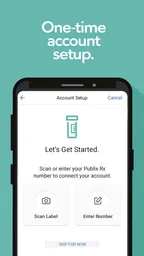
The best way to start is to think through the pharmacy tasks you repeat: keeping track of a prescription, checking its status, and preparing for the next pickup. The app’s role is to make those interactions easier to manage from wherever you are. I would begin by setting it up with the prescription information you need and then use it as the first place to check before making a separate trip or contacting the pharmacy.
A realistic example is a busy weekday when you are already planning errands. Rather than discovering at the store that a prescription needs attention, you can check the app beforehand and decide whether a pharmacy stop belongs on that day’s list. That small change can make a useful difference, especially when a household has several prescriptions to keep straight. The app is not a substitute for following a clinician’s instructions or confirming an urgent health concern with a qualified professional; it is a practical tool for the pharmacy-management part of the routine.
For the smoothest experience, I would avoid waiting until the last moment to learn how the app fits your needs. Try the routine when there is no immediate pressure: open the app, locate the prescription-related controls you expect to use, and see how the information is presented. Once you know where to look, checking in becomes a deliberate habit rather than a rushed search when you are already on the way out the door.
This is particularly helpful for people who are comfortable doing basic errands on a phone but do not want to manage every detail through phone calls. A caregiver coordinating pickups for a family member may also appreciate having a mobile point of reference, provided the relevant account and prescription arrangements are appropriate. The key is to use the app for visibility and organization, while still relying on the pharmacy team when a prescription needs clarification or a situation calls for personal assistance.
Check the details that shape your experience
Before depending on any pharmacy app, I recommend checking that the account and prescription information you see correspond to the person whose medication you are managing. This is a simple but important habit when more than one family member uses the same pharmacy. It helps prevent confusion between similarly named medicines or between one person’s pickup plans and another’s. I would also make a point of reviewing the displayed information before acting on it, especially if a prescription or schedule has recently changed.
Keep the app updated through your usual app store when updates are available. The current version is 3.1.17, and the app requires Android 8.0 or later. Those details matter if an older phone is involved: if installation or day-to-day performance is troublesome, checking the operating system is a sensible first step. The age rating is Everyone, but that does not mean every user should manage medicines without help; a family member may still need to assist someone who is not comfortable with mobile accounts.
I would also decide how the app fits alongside your existing reminders. If you already use a calendar or a medication reminder, keep that tool for the job it does best and use Publix Pharmacy for pharmacy-related tasks. Separating these roles can prevent a common mistake: assuming that an app for prescription management is automatically a complete medication schedule or a source of clinical advice. For doses, side effects, or treatment changes, follow the instructions from your healthcare professional and ask the pharmacy when you need medication-specific guidance.
One useful setup choice is to make the app easy to find without letting it become your only memory aid. Put it somewhere convenient on your phone, then attach a repeatable habit to it, such as checking prescription status when you plan the week’s errands. That is a low-effort way to get value without checking constantly. It also keeps the app from becoming another source of notifications or digital clutter if all you need is an occasional status check.
Use small habits to save time
Experienced users tend to benefit less from tapping around more often and more from checking at the right moment. I would pair a prescription check with something already in the routine: planning a grocery trip, reviewing the family calendar, or getting ready to leave for a pharmacy visit. The point is not to create extra screen time. It is to catch a task early enough that you can make a sensible plan instead of reacting at the counter.
A second helpful pattern is to separate “I need to know what is happening” from “I need someone to resolve a problem.” The app is a convenient first stop for routine management. If the information raises a question, or a prescription does not appear as expected, switching to direct contact with the pharmacy is more sensible than repeatedly refreshing or guessing. That handoff is a strength of a well-used mobile tool: it can help you identify when a human conversation is the next useful step.
For households, a shared routine is often more reliable than informal messages. Decide who checks the app and who handles pickup, and confirm the plan before leaving. This is especially helpful when one person is coordinating a prescription for someone else. A quick check of the intended recipient and the task at hand can prevent wasted trips and avoidable mix-ups. I would not assume that a single login automatically provides every family-management option, so keep arrangements within the account and pharmacy process that actually applies to your household.
Another practical trade-off is how much you rely on the phone while out. Checking before you leave is usually better than trying to sort out a pharmacy question in a parking lot or while juggling bags and errands. Make the app part of the planning stage, then keep the pharmacy’s direct support as a fallback for exceptions. That approach suits the app’s purpose without expecting a phone screen to resolve every issue.
Where the app has limits
Publix Pharmacy is most compelling when Publix is already your pharmacy. If your prescriptions are handled elsewhere, the app is unlikely to replace that provider’s own tools or processes. Likewise, someone looking for a broad medication reference, a clinical consultation service, or a complete health-record platform should choose a tool designed for those needs. This app is about pharmacy management, not a general-purpose medical service.
There is also a real difference between convenience and certainty. A mobile view can make routine information easier to check, but a screen cannot interpret a complicated prescription change or settle every question about timing and availability. When something does not look right, I would treat that as a reason to verify with the pharmacy rather than as proof that the prescription is lost or ready. This distinction keeps the app useful without asking it to do a pharmacist’s job.
Like many service apps, its usefulness depends on having the right information and a working account. If you dislike managing accounts on a phone, prefer speaking to pharmacy staff, or have a device that cannot run the required software, the usual in-person or phone route may be more comfortable. That is not a flaw for every user, but it does mean the app will not remove all friction for everyone. It is an option for routine convenience, not a mandatory step in getting prescriptions.
Compared with calling the pharmacy, the app offers a more self-directed way to handle routine checks, which can be convenient when you do not want to wait for a conversation. Compared with a general medication app, its advantage is its connection to Publix Pharmacy rather than broad tracking or health education. The trade-off is clear: choose it for Publix prescription tasks, and use a separate reminder, clinician, or pharmacy conversation for needs beyond that scope.
Who will get the most from it
I would recommend it first to regular Publix Pharmacy customers who want to manage routine prescription tasks from a phone. It is also a reasonable fit for someone who handles occasional pharmacy errands and likes to plan before leaving home. The app has an average rating of 4.8 from around 12,000 ratings, with about 4,300 written reviews and over a million installs. Those figures suggest broad use, but my recommendation rests more on whether Publix is your pharmacy and whether mobile management fits your habits.
It may be less suitable for a person who rarely uses Publix, does not want another account-based app, or needs detailed medical guidance rather than prescription logistics. If you share care responsibilities, first work out who is permitted and expected to manage each person’s prescriptions; do not assume that convenience removes the need for clear consent and coordination. For a straightforward, individual pharmacy routine, though, a mobile check can be much easier than relying on memory alone.
The app was released on May 31, 2017, and remains a free option. I see the strongest case for it in the everyday middle ground: it will not transform how you manage your health, but it can make familiar pharmacy tasks less dependent on a phone call or an extra store visit. If you are already a Publix Pharmacy customer, the sensible test is to use it for one ordinary prescription task and see whether its workflow suits you before making it part of every routine.
My overall take is that Publix Pharmacy is a focused convenience tool, not an all-in-one medical companion. It rewards a few repeatable habits: check before planning an errand, verify whose prescription you are viewing, and contact the pharmacy when a question needs a person. With that approach, it can reduce avoidable uncertainty and help keep routine tasks organized. If you want a broader health app or prefer direct conversations for every pharmacy need, another option may suit you better; if Publix is already part of your care routine, this is a practical app to try.
What we like
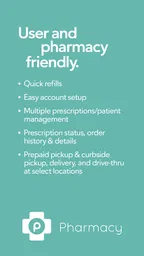
- Refill eligible prescriptions through the app.
- Check prescription status without calling the pharmacy.
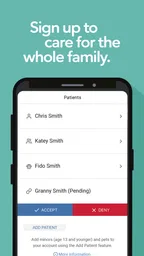
- Manage prescriptions for multiple family members.
- Receive notifications when prescriptions are ready.
- Find nearby Publix Pharmacy locations.
What could be better
- Some prescriptions may not be eligible for app refills.
- Prescription services depend on your local pharmacy.
- Account setup requires personal information.
- The app may require location access for nearby pharmacy results.
- Availability of pharmacy features can vary by state.





