
Precip – Rain Totals & Weather review
 Analysis by Appsdrops
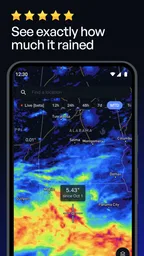
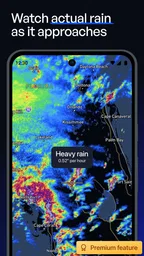
When I want to know whether a shower is likely to miss my street or soak the park across town, a general forecast can feel too broad. Precip – Rain Totals & Weather takes a more location-focused approach: it puts precipitation information on a map, making it easier to think about rain and snow at a particular place rather than only the nearest city. I find that focus useful for planning outdoor errands and trips, though it also means the app suits some weather questions better than others.
Precipitation is the point, not an all-purpose forecast
This is a weather app from Precipitation Inc., built around rainfall and snowfall totals. Its central idea is practical: choose a spot on the map and check precipitation there. That can be more helpful than a broad regional summary when conditions vary across a town, especially if I am deciding whether to walk, drive, or move an outdoor plan indoors.
The map-first approach is also the app’s defining trade-off. It gives precipitation the attention that many general weather apps spread across temperature, wind, alerts, and other details. If rain and snow are the main things I care about, that focus feels refreshingly direct. If I want one place to check every part of the forecast, I would compare it with a fuller weather app before making it my only option.
The app is free to install, rated for Everyone, and has a 4.6 average from around 4.4 thousand ratings. It has passed 100 thousand installs, which gives a prospective user some reassurance that it has found an audience without making popularity a substitute for trying the map in the places that matter to them. Optional in-app purchases are listed, with individual items ranging from about fifteen dollars to six hundred dollars; I would review the purchase screen carefully before committing to anything beyond basic use.
How the map helps with everyday decisions
A useful way to approach the map is to check more than one point when a plan depends on local conditions. For example, before leaving home for a park on the other side of town, I would compare the destination with my starting area. If the two spots look different, that is a cue not to assume my own window view tells the whole story. This is a small habit, but it makes location-specific weather information more actionable.
For a weekend walk, the map can help me decide whether to pack a rain layer or choose a route closer to shelter. For a drive, I can check the places along the way rather than focusing only on the forecast at either end. These are not guarantees about what the weather will do; they are sensible ways to use a precipitation-centered view to reduce avoidable surprises.
One non-obvious advantage of checking a destination directly is that it changes the question I ask. Instead of “Will it rain where I am?”, I can ask “What should I expect where I will be later?” That distinction matters for school pickups, sports practices, and visits to outdoor markets. A map encourages that planning habit more naturally than a single local conditions panel does.
What the current version tells me—and what it does not
The current release is version 4.8.3, and the app was released on March 26, 2024. Those facts establish that this is an actively versioned product with a recorded release history, but they do not by themselves reveal what changed between releases. I would not assume that a particular screen, forecast method, or feature was added or improved just because the version number has advanced.
For someone already using an earlier build, the practical question is whether the current map remains useful for their routine and locations. I would open it after updating, check familiar places, and see whether the presentation still supports the decisions I make. A version label is a useful point of reference, not proof that every user will notice a meaningful change.
For a new user, the version is less important than the app’s central workflow: can I find a location easily, understand the precipitation information shown there, and use it to make a real plan? I would judge it against those tasks rather than expecting a particular feature based on the release number. That keeps the decision grounded in what I can actually observe.
Where it fits beside familiar weather apps
Most people already have a default weather app, often one that opens quickly to a local forecast. Those apps can be convenient for a broad daily check, especially when I want temperature and general conditions at a glance. Precip is more appealing when the location itself is the question: a sports field, a relative’s neighborhood, or a stop on a longer drive.
I would use it alongside a general forecast rather than automatically replacing one. A broad app may be easier for checking the day’s overall outlook, while a map-based precipitation tool can help me inspect specific places. This division of labor is especially sensible when a forecast for one neighborhood does not answer what I need to know about another.
There is a clear exception: if I mainly need a complete daily briefing, the map focus may feel narrow. Likewise, someone who prefers a simple notification or a single local summary may find a map less convenient than a conventional forecast screen. The best choice depends on whether you want to explore precipitation by location or get a broad answer with minimal interaction.
Practical habits that make the map more useful
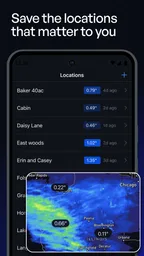
I would start by checking the app for the places I visit repeatedly, not just my current location. A home area, workplace, and regular outdoor destination make a useful personal set of reference points. When the weather is unsettled, comparing those locations can help me decide whether to change the timing of an errand or choose a different meeting spot.
For a trip, I would check the route in stages rather than treating the destination as the whole journey. A dry-looking endpoint does not necessarily settle whether the drive will be comfortable, and a local reading at home says little about conditions farther away. Looking at several points is a practical use of the map’s location emphasis, though it takes more effort than glancing at one summary.
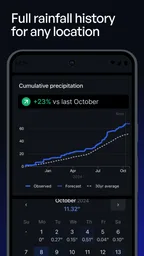
I would also avoid treating a displayed total as a complete answer to every outdoor question. A number about precipitation does not automatically tell me how slippery a path will be, whether a sheltered patio will stay dry, or how disruptive a shower will feel. I would combine what the app shows with the activity, terrain, and any other forecast information I normally rely on.
The friction and the audience it may not suit
A map can be more informative than a single forecast card, but it can also ask more of the user. I may need to choose a location, compare areas, and interpret what I see instead of receiving one clear recommendation. If I am in a hurry, that extra interaction can be a drawback. The app’s focused premise is strongest when I have a specific place in mind and a moment to check it.
There is also a learning curve in knowing what kind of question the app answers best. Someone expecting a full weather dashboard may initially look for more than precipitation totals and map-based location checking. I would suggest trying it on a day when rain or snow is relevant, rather than judging its value during a stretch when precipitation is not a concern.
The purchase range deserves a little attention too. The app is free to start, but the listed in-app items span from around fifteen dollars to six hundred dollars each. That wide range makes it sensible to inspect the details of any purchase before approving it. A casual user should not assume every optional item is necessary to get value from the basic idea.
Who I would recommend it to
I would recommend Precip to people who routinely make plans at different locations and want precipitation to be the deciding factor: parents coordinating outdoor activities, commuters checking more than one part of a route, or anyone who wants to compare conditions around town. It is also a good companion for people who already use a general forecast but want a more place-specific way to think about rain or snow.
I would be less likely to recommend it as the sole weather app to someone who wants a broad daily overview, prefers a simple glanceable forecast, or rarely needs to check places beyond their immediate area. In those cases, a conventional weather app may be quicker and more complete for everyday basics. The distinction is not that one approach is universally better; it is that this app puts a narrower question in the foreground.
My verdict after looking at its role
Precip has a clear purpose, and that clarity is its strongest quality. It encourages me to check the place I am actually going, not just the place where I happen to be. For outdoor plans, local errands, and route decisions, that shift can be genuinely useful. Its map-centered style is less compelling when I simply want a quick, all-purpose forecast.
I would keep it in mind as a focused companion rather than treating it as an automatic replacement for every weather tool. The current version, 4.8.3, provides a concrete point to evaluate, while the app’s real value depends on how well its location-based precipitation view fits your habits. If you regularly compare conditions across places, it is worth trying; if you want the broadest forecast with the fewest taps, a general-purpose alternative may suit you better.
My practical advice is to test it against a real decision: check your home, a destination, and—when relevant—a point along the route. If that comparison changes how confidently you plan, the app is doing something useful for you. If you keep opening another forecast for the information you actually need, its specialized focus may not earn a permanent place on your phone.
What we like
- Shows rainfall totals alongside local weather conditions.
- Offers a focused alternative to full-featured weather apps.
- Can help users track precipitation for outdoor plans.
- Rain data may be useful for gardening and property upkeep.
- A clear rain-focused layout can make key details easy to find.
What could be better
- Rainfall estimates can differ from measurements at your location.
- Forecast accuracy depends on the quality of available data.
- Coverage and detail may vary between regions.
- Weather information can change quickly after the app is checked.
- Some features may require a subscription or in-app purchase.





