

Pinu - Language Learning review
 Analysis by Appsdrops
I look at a language-learning app differently when I consider who can comfortably use it, and under what circumstances. A lesson that works well at a desk may be awkward on a noisy bus, difficult to follow for someone who relies on larger text, or frustrating if it expects precise taps. With Pinu, the central promise is learning through play and speaking, but the practical question is whether that approach fits a learner’s abilities and daily routine. My view is that it is worth considering as a low-commitment starting point, while anyone with specific access needs should test the actual interface before relying on it.
How the learning experience feels to navigate
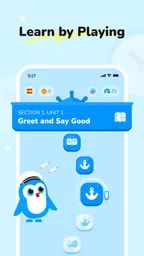
Pinu is an education app from LEAF BOAT TECHNOLOGY LIMITED. Its focus on playful language practice gives it a different feel from a traditional course built around long explanations and textbook-style exercises. That can be appealing if you lose interest in study sessions that feel like homework: short interactions are often easier to approach when you have only a few minutes and want to make some progress without planning a full lesson.
The app’s overall premise is easy to understand: language learning should involve engaging with words and speaking, rather than only reading rules. That is a useful direction for beginners who need a reason to return to practice. Still, a simple concept does not automatically mean every screen is easy to navigate. I would judge the interface by practical details such as whether instructions are clear, whether a learner can tell what to do next, and whether mistakes are explained in a way that helps rather than interrupts.
For someone new to language-learning apps, a playful approach can lower the emotional barrier to starting. You do not have to arrive with a study plan or a strong grasp of grammar to try a small activity. I would use that as an invitation to build a routine, not as proof that the app can replace a structured course. Learners who need a visible syllabus, explicit grammar explanations, or a clear record of progress should check whether the available lessons provide enough structure for their goals.
There is also a difference between an interface that feels lively and one that remains readable during a longer session. If animation, illustrations, or dense prompts compete with the words being taught, the playful presentation can become a distraction. I recommend trying a brief session first and noticing whether you can comfortably locate the instruction, the language prompt, and the next action without having to guess. That small check is more useful than assuming a game-like design will suit everyone.
The app is free to download, and its age rating is Everyone, which makes it broadly approachable for families to explore together. That rating is not a guarantee that every child will find the learning flow suitable or that every adult will find it accessible. I would still have a younger learner try it with a parent nearby at first, especially to see whether the prompts make sense and whether the app’s pace feels comfortable.
Speaking practice needs a comfortable pace
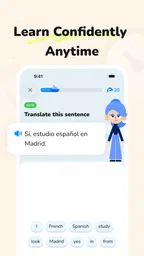
Speaking is a meaningful part of the app’s learning identity, but it can also be the most personal part of language practice. Some learners are happy to repeat words aloud; others feel self-conscious, need more time to process a prompt, or prefer to rehearse privately before speaking. If an activity asks you to respond out loud, try it in a quiet place and give yourself permission to pause. The best practice is the kind you can repeat without feeling rushed or judged.
For a learner who is nervous about pronunciation, I would treat speaking activities as practice rather than a test. A useful routine is to listen to or read the prompt, say the word softly once, then try again at a natural volume. If the app’s interaction does not leave room for that slower rhythm, it may be better as a supplement to a course where you can control the pace. That is especially true for learners who need extra processing time or who find rapid feedback stressful.
Touch, sound, and different ways of participating
Playful learning often depends on visual attention and touch, while speaking activities depend on sound and a willingness to use one’s voice. Those demands can suit many learners, but they are not universal. Someone with limited dexterity may find small or closely spaced controls tiring; someone with low vision may need strong text contrast and adjustable text; someone with hearing loss may need spoken material to have a clear visual equivalent. I would not assume those needs are covered without checking the app directly.
A practical way to evaluate the fit is to try the same short activity in more than one mode. If a prompt involves speech, see whether you can understand what is expected from the on-screen instructions alone. If it involves tapping, notice whether you can select the intended answer reliably without rushing. These observations can reveal more than a general impression of whether the app seems “easy.” They also help a parent or caregiver decide whether the learner can use it independently or would benefit from assistance.
There is a trade-off in combining play with language practice: visual cues can make an unfamiliar word less intimidating, but they may also encourage guessing from pictures instead of attending to pronunciation or spelling. I would pause after a successful answer and say the new word aloud, then try to recall it later without relying on the picture. This turns a quick game-like interaction into a more deliberate learning moment, particularly for people who remember better by hearing or repeating words.
Using it around a real day
Picture a learner with a few quiet minutes after breakfast. They open the app, try a short activity, and practice saying a word before moving on with the day. That is a realistic use case for a playful language tool: it can make a small gap feel productive without requiring a desk, notebook, or long block of concentration. For this kind of casual routine, Pinu may be easier to approach than a course that asks you to work through a lengthy lesson every time.
The same activity may not work well on a crowded commute. Background noise can make spoken prompts harder to hear and speaking aloud uncomfortable, while movement can make small controls harder to select. If you want to use a language app while travelling, test it in the conditions you actually face rather than assuming a lesson that works at home will transfer. A useful plan is to reserve speaking practice for a quieter moment and use other study methods when the environment makes listening or responding difficult.
It may also fit a parent and child sharing a short learning moment. An adult can read an instruction aloud, help interpret a new word, and give the learner time to answer. But shared use is not the same as independent access. If a child needs frequent help to understand what to tap or how to respond, that matters when choosing an app for everyday use. I would let the learner try it themselves first, then offer only the support they need, so it is clear whether the interface is genuinely manageable for them.
For people who rely on predictable routines, it can help to attach practice to an existing habit rather than waiting for motivation. A brief session after breakfast or before a familiar break is easier to remember than an open-ended promise to study later. Keep the goal modest: focus on completing an activity attentively, not on staying in the app for as long as possible. That approach is particularly helpful if a busy screen or fast pace makes extended sessions tiring.
Where it may not be the right tool
A playful app is not automatically the best choice for every language goal. If you need detailed grammar instruction, systematic exam preparation, extensive reading, or a carefully sequenced curriculum, compare Pinu with a course that clearly provides those things. Likewise, if you need text-to-speech, adjustable presentation, captions, or a specific input method, verify that the current app supports the option you rely on before making it part of your study plan.
It is also sensible to distinguish the price of getting started from the cost of continuing. The app is free, but it offers in-app purchases ranging from $1.99 to $99.99 per item. I would explore the free experience first and check each purchase screen carefully before paying, especially if a child will be using the device. A broad price range does not tell you which purchase is necessary for your learning goals, so decide only after you know what the free version lets you do and what a paid item would add.
Version 3.0.0 is the current version, and the app has been released for devices running operating system 9 or later. That gives potential users a straightforward compatibility check before downloading. Its average rating is 3.9 from around a hundred ratings, with dozens of written reviews; I would treat that as a useful signal of mixed user experiences, not as a substitute for trying the app with your own needs in mind. It has over 50,000 installs, suggesting that it has reached a meaningful audience, though popularity alone cannot establish whether its design works for a particular learner.
When comparing it with the usual alternatives, I see the main appeal in a more playful route into speaking and exploration, rather than a promise of a full reference library or a formal classroom course. A flashcard tool may be better if you want to control exactly which words you review. A textbook-based course may suit you better if you want grammar explained step by step. Pinu is most compelling for someone who wants a lighter way to begin practicing, provided the activities feel clear and comfortable on their device.
A useful trial before making it a habit
I would evaluate the app with a short, purposeful test rather than downloading it and immediately committing to a long routine. Try an activity when you are rested, then repeat one later in a realistic setting. Notice whether you can read the prompts, understand the instructions, use the controls, and take part in any speaking exercise without strain. If the experience changes substantially between a quiet room and a noisy environment, that tells you when the app is useful and when another learning method would be more practical.
For a learner with access needs, include a support person in that first test if appropriate, but let the learner lead. Ask whether the words are easy to distinguish, whether the pace allows enough time, and whether the speaking element feels comfortable. If the learner cannot complete an activity without repeated intervention, that is valuable information—not a personal failure. A different app with clearer controls or more flexible ways to participate may be a better fit.
I would also keep a small record outside the app if your goal is to remember vocabulary over time. After a session, write down one word you want to retain and revisit it the next day without looking. This is a simple way to check whether the playful activity is producing learning you can carry into conversation. It avoids relying solely on a momentary sense of success from getting an answer right on screen.
My inclusive verdict
Pinu is a free education app by LEAF BOAT TECHNOLOGY LIMITED that may make language practice feel more approachable for learners drawn to playful activities and speaking. Its Everyone age rating and broad device compatibility make it easy to consider, while the in-app purchase range is a reason to review costs before buying anything. I find its strongest potential in short, low-pressure practice sessions, especially for people who want an alternative to a rigid, textbook-like start.
My recommendation is conditional rather than universal. Give it a try if you want a light way to bring language practice into an ordinary day, and check whether its prompts, controls, and speaking activities work for you in the places you plan to use it. Choose a more structured or more adjustable alternative if you need explicit grammar teaching, specific accessibility tools, or a fully predictable pace. The right learning app is the one you can use comfortably and return to consistently; a short hands-on trial is the clearest way to decide whether this one earns a place in your routine.
What we like
- Short practice sessions fit easily into a busy day.
- A focused interface keeps lessons easy to navigate.
- Progress tracking helps learners see their improvement.
- Useful for building a regular language-learning habit.
- Suitable for learners who prefer independent study.
What could be better
- The best results require consistent practice over time.
- Some learners may need more advanced study materials.
- Self-study offers limited opportunities for live conversation.
- Lesson suitability can vary depending on your learning style.
- A stable internet connection may be needed for some features.





