


PictureThis - Plant Identifier review
 Analysis by Appsdrops
I find PictureThis most useful when I’m looking at a plant and want a quick, informed starting point—not a substitute for careful gardening judgment. It’s an education app from Glority Global Group Ltd. that turns a photo into a plant-identification attempt, then connects that result with care guidance and disease diagnosis. That combination makes it more practical than a name-only lookup, especially when I’m trying to decide what to do next. The experience does depend on having a suitable photo and, for parts of the process, a working connection, so it’s worth thinking about where and how you plan to use it.
When a plant photo needs a connection
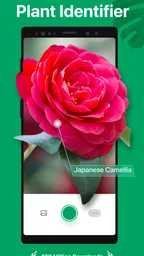
The central workflow is straightforward: photograph a plant, review the identification, and use the information to guide a closer look. In practice, the result is only as useful as the image. A single close-up of a leaf can be ambiguous, while a clear view that includes the plant’s overall shape, flowers, or fruit can give the app more visual context. I’d take a second photo from another angle if the first result seems uncertain rather than treating the first suggestion as definitive.
Network access matters most when you’re asking the app to interpret an image or want to load related guidance. That makes the experience feel different from flipping through a field guide: you can get a tailored response without first knowing which plant family to search, but the phone and connection become part of the process. If you’re in a garden with weak reception, I’d capture the relevant details while you’re there and make the identification when you can reliably use the app.
That small change in habit helps avoid a common frustration: standing beside an unfamiliar plant, taking a rushed or blurry picture, then assuming the app has failed when the result is broad or unhelpful. I get better value by framing the subject in daylight, keeping the plant in focus, and including distinctive features. For a large tree, that might mean photographing both a leaf and the wider growth pattern; for a flowering plant, the bloom can be more informative than a plain stem.
Use the result as a lead, not a verdict
Plant identification is a visual judgment, and lookalikes are a real complication. A convincing name should still be checked against details the photo may not show, such as leaf arrangement, growth habit, or the season in which it flowers. I treat the suggested identity as a way to narrow the search, then compare the description with the actual plant. This is especially important before acting on advice about a diseased plant or changing its care routine.
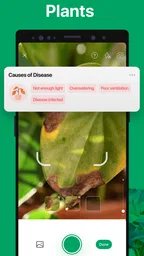
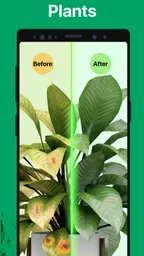
The app’s disease-diagnosis angle is appealing when a leaf has spots or discoloration, but an image cannot capture everything that may be affecting a plant. Watering habits, soil, light, temperature, and recent changes in its location can all matter. I’d use a diagnosis to decide what signs to inspect next, not as an automatic instruction to apply a treatment. That cautious approach is useful for houseplants, where overreacting to one damaged leaf can create a new problem.
In a garden, park, or on the move
For a realistic everyday use, imagine finding an unfamiliar shrub on a walk and wanting to know whether it’s worth planting in a similar spot at home. I’d photograph its leaves and flowers, check the suggested identity, and then use the care information to consider whether its needs fit my garden. The app is particularly convenient here because it links recognition with practical follow-up instead of leaving me with a name and a separate search to do.
There are limits to that convenience outdoors. Poor signal can interrupt the moment when you most want a quick answer, and bright sun, wind, or movement can make a clear photo harder to take. I’d avoid relying on an immediate lookup during a hike or in a remote garden. Take a few useful images while you have access to the plant, and return to the identification when connectivity is better. That workflow is more dependable than repeatedly trying to submit the same weak image.
At home, the app fits a different routine: I can check a new houseplant, compare its visible condition with the care guidance, and use the diagnosis feature as a prompt to examine the leaves more closely. It may help a beginner ask better questions—whether the plant needs different light, for instance—but it cannot see the room’s conditions or how the plant has been watered. I’d pair its guidance with observation over time instead of making several changes at once.
When something goes wrong, slow down the workflow
If an identification does not look right, I would first improve the evidence rather than immediately conclude that the app is useless. Move closer, avoid a cluttered background, and photograph a distinctive part of the plant. If the plant has several different features, take separate images instead of trying to fit everything into one frame. A fresh attempt can be more informative than repeatedly checking the same unclear picture.
If the connection is the obstacle, the sensible fallback is to keep the useful context: note where the plant is growing and capture clear views of its leaves, flowers, and overall form. Then try again when the app can connect. A general plant guide or a knowledgeable local gardener may be a better immediate option if you need an answer on the spot and can’t get the app to load what you need. I would not make a consequential care decision based only on a failed or partial lookup.
One helpful habit is to compare the result with the plant in front of you before moving on. Does the suggested name fit its growth pattern and the features visible in your photos? If not, take another image or consider that the plant may be at a different stage than the examples you have in mind. This check reduces the risk of confidently following care advice intended for a different species.
Keep connectivity and spending in perspective
Because image-based identification and related information are part of the appeal, I’d plan to use PictureThis when I have a dependable connection rather than assume every step will be available anywhere. That matters if you’re comparing plants while travelling, working in a large garden, or trying to diagnose a problem away from home. The app is free to download, but it also offers in-app purchases priced from $1.99 to $49.99 per item, so I’d check what is included and whether a paid option actually suits my needs before committing.
For a data-conscious routine, I’d avoid submitting repeat photos that add no new information. One well-framed image, followed by a more useful angle if needed, is a better approach than sending several nearly identical shots. If you’re concerned about mobile data or battery use, you can reserve plant checks for places where you already have a stable connection and keep the photo-taking session brief. I can’t assume a particular setting or offline workflow will be available, so I wouldn’t plan a trip around using it without connectivity.
Its scale suggests that many people find this kind of quick plant help worthwhile: it has more than 50 million installs and an average rating of 4.6 from around 810,000 ratings. Those figures are encouraging, but they don’t guarantee that every identification will match a difficult specimen. I’d judge it by whether it helps me move from “What is this?” to a sensible next step, especially when I can provide a clear photo and check the result critically.
Who will get the most from it
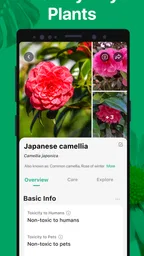
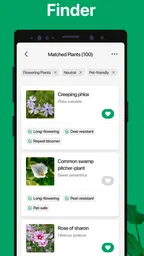
I’d recommend the app to curious beginners, houseplant owners, and gardeners who regularly encounter unfamiliar plants and want a convenient first reference. Its mix of identification, care guidance, and visual disease checks gives it more practical reach than a basic image search that returns scattered pages. The educational value is strongest when you use the suggestions to notice plant features and build your own understanding, rather than treating the app as an unquestionable authority.
Someone who already knows how to identify plants with a specialist field guide may prefer that guide for a careful, offline comparison, particularly when location and fine botanical details matter. A person who needs a guaranteed diagnosis or urgent treatment advice should also look beyond an app. And if you rarely identify plants, the extra guidance may not justify making it part of your routine. PictureThis is best for quick exploration and follow-up, not for replacing expertise or a thorough assessment.
The app is listed for everyone, and its current version is 5.40.0; it first appeared on July 21, 2017. For me, those details matter less than the everyday trade-off: it makes plant recognition approachable, but a good result depends on a useful photo, a connection when needed, and a little skepticism. I’d use it as a pocket companion for curiosity and routine plant care, then verify anything that could affect a plant’s health or safety.
My connectivity verdict
PictureThis earns a place on my phone if I’m the sort of person who often stops to identify a flower, checks a new houseplant, or wants a starting point for investigating leaf damage. Its strongest idea is connecting a visual guess with information that can help me decide what to inspect next. Its main friction is that the convenient, photo-led workflow is less dependable when reception or image quality is poor.
My advice is simple: take clear, purposeful photos, use a reliable connection for lookups, and treat identification and diagnosis as guidance to verify. If you want a quick educational companion and are comfortable checking its suggestions against the real plant, it’s a useful choice. If you need guaranteed answers in remote places or expert-level certainty, a field guide or specialist opinion is the better tool.
What we like
- Identifies many plants from a quick photo.
- Includes care guidance for common plant problems.
- Saves identified plants for later reference.
- Offers reminders to support a regular care routine.
- Has a clear interface that is easy for beginners to navigate.
What could be better
- Accurate results depend on a clear and detailed photo.
- Some identification and care features require a subscription.
- Plant recommendations may not account for every local climate.
- Care advice can vary in usefulness across plant species.
- Frequent prompts to upgrade may interrupt the experience.





