
ParentSquare review
 Analysis by Appsdrops
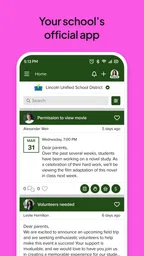
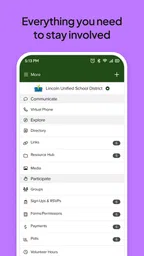
School communication sounds simple until a message is buried in an inbox, a notice arrives while you are busy, or two caregivers are trying to keep track of the same school update. I see ParentSquare as a focused place for school-related communication rather than a replacement for every way a family keeps in touch. Its value depends heavily on whether your school uses it consistently, but when it does, having school messages gathered in one app can make the daily routine easier to follow.
Where families can get stuck
ParentSquare is an education app developed by ParentSquare, designed around private communication between schools and families. That purpose is useful, but it also sets an important expectation: the app is most helpful when your school community actively uses it. It cannot make an announcement appear there if the school continues to send that information through another channel.
The first point of friction is often not the interface, but knowing whether a particular message belongs in ParentSquare. Families may still receive information through email, a school portal, paper notices, or direct calls. I would treat ParentSquare as a central place to check, not as proof that every school update will arrive in one location. Ask the school which kinds of messages it shares through the app, especially for time-sensitive notices.
Another common stumbling block is account access. If you are not seeing the school or the expected communication, first check that you are signed in with the contact details the school has on file. A mismatch between the information you use in the app and the information the school has associated with your family can make it seem as though the app is empty or incomplete. In that situation, contacting the school to confirm your account details is more useful than repeatedly reinstalling the app.
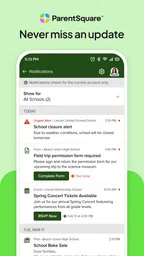
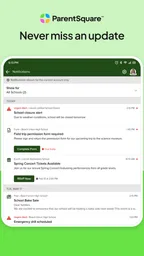
Notifications can create a different kind of confusion. A family might assume a message was never sent when the phone simply did not draw attention to it. I recommend checking the app directly when you are expecting an update, rather than relying only on a notification. If alerts seem inconsistent, review the app’s notification settings on your device and make sure you have not muted the conversation or app inadvertently. The exact options can vary by device, so use the controls available on yours.
Set expectations before relying on it
Before making ParentSquare your main school-message routine, find out who in the household should use it and which contact details the school recognizes. If two caregivers both need information, it is better to confirm how each should gain access than to assume that one person’s account automatically covers the other. This small check can prevent a stressful scramble when an important update is shared.
It is also worth establishing what counts as urgent. A school communication app can make messages easier to find, but it does not guarantee that someone will notice every alert immediately. For a same-day change, keep following the school’s stated urgent-contact method. For routine news, checking ParentSquare at a predictable point—such as after school or during your evening planning—can reduce the temptation to monitor your phone all day.
The app is free, has an Everyone age rating, and has been available since January 31, 2015. Those details make it straightforward to consider for a household, but the real decision is practical: will the school and the adults responsible for the student actually use it? A communication tool works best when everyone knows where to look and what to do if something seems missing.
Setup checks that prevent avoidable frustration
ParentSquare’s current version is 2.120.0, and it supports devices running Android 7.0 or later. If installation or updating is the problem, check the device’s operating-system version and available storage before troubleshooting your account. On iOS, use the requirements shown in the app store for your device. These basic checks help separate a device issue from a school-account issue.
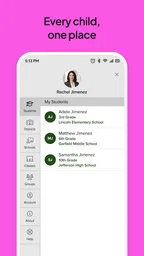
Once the app opens, verify that you are using the account associated with the right school community. If your family has children at more than one school, take a moment to confirm which school information you can see before assuming that one account view includes every child. When something looks incomplete, write down what you expected to find and the school it relates to. That makes a follow-up with school staff more specific and easier to resolve.
A useful setup habit is to decide how you will review messages rather than trying to respond to everything as it arrives. For example, you might scan new school communication once in the morning and once after the school day, while leaving urgent contact to the method the school has designated. This is not a hidden setting; it is a simple routine that makes a message feed more manageable and reduces the chance that a routine announcement interrupts work or family time.
For a household with multiple caregivers, agree on who will act on which kinds of information. One person might keep track of schedule changes while another handles forms or classroom communication. The point is not to duplicate every message, but to avoid assuming that the other adult has seen it. A quick shared habit—such as mentioning an important notice at dinner—can bridge the gap if one person misses an alert.
Recover a workflow when a message seems missing
If you cannot find an expected update, start with the simplest checks: open ParentSquare directly, make sure you are in the correct account and school context, and review the conversation or message area where you would expect it. Then check whether the school sent the information through another channel. This order matters: it avoids treating every missing notice as an app malfunction when the communication may have been delivered elsewhere.
If the issue continues, capture the useful details before asking for help: the school, the general subject of the message, when you expected it, and whether another caregiver received it. You do not need to send private student information to an unofficial support channel. Ask the school through its normal contact route to confirm whether the message was sent to your account. If the school confirms it was, you can then investigate app access or device notifications with a clearer description of the problem.
When an app update is available, keeping it current is a sensible maintenance step, but it should not be the first answer to every communication gap. Updates can address app behavior, while a contact-record mismatch or a school’s choice of communication channel requires a different fix. Reinstalling before checking those basics may cost time without changing what messages your account can see.
A particularly useful distinction is whether the problem affects only alerts or the actual message. If you can find the notice by opening the app, the issue is likely about getting your attention rather than receiving the communication. If the notice is absent from the app as well, confirm the school, account, and channel before moving on to device troubleshooting. This simple split helps you explain the problem accurately instead of reporting only that “the app isn’t working.”
When the app may not be the right tool
ParentSquare is not the best fit for every school or family. If your school does not use it for the messages you need, another established channel—such as the school’s own portal or its preferred email process—may be more dependable. Installing the app alone will not unify communication that the school sends somewhere else. I would ask the school what it expects families to monitor before changing your routine.
It may also be a poor choice as your only method for urgent communication. Apps can be silenced, notifications can be overlooked, and a phone may be unavailable at the moment a notice arrives. Keep the school’s recommended method for urgent matters in mind, and do not assume that a message in an app has been read simply because it was sent.
Families who prefer one universal inbox for school, work, appointments, and personal messages may find a dedicated school channel adds another place to check. In exchange, keeping school communication separate can make it easier to locate a classroom notice without searching through unrelated email. Whether that trade-off feels worthwhile depends on how much your school shares there and how comfortable your household is maintaining another routine.
Compared with a general email inbox, ParentSquare offers a school-focused destination, which can make school communication easier to distinguish from everything else. Compared with a school portal, it is better understood as a communication app, not automatically as a complete home for every academic record or task. I would keep using whatever official system the school assigns for information that is not shared through ParentSquare rather than expecting one app to replace all school tools.
My practical verdict
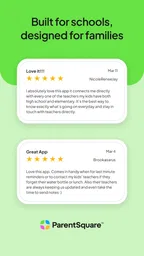
The app has a 4.3 average from around 43,000 ratings, with more than 13,000 written reviews and over 5 million installs. I take that as a sign that many families use it, not as a guarantee that every school’s setup will feel complete. ParentSquare is free, and its core appeal is easy to understand: a dedicated channel can reduce the effort of keeping up with school communication when the school and family both use it consistently.
I would recommend trying it if your school relies on it and you want a more organized way to follow school messages. It is especially useful for caregivers who need a predictable place to check routine updates, or for households where adults want to coordinate around notices without letting school emails blend into work correspondence. The best results come from confirming account details early, setting a realistic checking routine, and knowing which channel the school uses for urgent updates.
I would not recommend treating it as a guaranteed all-in-one school dashboard or as a substitute for contacting the school when information is missing. Its usefulness is tied to the communication practices of the school community, and notification habits still matter. ParentSquare is a practical tool when those limits are clear: set it up carefully, check it deliberately, and use the school’s other official channels when a message is time-sensitive or does not appear where expected.
What we like
- A single platform keeps school announcements and family messages together.
- Calendar updates make it easier to track school events.
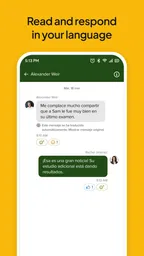
- Translation tools can help families read school communications.
- Users can choose how they receive notifications.
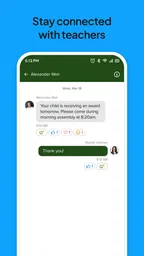
- The app supports direct communication with teachers and staff.
What could be better
- Features depend on whether a school or district uses ParentSquare.
- Frequent notifications may feel overwhelming without careful settings.
- Some messages may require a ParentSquare account to access.
- The interface can be confusing when managing multiple children.
- Translation quality may vary across languages.





