


Oticon Companion review
 Analysis by Appsdrops
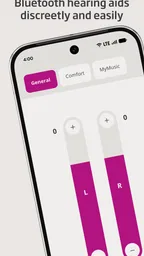
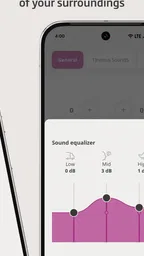
Choosing a hearing-aid companion app is less about collecting features and more about finding a reliable way to manage the hearing aids you already use. Oticon Companion is designed for that practical role: it lets you control your hearing aids discreetly with a touch of a finger. If you want a phone-based companion from Oticon rather than a general medical information app, it is a focused option worth considering.
What to consider before choosing a hearing-aid app
Before installing any hearing-aid app, I’d start with compatibility. A companion app is useful only when it works with the hearing aids you use, so check that point before making it part of your routine. The app’s name and developer make its Oticon focus clear; it is not presented as a universal controller for every hearing-aid brand.
Next, think about what you actually want to do from your phone. Some people mainly want a discreet way to adjust their hearing aids, while others are looking for education, appointment support, or broader hearing-health information. Oticon Companion is positioned around control, so its appeal is strongest when that is the job you want an app to handle.
Ease of use matters, too. A hearing-aid control should feel approachable when you need it, not like another complicated device to learn. The promise of control at the touch of a finger suggests a simple, direct interaction. I’d see that as a useful starting point for anyone who prefers making adjustments through a phone rather than reaching for separate controls.
A focused tool, not a complete hearing-care service
It helps to set expectations clearly. Oticon Companion is a medical app centered on hearing-aid control, rather than a replacement for professional advice or a broad hearing-care program. That distinction makes the choice easier: if you want a phone companion for your hearing aids, it fits the brief; if you want a different kind of support, another category of app may suit you better.
Oticon A/S develops the app, giving it a direct connection to the brand it serves. That can be reassuring if you already use Oticon hearing aids and want an app designed with that ecosystem in mind. It also means the app is best judged as a companion for Oticon users, rather than as a reason on its own to change hearing-aid brands.
Where Oticon Companion makes sense
The clearest strength is its straightforward purpose. Instead of presenting itself as a one-size-fits-all hearing solution, Oticon Companion focuses on discreet control. For me, that kind of clarity is valuable: it makes the app easier to evaluate, because you can compare its central purpose with your own everyday needs.
Phone-based control can also make small adjustments feel more convenient. If your phone is already close at hand, having a hearing-aid companion there may be more natural than searching for a separate control. The app’s short description captures that idea well: use a touch of a finger to manage your hearing aids discreetly. It is a modest promise, but a practical one.
The app has a 4.2 average rating from around 21,000 ratings, alongside roughly 2,300 written reviews. Those figures suggest that many users have taken the time to rate or discuss their experience, though an overall score cannot tell you whether the app will suit your particular hearing aids or personal preferences. I’d treat ratings as a useful signal, then put compatibility and your own control needs first.
Its reach is another sign that the app has found an audience: it has more than a million installs. That doesn’t guarantee a perfect experience for every user, but it does mean this is an established companion app rather than an obscure utility with no visible uptake. For someone already in the Oticon ecosystem, that may make it easier to feel comfortable giving it a try.
Everyday convenience without overcomplicating the choice
Some apps try to serve many different needs at once, which can make it hard to tell what they are really for. Oticon Companion’s narrower identity is an advantage if your priority is control. You can assess it against a simple question: do you want to manage your Oticon hearing aids discreetly from your phone? If so, the app’s purpose lines up with that need.
The app is free, which lowers the barrier to exploring whether it fits your routine. Free access does not remove the need to check compatibility or learn how the app works with your particular setup, but it does make trying the companion more approachable than choosing a paid app before you know whether it suits you.
It is rated for everyone, and its current version is 1.8.0. It was released on January 17, 2023, and supports devices running Android 8.0 or later. These details can help you decide whether your phone is in the right range to install it, but they should sit behind the more important question of whether your hearing aids are compatible.
When another kind of app may be a better fit
If you use hearing aids from a different manufacturer, a brand-specific companion from that manufacturer may be the more appropriate place to start. Hearing-aid apps are not interchangeable simply because they share a medical category. In this case, the Oticon connection is central to the app’s identity, so the best fit is likely to be someone whose hearing aids belong to that ecosystem.
You may also be looking for something other than control. A general hearing-health app, an educational resource, or a service that helps organize care could be more relevant if your main goal is learning or planning rather than adjusting hearing aids. Those are different categories of tools, and comparing them directly with Oticon Companion would be like comparing a remote control with a guidebook: each can be useful, but for a different job.
Another consideration is how you prefer to interact with your hearing aids. If you rarely reach for your phone when making adjustments, an app-based approach may not add much convenience to your day. On the other hand, if keeping control discreet is important, having a phone companion may feel like a natural extension of the devices you already use.
I would avoid choosing an app based only on a high rating or a large install count. Those figures can help you understand whether other people are using it, but they cannot replace checking compatibility and considering your habits. The right choice is the one that works with your hearing aids and feels comfortable in the situations where you expect to use it.
What switching involves
For someone already using Oticon hearing aids, the decision is mostly about adding a phone-based way to control them, rather than replacing the hearing aids themselves. That makes the app a potentially low-commitment addition to your setup. You can consider whether the convenience it offers matches how you prefer to make adjustments, while keeping your existing hearing-care routine in view.
Moving from a companion app associated with another hearing-aid brand is a different matter. An app cannot make one brand’s devices behave like another’s, so changing apps alone may not solve a compatibility mismatch. If you are considering a broader change to your hearing setup, treat that as a separate decision and get guidance appropriate to your devices and needs.
There is also a small learning curve whenever you bring a new control tool into a routine. Even a simple interface takes a little time to become familiar. I’d give yourself a chance to see whether using the phone feels more convenient in everyday situations, rather than deciding from the app’s description alone. The best companion is the one you can use comfortably when you need it.
As with any medical-device companion, the app should be viewed as a control aid, not a substitute for professional support. If you have questions about your hearing aids, their settings, or whether an adjustment is right for you, your hearing-care professional remains the better source of personalized guidance.
My recommendation
Oticon Companion is a sensible choice for Oticon hearing-aid users who want discreet phone-based control. Its appeal is its focused purpose, free access, and direct connection to Oticon. It is not trying to be every kind of hearing app, and that focus makes it easier to judge against a real need.
I’d recommend starting with compatibility, then considering whether you genuinely want to control your hearing aids from your phone. If both answers point in the right direction, the app is worth trying. If you use another hearing-aid brand or want education and broader care tools instead, look at alternatives designed for those needs rather than expecting this app to cover them.
In short, this is a practical companion rather than a complete hearing-care solution. For an Oticon user who values discreet adjustments and prefers a phone-based control option, it could be a helpful addition to the everyday routine. For everyone else, the best decision is to choose an app that matches both the devices they use and the kind of support they are actually seeking.
What we like
- Adjusts compatible hearing aids through a straightforward interface.
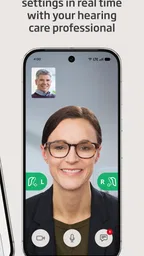
- Offers remote support from a hearing care professional.
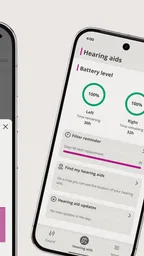
- Includes a hearing aid finder for misplaced devices.
- Provides access to hearing aid settings on the go.
- Supports streaming control on compatible hearing aid models.
What could be better
- Features vary by hearing aid model and phone compatibility.
- Remote support requires a participating hearing care professional.
- Some adjustments may require an internet connection.
- Bluetooth pairing can take troubleshooting on some devices.
- The app cannot replace in-person hearing care appointments.





