







Oscar Health review
 Analysis by Appsdrops
Managing health coverage is easier when the essentials are close at hand, and that is the idea behind Oscar Health’s mobile app. It is designed for Oscar members who want to get care while away from a computer, making it a practical companion for handling health-related tasks on the go. My overall impression is that it works best as a convenient access point for members, rather than as a replacement for personal medical advice or a conversation with a care professional.
A practical starting point for members
Oscar Health is a medical app from Oscar Health, Inc. Its purpose is straightforward: help members access care through a mobile device. That focus matters. Instead of presenting itself as a general wellness tracker or a broad medical reference, the app is tied to the experience of being an Oscar member. If you already use Oscar Health, having a dedicated app can make it easier to begin a care-related task without first reaching for a laptop.
The app is free to download, is rated for Everyone, and has been available since December 19, 2014. Its current version is 6.43.1, and it requires iOS 11 or later. It has more than 500,000 installs, with an average rating of 3.1 from around 3,800 ratings and about 1,200 written reviews. Those figures suggest a product with an established audience, while the middling average is a reminder that individual experiences can vary.
For a new user, I’d begin with a simple routine: open the app when you have a specific member task in mind, look through the available options, and take the next step that fits your need. That keeps the experience focused. Health apps can feel overwhelming when you expect them to do everything, so it helps to treat this one as a mobile doorway into Oscar’s member services and care experience.
Build a dependable baseline routine
A repeatable workflow is more useful than tapping around without a goal. Before opening the app, decide whether you are trying to access care or take care of another member-related need. Then use the app’s available navigation to find the relevant path. This may sound basic, but a clear starting point can save time, especially when you are checking something while out of the house or between other commitments.
I also recommend taking a moment to become familiar with the app when you are not in a hurry. Explore the screens that are relevant to your membership, note where common tasks begin, and get comfortable returning to the main areas. Once you know the route, you are less likely to feel rushed when you actually need to use the app. That kind of familiarity is a real advantage in a medical context, where clarity matters more than flashy presentation.
It is worth remembering that the app is intended for Oscar members. If you are not a member, its central purpose may not be particularly useful to you. For members, though, the idea of keeping care access in a mobile format is appealing: you can make the app part of your regular health-administration routine instead of treating it as something to install only when a problem comes up.
Check the basics before relying on it
Settings are worth checking, but I would keep expectations grounded and focus on the options the app actually presents on your device. Make sure you can sign in and reach the parts of the experience you expect to use. If the app offers account or device preferences, review them at your own pace rather than assuming a particular option is available. A quick orientation helps you understand your own setup without relying on guesses or outdated advice.
It is also sensible to keep your device’s operating system and the app reasonably current. The app’s minimum operating-system requirement is iOS 11, so compatibility is something to consider before installing it on an older device. Keeping software updated can help you use the version currently offered, although updates do not guarantee that every user will have the same experience or that a particular issue will disappear.
For a smoother routine, think about the practical conditions in which you use health apps. Keep your sign-in details somewhere secure, avoid sharing private account access casually, and give yourself enough time to complete a task rather than trying to do it while distracted. These are general habits, not special Oscar features, but they help make any member app easier and more comfortable to use.
Make common tasks easier to repeat
The fastest approach is usually to reduce unnecessary searching. When you learn where a useful section is, return to it the same way each time. You can also make a personal note of the steps that work for you, without recording sensitive information in an insecure place. The goal is not to invent shortcuts the app may not have; it is to create a consistent habit around the tools that are actually visible in your version.
One helpful pattern is to handle a small member task as soon as it comes to mind, provided you have a calm moment and a reliable connection. Leaving every administrative detail until you urgently need it can make a simple process feel stressful. A brief check-in at a convenient time lets you stay familiar with the app’s layout and spot anything that needs attention before it becomes time-sensitive.
Another useful habit is to distinguish between care access and urgent medical situations. A mobile member app can be convenient for routine interactions, but it should not be treated as an emergency service. If you are facing a serious or immediate health concern, use the appropriate local emergency resources or contact a qualified professional. Keeping that boundary clear helps set realistic expectations for what an app can do.
For households managing more than one person’s health needs, a consistent routine can be especially valuable. Decide who is responsible for checking account-related tasks and keep each person’s information private. The app can be part of that routine for Oscar members, but it should not replace direct communication with a healthcare professional when a question requires clinical judgment.
Understand where convenience has limits
Oscar Health’s central promise is convenience for members, and that is also the right way to judge it. A mobile interface can bring useful care access closer, but it does not automatically make every health task simple. Your experience depends on what you need to do, how comfortable you are with mobile services, and how well the app fits into your existing relationship with Oscar. If you expect a general-purpose medical encyclopedia, you may be looking for a different kind of product.
The average rating of 3.1 shows that opinions are mixed. Ratings can reflect many things, including different expectations, devices, and individual experiences, so I would not treat one score as a complete verdict. Still, it is useful context: the app has an established user base, but it may not feel equally polished or convenient to everyone. I’d approach it with a practical mindset and judge it by how well it supports the tasks you personally need.
There is also a difference between accessing care and receiving a complete answer to every medical question. An app can help you connect with a member experience, but decisions about symptoms, treatment, and medication belong with qualified health professionals. Use the app as a tool for navigating your Oscar membership and care options, not as a substitute for medical expertise.
Experienced users tend to get the most from apps by understanding their boundaries. They do not assume that every feature is hidden somewhere or that every task can be completed in one tap. Instead, they learn the available paths, keep their routines straightforward, and switch to another appropriate channel when the app is not the right fit for the situation. That is a sensible way to use Oscar Health, too.
Who is likely to find it useful?
The app makes the most sense for people who are already Oscar members and want a mobile way to access care-related services. If you prefer handling member tasks from your phone, it may fit naturally into your routine. If you rarely use mobile health services or are not part of Oscar’s membership, the app’s specific focus may make it less relevant.
Its approachable purpose is a strength: the app is built around helping members get care on the go rather than trying to be everything to everyone. That clear scope makes it easier to understand what role it can play. At the same time, a medical app’s usefulness depends heavily on whether it supports the tasks you need, so it is best to explore it directly and see how it fits your own membership experience.
Oscar Health is best viewed as a convenient member companion: useful for bringing Oscar’s care experience onto your phone, but not a stand-in for professional medical guidance. I’d recommend it to Oscar members who want a mobile starting point for care-related tasks and are willing to learn the app’s layout. Keep your workflow simple, check the options available to you, and use the right professional or emergency resource when the situation calls for more than an app can provide.
What we like
- Members can access virtual care through the Oscar app.
- The app makes it easy to search for doctors in Oscar’s network.
- Users can view plan details and track claims in one place.
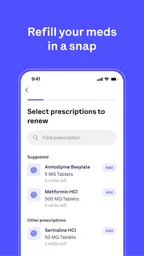
- Prescription information is available through the member account.
- Some plans include provider visits through virtual care at no added cost.
What could be better
- Features depend on the user’s Oscar plan and location.
- The app is useful only to Oscar members and applicants.
- Some care options may require an appointment rather than instant access.
- Provider availability can vary by network and region.
- Claim status may take time to update after a visit.





