
OptumRx review
 Analysis by Appsdrops
When I need to sort out a prescription benefit, I would rather check the details myself than wait on hold or hunt through paperwork. OptumRx is built for that kind of task: it is a medical app from Optum Inc. focused on helping people manage their pharmacy benefits. My overall impression is that it makes most sense as a practical companion to an OptumRx plan, not as a general medication tracker or a replacement for a pharmacist.
Managing a pharmacy benefit from your phone
The app is free, rated for Everyone, and has a 4.2 average from around 55,000 ratings. It has been installed over a million times and has around 7,900 written reviews. Those figures suggest a well-established service, but they do not tell you whether it will work smoothly with your particular plan. The important question is whether your pharmacy benefits are handled through OptumRx and whether the app’s account tools match the tasks you need to do.
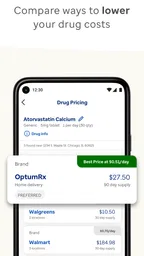
For someone with the right plan, putting benefit information on a phone can reduce small but recurring hassles: checking what a prescription may cost, understanding the status of a pharmacy-related request, or having relevant plan details close at hand when speaking with a pharmacy. The value is less about novelty and more about having a direct place to begin when a prescription question comes up.
I would approach it as a self-service channel. It can help you find and manage benefit information, but medication choices, symptoms, and treatment decisions still belong in a conversation with a qualified health professional. That distinction matters: a pharmacy-benefit app can make administrative steps easier without being a source of clinical advice.
Where it fits in everyday routines
A useful moment to have it ready is before a refill is due, rather than after you arrive at the pharmacy. If a medication is approaching its refill point, checking the benefit side in advance gives you time to notice a question and contact the appropriate support channel before the task becomes urgent. I would also keep the app available when discussing a prescription with a pharmacist, so I can check benefit details instead of relying on memory or an old note.
For example, imagine you are picking up a prescription during a busy lunch break and the amount due is different from what you expected. The app’s role is to help you investigate the benefit side of the issue, while the pharmacy can explain what was billed and a prescriber can address a treatment change. Keeping those responsibilities separate is a simple way to avoid treating an account screen as a medical answer.
That workflow is especially useful for people who handle prescriptions for themselves and want a convenient place to review benefit information. It can also help someone who prefers checking details independently before calling. If you rarely use prescriptions, do not have an OptumRx benefit, or primarily want reminders and a list of medicines, a dedicated medication organizer may be a better fit.
What the current version tells me—and what it does not
The current version is 4.61.0, and the app was released on January 28, 2015. That long span and the current version number show that this is an established product with ongoing versioning, rather than a newly launched tool. They do not, by themselves, reveal which changes arrived in each update or guarantee that every screen has recently been redesigned.
I would be careful not to treat a version number as a feature list. The practical test for an existing user is whether the current app lets them complete their regular benefit tasks reliably. If you already use OptumRx, it is reasonable to keep the app updated and check whether the account information and workflows you depend on remain easy to reach. A new version can matter even when the visible change is modest, but the number alone cannot tell you what changed.
For a prospective user, the same caution applies. The current release is the version to assess, not an imagined future app. I would install it only when there is a clear reason tied to my pharmacy benefit, then confirm that I can sign in and locate the information I need. That short trial is more useful than assuming the app will solve every prescription-related problem.
How it compares with calling or using other health apps
The usual alternatives are contacting the pharmacy-benefit service, asking the dispensing pharmacy, or using a broader health app. Each serves a different purpose. A call can be better when a case is unusual or needs a person to interpret it. The pharmacy is the right place for questions about a pickup or the dispensing process. A general medication app may be better for tracking doses, maintaining a personal medicine list, or setting reminders, depending on its tools.
OptumRx’s advantage is that it is tied to pharmacy benefits rather than trying to be a universal health hub. That focus can make it more relevant when the question concerns coverage or managing a benefit through OptumRx. The trade-off is just as important: it is not the natural choice for someone whose plan is managed elsewhere, and it should not be expected to provide the broader medication-management features people may want from a dedicated organizer.
I would also avoid assuming that a phone app is always faster than a conversation. Straightforward checks may be convenient to handle on your own, but a complicated billing discrepancy or a benefit issue with several moving parts may still call for direct assistance. The app is best viewed as a first stop for manageable tasks, not a promise that every issue can be resolved without help.
Small workflow choices that make it more useful
One practical tip is to check benefit details before making a trip for a prescription when timing allows. That gives you a chance to identify a question while you still have room to contact the pharmacy or benefit support. It is a simple habit, but it can prevent a rushed counter conversation from becoming the first time you look at the issue.
A second useful distinction is to note which party can answer which question. If the issue is about how a prescription was processed at pickup, start with the pharmacy. If you need to understand the benefit side, use the OptumRx channel or contact its support. If the question concerns whether a medicine or dose is appropriate, speak with your prescriber or pharmacist. This separation can save time and reduce the risk of acting on an administrative detail as though it were clinical guidance.
Third, I would not make the app the only place where an important prescription plan exists. Keep essential information accessible in another way, especially if you expect to need it while travelling or during a time-sensitive refill. A phone is convenient, but a login problem, a depleted battery, or limited connectivity can turn a normally easy task into friction. Keeping a backup note of the details you personally rely on is sensible without duplicating every account record.
Finally, if you help a family member with prescriptions, agree on how account access and decisions will be handled before a stressful moment. The app can support benefit-related tasks, but it does not replace the person’s consent or the judgment of their health professionals. That small bit of planning is more valuable than trying to sort out roles at the pharmacy counter.
Where friction may remain
The main limitation is that usefulness depends on the relationship between the user and the benefit. If you are not covered through OptumRx, the app is unlikely to be a central part of your routine. Even for an eligible user, an app can only be as useful as the account information and tasks it makes available; it cannot remove every question that depends on a pharmacy, prescriber, or benefit representative.
There is also a learning curve whenever an administrative service moves to a phone. People who already know how their benefit works may find it convenient, while someone unfamiliar with pharmacy coverage may still need help interpreting what they see. I would not assume that a digital interface automatically makes benefit rules simple. If a detail affects whether you can obtain a medication or what you should pay, confirm anything unclear with the appropriate professional or support channel.
Another trade-off is attention. The app is useful when it answers a real question, but it does not need to become another health screen you check without a purpose. I would use it around concrete tasks—reviewing a benefit, preparing for a refill, or following up on a pharmacy issue—rather than treating it as a complete record of personal care.
Who should try it, and what to watch next
I would recommend trying OptumRx if your pharmacy benefits are managed through the service and you want a mobile way to handle benefit-related tasks. It is a sensible option for someone who prefers self-service, wants to prepare before visiting a pharmacy, or would rather check account information on a phone than search through old documents. Its medical category describes the setting, but its day-to-day purpose is narrower and more administrative than a general health app.
I would skip it if your plan does not use OptumRx, if you chiefly need medication reminders, or if you expect a medical advice service. In those cases, the relevant insurer’s tools, a pharmacy conversation, a clinician, or a medication organizer may be more appropriate. The best alternative depends on the job you need done, not on which app has the broadest description.
As the product continues to evolve, the thing I would watch is whether its current version keeps the core benefit tasks straightforward for people who already rely on it. A higher version number is not enough to judge progress; what matters to users is whether routine questions are easier to resolve and whether the app fits the way their plan works. For now, I see it as a focused convenience rather than an all-purpose health tool: useful when the benefit relationship is right, and much less compelling when it is not.
My recommendation: if OptumRx manages your pharmacy benefits, the app is worth considering as a practical place to start with routine benefit questions. I would keep expectations specific, use pharmacy and clinical professionals for the issues that belong to them, and maintain a backup for important information. That balance captures its real strength: making benefit management more accessible without pretending that every prescription problem can be solved on a screen.
What we like
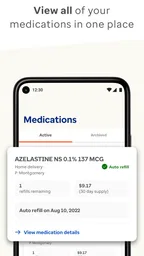
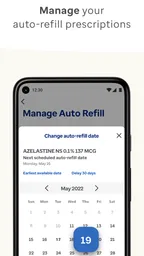
- Shows prescription details and available refill information.
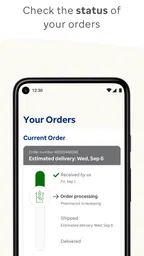
- Lets members track the status of prescription orders.
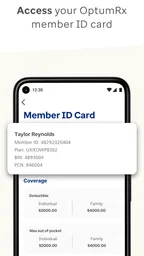
- Offers access to pharmacy benefits and coverage details.
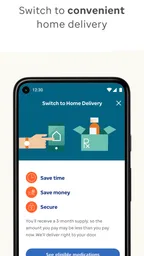
- Supports prescription transfers to a home delivery service.
- Includes tools to locate nearby network pharmacies.
What could be better
- Features may vary depending on your health plan.
- Some prescriptions may not be eligible for home delivery.
- Account access requires member and plan information.
- Order updates may not appear immediately.
- Some users report login or app performance issues.





