
One Medical review
 Analysis by Appsdrops
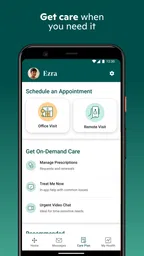
When I first open One Medical, I’m looking for a straightforward way to move from “I need help” to a useful next step, rather than another health app full of advice I may not need. This medical app is built around getting care for both physical and mental health. That makes it most appealing if you want a digital route into care, not a replacement for every part of seeing a clinician.
The first thing I’d keep in mind is that an app can make the process of seeking care easier, but it cannot make every health concern suitable for handling on a phone. I find it helpful to treat One Medical as a way to connect with care and manage the steps around it, while using emergency services for urgent or life-threatening problems. If you’re new to it, a good first goal is modest: get signed in, understand what the app asks you to do next, and use it for one clear need.
What to expect from a care app
One Medical is developed by 1Life Healthcare, Inc. and sits in the medical category. It is free to download, has an Everyone age rating, and has been available since March 27, 2013. Its current version is 4.136.0, and it requires Android 10 or later on Android devices. On iOS, check the app store’s compatibility details for your particular device before installing.
The app has an average rating of 3.4 from around 2.3 thousand ratings, with about 1 thousand written reviews and over 500 thousand installs. I’d read that as a reason to set realistic expectations, not as a verdict that it will or won’t suit you. Health-care apps are judged on more than their screens: whether the service fits a person’s needs and whether the route to care feels convenient both matter.
For a first-time user, the key distinction is between a care access tool and a general health-information library. The practical question is not simply whether the app has lots to browse; it’s whether it helps you take an appropriate next step for a concern involving your body or mind. If you mainly want symptom articles or a broad wellness tracker, a dedicated health-information or tracking app may be a better fit.
I would also avoid assuming that installing it automatically means every kind of care is available to every person. Before relying on it for a specific need, check what the app shows for your account and situation. That small check can save frustration, especially if you are looking for a particular clinician, type of appointment, or way to get help.
Make the first setup useful, not rushed
When you install One Medical, start by using the information you normally use to identify yourself in a health-care setting. Read each prompt before continuing, and make sure your contact details are current. If the app asks you to complete profile or account steps, do them carefully; accurate basics make it easier to understand what the app is showing and reduce the chance of having to correct something later.
I recommend setting it up at a calm moment rather than while you are already feeling unwell. Keep any relevant details about your health concern nearby, such as when it began and what has changed. You don’t need to write an essay. A few plain notes—what you noticed, when it started, and what you want help deciding—can make it easier to explain the issue clearly when you reach the appropriate care step.
A useful, less obvious habit is to decide what success would look like before you tap around. For example, your goal might be to understand how to seek help, arrange a next step, or prepare information for a conversation. Having one goal keeps you from treating the app like a maze of menus and helps you notice whether it is actually useful for your situation.
If setup presents a choice you don’t understand, don’t guess simply to get through it. Pause and look for the app’s own explanation or support route. In health care, choosing the wrong option can create extra work later, and there is little benefit in speed if you end up needing to repeat the process.
Your first meaningful action
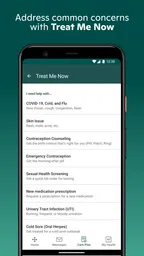
For a first visit, I’d use a real but non-emergency question rather than exploring every screen without a purpose. Say you wake up with a persistent concern that is worrying you but does not feel immediately dangerous. Open the app, describe the issue in concise terms, and follow the care path it presents. If the route does not match what you need, step back and use the available guidance rather than forcing the concern into an unsuitable category.
That workflow has a practical advantage: it helps you distinguish “I want information” from “I need a clinician’s input.” Those are not always the same request. If you have already tried a general search and still feel uncertain, a care-focused app may be more useful than reading one more article, because the goal is to reach an appropriate care option rather than keep collecting possibilities.
For a mental-health concern, the same principle applies, though the details you share may feel more personal. I’d write down what you want help with and what outcome you hope for before beginning. You can then communicate the main point without feeling pressured to explain everything perfectly in a single moment. If you are in immediate danger or might harm yourself or someone else, use emergency or crisis support rather than waiting on an app-based route.
One helpful tip is to keep your first request focused. A single main concern is easier to explain and easier to follow through on than a list of unrelated issues. If several things are bothering you, note them separately and start with the one that is most pressing. This is not about minimizing other concerns; it is a way to make the first interaction clearer.
Where new users can get confused
The most common expectation mismatch with a medical app is assuming that “easy access” means instant answers for every issue. Care still depends on the nature of the concern and the steps the service makes available. If you don’t see the option you expected, that does not necessarily mean your concern is unimportant; it may mean you need a different route or a more direct form of care.
Another point worth checking is whether the app is the right choice for where you receive care. Before making plans around it, confirm that the service shown in your account fits your location and needs. This is especially important if you are traveling, changing providers, or hoping to use the app for a particular kind of appointment. A little verification up front is more useful than assuming the same options apply in every circumstance.
I also wouldn’t use the app as a substitute for a personal health record unless it clearly provides the specific record feature you need. If you’re trying to keep track of medications, test results, or past visits, check what is available in your account and keep your own notes when necessary. A simple dated note of what you asked and what action you plan to take can be surprisingly useful when you return later.
Ratings offer another reason to approach it with a little patience. A 3.4 average suggests that experiences vary, so I would judge the app by whether it helps with your particular care task rather than expecting a flawless process. If something is unclear, try to identify exactly where you got stuck before seeking help. “I can’t find the next step after describing my concern” is more actionable than “the app doesn’t work.”
Who is likely to benefit—and who may prefer another route
I can see One Medical suiting someone who wants a phone-based starting point for physical or mental health care and is comfortable completing basic steps in an app. It may be especially useful if you prefer to organize your concern before reaching out, or if you want a clearer route than searching the web and trying to decide which advice applies to you.
It is less suitable if you need emergency attention, want a guaranteed immediate appointment, or expect the app to replace in-person evaluation for every problem. It may also be the wrong choice if the care options available to you don’t match your location or the kind of support you need. In those cases, contacting a clinician directly, using another appropriate care service, or seeking urgent help is a better move.
Compared with a typical symptom checker, One Medical is oriented toward care access rather than simply generating a list of possible explanations. Compared with calling a clinic, an app can feel more convenient for handling the initial steps, but a phone call may be clearer when your situation is complicated or you need to ask a person how the process works. I’d choose the route that gets you to the right help with the least confusion, not the one that happens to be on your home screen.
How I’d make it useful after the first visit
Once you have taken one meaningful action, make a short follow-up note for yourself: what you asked, what the next step is, and when you intend to do it. This is a simple way to prevent an unfinished request from disappearing among other notifications and daily tasks. It also gives you a clear starting point if you need to return to the app.
If the first attempt goes smoothly, use One Medical for needs that fit the service rather than opening it out of habit. If the route feels confusing, try again with a more specific question or use another care channel. The app’s value is measured by whether it helps you act, not by how often you check it.
My overall view is that One Medical is worth considering for people who want a digital entry point to physical and mental health care and are willing to verify that its options suit their needs. The free download lowers the barrier to trying it, while the mixed average rating is a reminder to judge the experience on your own task. Start with a clear, non-urgent concern, take the next step the app presents, and switch to direct or urgent care whenever that is the safer or more suitable choice.
What we like
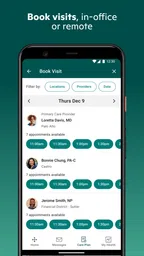
- Book appointments with a primary care clinician through the app.
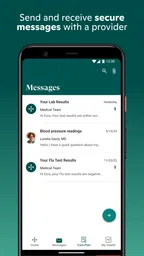
- Use secure messaging to contact your care team.
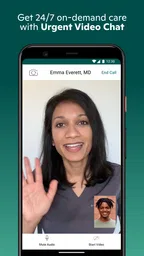
- Access video visits for eligible medical concerns.
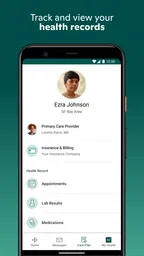
- Review test results and health records in one place.
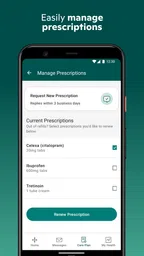
- Manage prescriptions and request refills from the app.
What could be better
- Membership fees may apply for some services.
- Availability of clinicians can vary by location.
- Video visits are not suitable for every health concern.
- Some services may require a separate insurance copay.
- Access to certain features may depend on your One Medical membership.





